

What's changed: Added AZ-900 Chapter 1 (Cloud Concepts)
1.1Cloud Computing and Its Benefits
Understand what cloud computing is and its key benefits—high availability, scalability, elasticity, reliability, predictability, security, governance, and manageability. This is the starting point for AZ-900.
Cloud computing means renting computing resources—servers, storage, databases, networking, and software—over the internet, on demand. Instead of building your own datacenter, you use up-to-date infrastructure and pay only for what you use. Microsoft Azure is one leading example of such a (public) cloud.
Why did the cloud take off? Traditionally you bought lots of servers up front to handle peak demand, then installed and ran them yourself. That meant heavy up-front investment, weeks of procurement, and wasted capacity outside of peaks. The cloud turned this "own and hold" model into a "rent when needed" model. You can start a server in minutes and stop it—and its billing—when you are done. This on-demand and pay-as-you-go nature is the source of nearly all of the cloud benefits.
1.1.1Core characteristics of the cloud
- On-demand self-service: provision resources yourself, instantly, from a portal or CLI—no waiting on an admin.
- Broad network access: usable from anywhere over the internet.
- Resource pooling: the provider shares a huge pool of resources across many customers, achieving economies of scale.
- Measured service (pay-as-you-go): usage is metered and you are billed for what you consume.
These characteristics stand out against traditional on-premises (owning and running your own gear). On-premises, every expansion meant buying hardware and spending weeks installing, cabling, and setting up the OS. In the cloud, the same is done self-service in minutes, and deleting resources stops their cost. The table contrasts the two.
| Aspect | On-premises | Cloud |
|---|---|---|
| Speed to acquire | Weeks (buy and install) | Minutes (self-service) |
| Up-front cost | Large (buy hardware = CapEx) | Small (pay-as-you-go = OpEx) |
| Scaling | Slow, with hard limits | Instant and elastic |
| Maintenance | All on you | Provider handles the physical layer |
| Resilience | Build redundancy/DR yourself | Use availability zones / geo-redundancy |
1.1.2Key benefits of the cloud
AZ-900 asks about a family of terms describing cloud benefits. Four of them—high availability, reliability, scalability, and elasticity—are close in meaning and easily confused, so we first separate them carefully one by one.
- High availability (HA): keeping the service running even when failures occur—achieved with redundancy and availability zones, and promised via an SLA (covered later).
- Reliability: the ability to recover from and withstand failures or disasters—e.g., geo-replication and backups. If HA means "do not fall," reliability means "get back up if you do."
- Scalability: the ability to change capacity with demand, possibly manually. Scale up (vertical) = a bigger machine / scale out (horizontal) = more machines.
- Elasticity: scaling out/in automatically with load (autoscaling). Think of it as scalability made automatic.
- Agility: provisioning resources in minutes, shortening time to market.
- Predictability: predictability of both performance (capacity you can count on) and cost (you can estimate spend).
- Security, governance, manageability: strong security features, policy-based control (governance), and easier operations via templates and automation (manageability).
The remaining security, governance, and manageability matter too. Security: beyond hardened physical datacenters, Azure provides advanced features like encryption, firewalls, and threat detection (though, per the shared responsibility model in the next section, configuration duties remain with you). Governance: Azure Policy, tags, and locks let you enforce "use that follows organizational rules" by design. Manageability: templates (ARM/Bicep), automation, and the portal/CLI/PowerShell let you codify, reproduce, and automate your setup. These pay off most for larger organizations that need control.
1.1.2.1Distinguishing the four confusing terms
| Term | In a phrase | What it addresses | Example |
|---|---|---|---|
| High availability | Do not go down | Stay up despite partial failures | Redundancy across availability zones |
| Reliability | Recover if it falls | Recovery from failure/disaster | Backup/restore to another region |
| Scalability | Change capacity | Match capacity to demand (can be manual) | Bigger VM / add VMs |
| Elasticity | Auto change | Automatic scaling with load | Autoscale: more by day, less at night |
1.1.2.2Scale up vs scale out
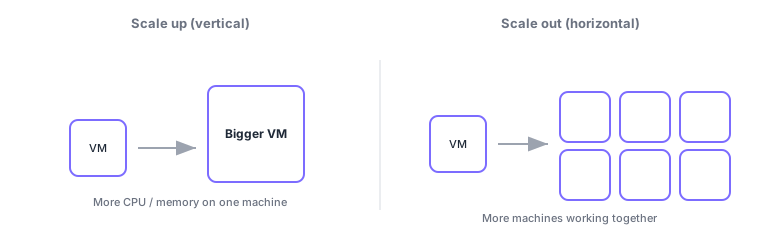
| Aspect | Scale up (vertical) | Scale out (horizontal) |
|---|---|---|
| What you do | Make one machine bigger (more CPU/memory) | Add more machines of the same role |
| Limit | Capped by the largest single machine | Grows as long as you can add nodes |
| Good for | Boosting a single database, etc. | Parallel web servers, etc. |
Common points: scale up = vertical (bigger machine) / scale out = horizontal (more machines), elasticity = automatic scaling, HA = stay up / reliability = recover, and predictability covers both performance and cost.
1.1.2.3Why it works: economies of scale and how HA is achieved
Behind the cloud being cheaper and faster lie economies of scale. Providers procure and operate enormous fleets of servers globally and share (pool) them across many customers. Co-using a scale no single company could afford lowers per-unit cost and spreads the latest hardware and security investments across everyone. From your side, the essence is that you no longer buy for the peak yourself, eliminating the waste of over-provisioning.
How is high availability actually achieved? The key is redundancy—provisioning multiple components of the same role so the rest carry on if one fails. In Azure, a region contains physically separated availability zones (datacenter groups with independent power, cooling, and networking); distributing across them keeps the service running even if one zone goes down. Providers also commit to uptime (e.g., 99.9%) by contract via an SLA (service-level agreement). The relationship: "HA = make it hard to go down by design," "SLA = guarantee that level numerically" (regions and availability zones are covered in the next chapter).
1.1.3Peripheral knowledge: agility and global reach
The value of the cloud is not only "it is cheaper." Often the bigger gain is agility: from idea to experiment, you no longer wait weeks for procurement—you spin up an environment in minutes and throw it away if it fails. That speed directly drives business competitiveness. Azure also has regions (clusters of datacenters) worldwide, so you can deploy globally in a few clicks (global reach). These are advantages that are hard to get by "owning."
Scenario: a traffic spike on sale day. Even with 10× the usual orders, elasticity (autoscaling) adds web servers automatically and scales back down afterward. You never had to buy 10× the servers and let them sit idle—this is the power of pay-as-you-go plus elasticity.
Watch the mix-ups: (1) "scalability" vs "elasticity"—being able to change capacity is scalability; doing it automatically is elasticity. (2) "high availability" vs "reliability (disaster recovery)"—HA is about not going down within a region, while reliability/DR is about recovering in another region during a disaster. Exams test these with swapped options.
Q. Is "cloud = always cheaper"? No—it depends on usage. For steady, always-full workloads, on-premises can be cheaper. The cloud shines for variable load (elasticity cuts waste) and when you need agility and global reach. Frame cost not as "cheap" but as "pay only for what you use = less waste."
1.1.4Section summary
- The cloud = renting resources over the internet on demand, pay-as-you-go (e.g., Azure)
- HA = stay up / reliability = recover / scalability = change capacity / elasticity = auto change
- Scale up = vertical (bigger machine) / scale out = horizontal (more machines)
- Benefits go beyond cost: agility, global reach, predictability (performance/cost), security/governance/manageability
Sign in to track progress — Log in.
Quick check
(just a quick review)Q1. Which approach adds more web server instances to handle load?
Q2. Which cloud characteristic automatically adds or removes resources based on load?
Q3. Which two aspects does "predictability" cover?
Q4. Which term describes keeping a service running despite failures within a region?
Q5. Which method increases performance by adding CPU and memory to a single VM?
Q6. Which best describes cloud "agility"?
Keep track of your progress
The full study guide is free to read. Sign up free to practice with the question bank, track what you have read, review your mistakes, and highlight passages.