

What's changed: Deepened AZ-500 Chapter 4 (ja figures; comparison tables/scenarios/FAQ/traps/deep paragraphs in all sections)
4.3Governance and Compliance
Understand Azure Policy to technically enforce organizational rules, Azure Blueprints to apply bundled configuration templates (note: deprecated and slated for retirement in July 2026; the successor is Azure Deployment Stacks with Azure Policy), and Defender for Cloud’s regulatory compliance to visualize alignment with standards. Keep large environments consistently secure.
In large environments, manual checks can’t ensure consistency. Use Azure Policy to enforce rules technically and continuously evaluate compliance.
4.3.1Governance mechanisms
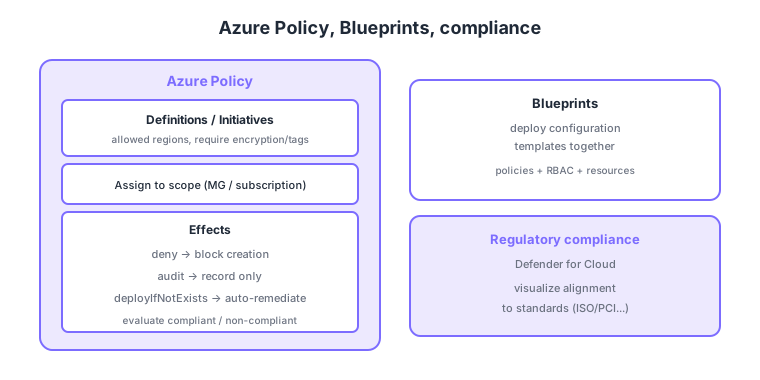
- Azure Policy: define rules and assign to a scope, continuously evaluating compliant/non-compliant.
- effect: deny (block non-compliant creation), audit (record only), deployIfNotExists (auto-remediate), etc.
- Initiative: a bundle of multiple policies; assign coverage for a standard (e.g., ISO/PCI) all at once.
- Blueprints / regulatory compliance: deploy configuration templates together and visualize alignment to standards in Defender for Cloud.
Common on AZ-500: enforce rules technically = Azure Policy, block non-compliant creation = deny effect, record only = audit, auto-remediate = deployIfNotExists, bundle of policies = initiative, visualize alignment to standards = Defender for Cloud regulatory compliance. RBAC is "who can do what"; Policy enforces "how resources must be."
RBAC (authorization) and Azure Policy (enforcing resource state) play different roles; combine both to keep a least-privilege, compliant environment.
Effects behave very differently, so keep them straight: deny blocks creating/updating non-compliant resources; audit/auditIfNotExists only record; append adds missing properties; modify changes things like tags; and deployIfNotExists auto-deploys a missing related resource (e.g., a diagnostic setting). The last two actually make changes, so they need a managed identity and a remediation task. Scope is inherited down the management group → subscription → resource group hierarchy, with carve-outs expressed via exclusion or exemption. Assigning a deny later doesn’t delete existing non-compliant resources—they’re just evaluated as non-compliant—so you fix them with remediation tasks. Note Azure Blueprints is now being guided toward Template Specs + deployment stacks, a newer angle. Organization-wide foundations are codified as an Azure Landing Zone (management-group hierarchy, policies, networking defaults).
| Aspect | Azure RBAC | Azure Policy |
|---|---|---|
| Question | Who can do what | How resources must be |
| Targets | Principal permissions | Resource configuration/state |
| Example | Reader/Contributor/Owner | Require encryption, allowed regions only |
Scenario: enforce “all storage must have diagnostic settings” org-wide and auto-fix existing ones. → Assign a deployIfNotExists policy (optionally within an initiative) at the management group, grant it a managed identity, and run a remediation task to deploy diagnostic settings to existing resources too. New resources then comply automatically.
FAQ: Q. Does Policy auto-delete existing non-compliant resources? → A. No. deny only stops new create/update; existing ones are evaluated as non-compliant. Fix them via remediation tasks (modify/deployIfNotExists). Q. Can RBAC substitute? → A. No—RBAC is permissions, Policy enforces resource state; different roles, used together.
Trap: “assigning a deny policy deletes/fixes existing non-compliant resources” is wrong—deny only blocks new create/update; existing ones stay non-compliant. Auto-fixing is the job of modify or deployIfNotExists + remediation tasks. Also “Azure Policy controls access rights” is wrong—that’s RBAC.
4.3.2Section summary
- Azure Policy = technical enforcement of rules (deny/audit/deployIfNotExists, initiatives)
- Regulatory compliance = visualize alignment to standards (Defender for Cloud)
Sign in to track progress — Log in.
Quick check
(just a quick review)Q1. You want to technically enforce org rules like "resources in specific regions only" or "encryption required." What do you use?
Q2. Which Azure Policy effect blocks the creation of non-compliant resources?
Q3. You want to bundle multiple Azure Policies to assign coverage for standards like ISO or PCI at once. What do you use?
Keep track of your progress
The full study guide is free to read. Sign up free to practice with the question bank, track what you have read, review your mistakes, and highlight passages.