

What's changed: Deepened AZ-500 Chapter 4 (ja figures; comparison tables/scenarios/FAQ/traps/deep paragraphs in all sections)
4.2Microsoft Sentinel (SIEM / SOAR)
Understand Microsoft Sentinel, a cloud-native SIEM (security information and event management) and SOAR (automated response). It ingests broadly via data connectors, detects threats with analytics rules, and responds automatically with playbooks.
Looking at individual logs alone can’t reveal organization-wide attacks. Sentinel is a cloud SIEM/SOAR that correlates, detects, investigates, and auto-responds across many sources.
4.2.1Sentinel building blocks
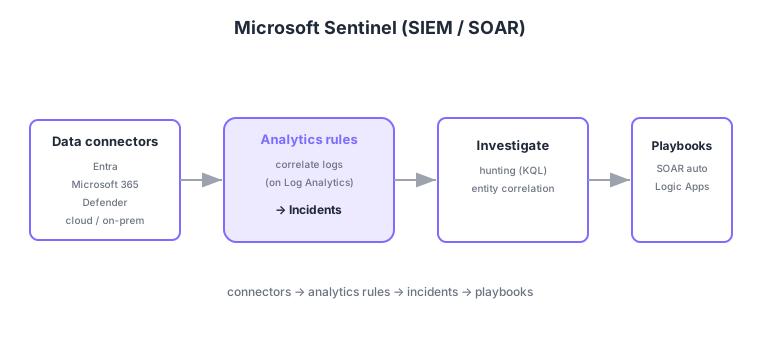
- Data connectors: ingest diverse sources—Entra, Microsoft 365, Defender, other clouds/on-prem.
- Analytics rules: correlate ingested logs to detect threats and create incidents.
- Investigation/hunting: entity correlation on incidents and proactive threat hunting with KQL.
- Playbooks: automated response (SOAR) via Logic Apps—automate notifications, ticketing, isolation, etc.
Common on AZ-500: cloud-native SIEM = Microsoft Sentinel, ingest diverse sources = data connectors, correlate and create incidents = analytics rules, automated response (SOAR) = playbooks (Logic Apps). Note Sentinel runs on a Log Analytics workspace.
Defender for Cloud handles resource "posture and protection," while Sentinel handles cross-organization "detection, investigation, response (SIEM/SOAR)." They are complementary.
Analytics rules come in several kinds: scheduled query rules run KQL periodically to create incidents; Microsoft security rules promote Defender alerts directly into Sentinel incidents; Fusion uses machine learning to correlate multiple weak signals into multistage-attack detections; and anomaly/UEBA finds deviations in user/entity behavior. Since ingestion cost drives billing, it’s practical to filter/classify before ingest using DCRs (data collection rules) or the Basic log tier rather than dumping raw logs. For context, use threat intelligence connectors (TI feeds) and watchlists, and visualize detection coverage via MITRE ATT&CK mapping. SOAR automation is designed in two layers: automation rules (triage, tagging, assignment on incident creation) that invoke playbooks (the concrete Logic Apps actions).
| Role | Defender for Cloud | Microsoft Sentinel |
|---|---|---|
| Main purpose | Posture + workload protection (CSPM/CWP) | Detect/investigate/respond (SIEM/SOAR) |
| Scope | Azure/multicloud resources | Cross-org (diverse sources) |
| Automation | Some workflow automation | Playbooks (Logic Apps) |
Scenario: on a suspicious sign-in, auto-disable the user temporarily and notify the SOC. → Define the condition in a Sentinel analytics rule to create an incident, then have an automation rule invoke a playbook (Logic Apps) that disables the Entra ID user and posts to Teams. To guard against false positives, validate with notify-only first, then enable the disable action.
FAQ: Q. Is Sentinel separate from Log Analytics? → A. Sentinel runs on a Log Analytics workspace; ingested logs land in the same workspace and are queried with KQL. Q. How to control ingestion cost? → A. Filter before ingest with DCRs or the Basic log tier, and route unneeded verbose logs to Storage archive.
Trap: “the playbook itself detects threats” is wrong—detection is the analytics rule’s job (creating incidents); the playbook performs the subsequent automated response (SOAR). Also “Sentinel replaces Defender for Cloud” is wrong—Defender does posture/protection, Sentinel does cross-org detection/response; they’re complementary.
4.2.2Section summary
- Sentinel = cloud SIEM/SOAR (connectors → analytics rules → incidents → playbooks)
- SOAR automated response = playbooks (Logic Apps)
Sign in to track progress — Log in.
Quick check
(just a quick review)Q1. Which cloud-native SIEM/SOAR correlates logs across diverse sources to detect, investigate, and auto-respond to threats?
Q2. What implements automated response (notify, isolate, ticket) to incidents detected in Sentinel?
Q3. What do you configure to ingest logs from diverse sources (Entra, Microsoft 365, Defender) into Sentinel?
Keep track of your progress
The full study guide is free to read. Sign up free to practice with the question bank, track what you have read, review your mistakes, and highlight passages.