

What's changed: Deepened AZ-400 Chapter 3 (added comparison tables, scenarios, FAQs, exam traps, deep-dive paragraphs to each section; localized figures to Japanese)
3.1CI Pipelines and Builds
Understand continuous integration—Azure Pipelines (YAML), triggers, agents (Microsoft-hosted/self-hosted), templates/stages, and automated tests. Build and validate automatically on every commit.
Pipelines are the core of AZ-400. Define Azure Pipelines as YAML to auto-build and test on every commit.
3.1.1CI pipeline composition
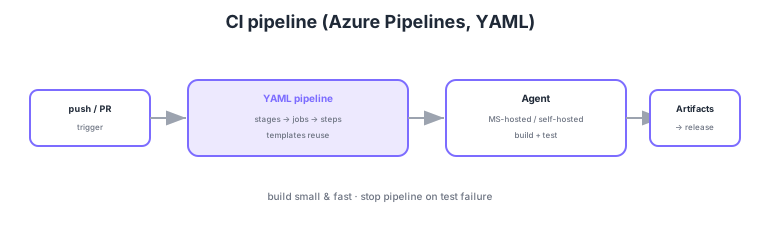
- YAML pipeline: manage pipelines as code (stages → jobs → steps).
- Triggers: auto-start on push/PR/schedule; CI typically uses push triggers.
- Agents: choose Microsoft-hosted (no maintenance) or self-hosted (custom env/special deps).
- Templates: reuse common steps/jobs to avoid duplication.
Common on AZ-400: pipeline as code = YAML, auto-start = triggers (push/PR/schedule), no maintenance = Microsoft-hosted agents, custom env/special deps = self-hosted, reuse = templates. CI builds/tests small and fast, halting the pipeline on failure.
Use self-hosted agents for special OS/tooling, corporate network access, or GPUs. Microsoft-hosted agents suffice for most cases.
AZ-400 CI design probes "structuring pipelines as code to build/test fast and reliably." A YAML pipeline uses the hierarchy stages → jobs → steps (tasks/scripts), triggered by trigger (CI = branch push), pr (PR trigger), and schedules (cron), with pool selecting the agent pool. Reuse via templates (step/job/stage/variable templates with parameters) standardizes across the org. Choose agents by requirement: Microsoft-hosted (clean each run, no maintenance, buy parallel jobs) vs self-hosted (custom OS/tools, corporate-network reach, GPUs, resident caches for speed). Speed up with dependency caching (Cache task), parallel/matrix jobs, artifact publishing (PublishPipelineArtifact) and stage-to-stage passing, and path filters on changes. For quality, embed tests in CI and halt on failure, publish test results (PublishTestResults) and coverage to dashboards, and shift SAST/dependency scanning left (PR/CI). Configure environments with service connections and variable groups, and keep secrets out of logs. The key is to codify in YAML, reuse via templates, fit agents to requirements, go fast with caching/parallelism, and halt reliably on test failure.
| Aspect | Choice/feature | Key point |
|---|---|---|
| Pipeline definition | YAML (as code) | stages→jobs→steps; reviewable/versioned |
| Trigger | trigger / pr / schedules | CI = push; validation = PR trigger |
| Execution env | MS-hosted / self-hosted | No maintenance / special needs, resident cache |
| Reuse / speed | Templates; cache; parallelism | Dedup + shorter builds |
Scenario: CI is slow across multi-language/service repos, and each team maintains copy-pasted similar YAML. → Extract common build/test steps into parameterized step/job templates referenced by each pipeline (dedup). Cut build time with dependency caching and matrix parallelism. Embed tests in CI and dashboard results via PublishTestResults. This gains shorter lead time and consistency together.
FAQ: Microsoft-hosted or self-hosted agent? For standard OS/tools and to avoid maintenance, use Microsoft-hosted (clean each run, reproducible). For special OS/tools, reaching resources inside the corporate network, GPUs, or speed via resident caching of large dependencies, use self-hosted. Weigh cost, parallel job counts, and maintenance burden.
Exam trap: Building pipelines in the classic GUI (not as code) is weak for review/versioning/reuse—AZ-400 recommends YAML (as code). Also, don’t solve "make builds faster" by blindly adding agents—first consider caching, parallel/matrix, and removing unneeded steps. Removing tests from CI to go faster is counterproductive (it raises change failure rate).
3.1.2Section summary
- CI = YAML pipeline + triggers + agents
- Reuse = templates / output = published artifacts
Sign in to track progress — Log in.
Quick check
(just a quick review)Q1. Manage pipeline definitions as code in the repo for review/versioning. What?
Q2. You need a build requiring special in-house tools or GPUs. Which agent?
Q3. Centralize common build steps across pipelines to avoid duplication. What?
Keep track of your progress
The full study guide is free to read. Sign up free to practice with the question bank, track what you have read, review your mistakes, and highlight passages.