

What's changed: Deepened AZ-400 Chapter 3 (added comparison tables, scenarios, FAQs, exam traps, deep-dive paragraphs to each section; localized figures to Japanese)
3.2CD and Deployment Strategies
Understand continuous delivery—release pipelines/environments, approvals/gates, deployment strategies (blue-green/canary/rolling), and feature flags. Deliver to production safely.
CD is about safe production rollout. Gate each environment with approvals/gates and deliver with low-risk deployment strategies.
3.2.1CD and progressive deployment
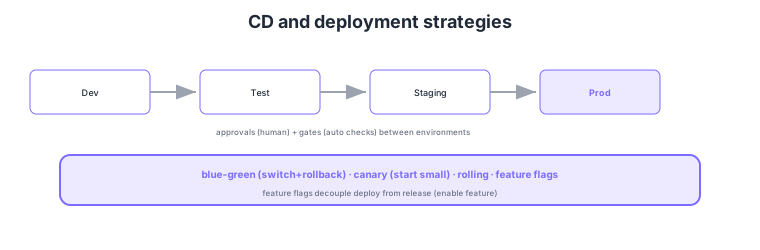
- Environments + approvals/gates: progress Dev→Test→Staging→Prod; control via approvals (human)/gates (automated checks).
- Blue-green: switch all at once + instant rollback to a parallel environment.
- Canary/rolling: reduce risk by validating from a small portion / replacing gradually.
- Feature flags: decouple deployment from feature enablement for staged rollout and instant kill-switch.
Common on AZ-400: human gate between environments = approvals, automated gate = gates, parallel env all-at-once + rollback = blue-green, start small = canary, decouple deploy from release = feature flags. Separating deploy (place code) from release (enable feature) makes shipping safer.
Gates can use monitoring queries (e.g., error rate below threshold), work item states, or external approvals. Manage feature flags centrally with Azure App Configuration.
AZ-400 CD design probes "progressing through environments, limiting risk with human approvals and automated gates, and shipping to production with low-risk deployment strategies." Environments represent deploy targets (Dev/Test/Staging/Prod) with attached approvals and checks—pre-deployment approvals (human) and gates (automated): monitoring queries (Azure Monitor alert/metric health), work item states, REST/function calls, business-hours restrictions. Choose deployment strategies by downtime and blast radius: blue-green (switch all at once to a green environment, instant rollback on issues), canary (validate on a small traffic slice, then expand), rolling (replace in batches). Crucially, separate deployment (place code in prod) from release (enable feature)—with feature flags (e.g., Azure App Configuration Feature Manager) you ship code first and stage features via flags, with instant kill-switch and A/B testing. Roll back by blue-green switch-back, redeploying a prior artifact, or flipping a flag off. Tied to monitoring (Application Insights/Azure Monitor), an automatic rollback gate that blocks/reverts on error-rate spikes is the standard. The key is to achieve safe yet fast production rollout via environments + approvals/gates + progressive deployment + feature flags.
| Mechanism | Type | Role |
|---|---|---|
| Approval | Human gate | Responsible person signs off prod deploy |
| Gate | Automated gate | Monitoring query/work item/external check |
| Blue-green/canary/rolling | Deployment strategy | All-at-once/start small/gradual |
| Feature flags | Decouple deploy from release | Staged rollout; kill-switch; A/B |
Scenario: Ship a new feature to production but be able to disable it instantly on issues and validate with a subset of users first, avoiding code redeploys. → Deploy the code to production and control the feature via a feature flag (Azure App Configuration). Turn the flag on for internal/some users first (canary-like) to validate; on issues, flip the flag off (kill-switch) to disable without redeploy. Before the prod deploy, auto-verify error-rate health with a monitoring gate.
FAQ: Approvals vs gates? Approvals are human gates—a responsible person manually decides go/no-go (change management/final check). Gates are automated—they wait until conditions (monitoring queries for error rate/availability, work item states, external APIs) are met, then proceed. Use approvals when human judgment is needed, gates when it’s machine-checkable; combine both.
Exam trap: Solving "disable a feature instantly" with code redeploy/rollback is slow and inefficient—feature flags turn it off immediately without redeploy. Also, automated pre-prod health checks are gates (monitoring queries), distinct from manual approvals (don’t conflate). The distinction deploy = place code, release = enable feature is also frequently tested.
3.2.2Section summary
- CD = environments + approvals/gates for progression
- Safe rollout = blue-green/canary/rolling + feature flags
Sign in to track progress — Log in.
Quick check
(just a quick review)Q1. Require manual approval by a responsible person before deploying to production. What?
Q2. Auto-verify error rate stays below a threshold post-deploy before proceeding. What?
Q3. Code is deployed, but you want to enable the feature separately for staged rollout/instant kill-switch. What?
Keep track of your progress
The full study guide is free to read. Sign up free to practice with the question bank, track what you have read, review your mistakes, and highlight passages.