

What's changed: Deepened AZ-400 Chapter 2 (added comparison tables, scenarios, FAQs, exam traps, deep-dive paragraphs to each section; localized figures to Japanese)
2.3Repository Management and Security
Understand repository governance—access permissions, large files (Git LFS), submodules, secret scanning, and mono-repo vs multi-repo. Keep repositories healthy and secure.
Keep repositories healthy and secure. Manage permissions, large files, and secret leakage, and choose structure (mono/multi).
2.3.1Repository management
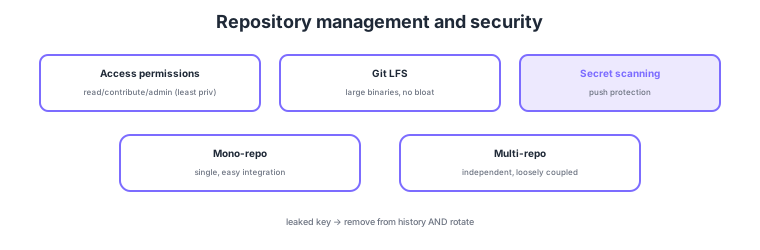
- Access permissions: grant read/contribute/admin with least privilege.
- Git LFS: manage large binaries to prevent repo bloat.
- Secret scanning: detect leaked API keys in commits (push protection blocks the push itself).
- Mono-repo vs multi-repo: choose single/easy integration vs independent/loosely coupled by team structure.
Common on AZ-400: large binaries = Git LFS, detect committed secrets = secret scanning/push protection, least-privilege permissions, structure = mono-repo (easy integration) / multi-repo (independent). If a key is accidentally committed, remove it from history AND rotate the key.
AZ-400 repository management probes "health, security, and structure choices." Grant access permissions with least privilege—in Azure DevOps read/contribute/admin, in GitHub Read/Triage/Write/Maintain/Admin—to teams/individuals, restricting direct-push rights to protected branches. Handle large binaries with Git LFS (store the actual file in separate storage, tracking only a pointer) to prevent repo bloat and slow clones. For shared code across repos, use submodules (reference a specific commit; tightly coupled and somewhat awkward) or packaging (version-distributed via Artifacts/npm/NuGet; loosely coupled and recommended). The security crux is preventing secret leakage: secret scanning + push protection (rejecting the push itself on detection) blocks secrets before/at commit, and if one leaks you must not only remove it from history (git filter-repo/BFG) but also rotate (invalidate) the key—a once-public secret is already exposed even after history cleanup. Also wire dependency vulnerability checks (Dependabot, etc.) and code scanning (SAST) into the pipeline. For structure, choose mono-repo (easy cross-cutting changes, unified CI, code sharing, but needs scaling effort) vs multi-repo (team independence, permission separation, loose coupling, but cross-cutting changes are tedious) by team structure. The key is to combine least privilege, LFS, secret protection (scanning + rotation), and structure choice to keep repositories secure and scalable.
| Concern | Measure | Key point |
|---|---|---|
| Permissions | Least-privilege roles | Restrict direct push to protected branches |
| Large binaries | Git LFS | Pointer + separate store; no bloat |
| Secret leakage | Secret scanning + push protection | Reject push; rotate if leaked |
| Repo structure | Mono-repo / multi-repo | Easy integration / independent, loose |
Scenario: A developer accidentally commits a production API key and pushes to the remote. Minimal correct response? → (1) Immediately rotate the key (invalidate and reissue)—top priority (a pushed secret is already exposed). (2) Remove it from history (excise the blob with git filter-repo/BFG and force-push). (3) Prevent recurrence by enabling secret scanning push protection and switching to referencing secrets from Key Vault / variable groups (secret) rather than in code.
FAQ: Mono-repo or multi-repo? For frequent cross-cutting refactors and code sharing with unified CI/dependency management, use mono-repo (but at scale you need sparse checkout and build caching). For independently owned/released teams or services with separated permissions, use multi-repo. Choose per the org/Conway’s law (team structure), and keep shared code loosely coupled via packaging.
Exam trap: Treating a leaked key as "just remove it from history" is wrong—it was already exposed once pushed, so you must rotate (invalidate) it. Also, solving the large-binary problem by "adding to .gitignore" alone is insufficient—use Git LFS for binaries you must version. The durable fix for secrets is leak detection (scanning) + referencing an external secret store.
2.3.2Section summary
- Management = least privilege + Git LFS (large files)
- Security = secret scanning/push protection / structure = mono/multi-repo
Sign in to track progress — Log in.
Quick check
(just a quick review)Q1. Include large binaries (videos, build artifacts) in a repo while preventing bloat. What?
Q2. Detect and block accidentally committed API keys/passwords at push time. What?
Q3. An API key was accidentally committed in the past. What is the minimum required response?
Keep track of your progress
The full study guide is free to read. Sign up free to practice with the question bank, track what you have read, review your mistakes, and highlight passages.