

What's changed: Deepened AZ-400 Chapter 1 (added comparison tables, scenarios, FAQs, exam traps, deep-dive paragraphs to each section; localized figures to Japanese)
1.3Collaboration and Integration
Understand team collaboration—notifications/service hooks, Teams/Slack integration, Wikis, traceability (work item ↔ commit ↔ build), and auditing. Design information flow and traceability.
DevOps lives on information flow. Share fast via notifications/chat and make everything traceable from work to deployment.
1.3.1Integration and traceability
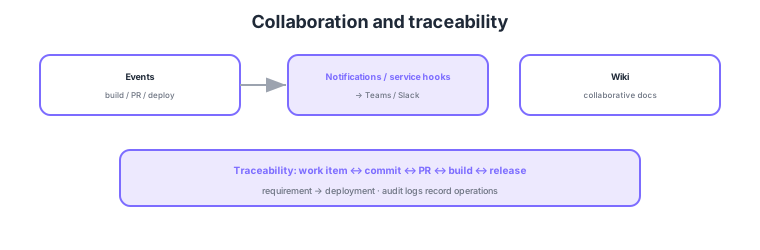
- Notifications/service hooks: relay events (build/PR/deploy) to Teams/Slack, etc.
- Wikis: collaboratively edit docs and share knowledge.
- Traceability: link work item ↔ commit ↔ PR ↔ build ↔ release to trace requirement to deployment.
- Auditing: audit logs of operations support compliance and governance.
Common on AZ-400: event integration = notifications/service hooks (Teams/Slack), docs = Wiki, requirement-to-deployment tracing = linking work items to commits/builds, operation records = audit logs. Linking work items to commits/PRs lets you trace why a change was made.
AZ-400 probes "how to design information flow and traceability." Notifications are subscription-based for events addressed to you (assignments, mentions, build results), while service hooks push events to external systems (Teams/Slack/webhooks/Jenkins, etc.). For chat, add the Azure Boards/Pipelines apps to Teams/Slack to receive build/release notifications, approve, and even create work items from chat (ChatOps). Wikis come as a project wiki (standalone) and publish-as-code wiki (repo-backed) for collaboratively editing design decisions and runbooks. The crux of traceability is linking work items to branches/commits (#ID in commit messages)/PRs/builds/releases, so you can bidirectionally trace "which requirement and which review this production change went through"—directly serving audit, incident analysis, and compliance (change management). Audit logs record org-level operations (permission changes, pipeline edits, policy changes), streamable to Log Analytics/Splunk/Event Grid for long-term retention and SIEM (e.g., Sentinel) integration. The key is to combine precise, low-noise notifications (subscription/service-hook design), knowledge sharing (Wiki), bidirectional traceability from requirement to deployment, and accountability via auditing.
| Goal | Means | Key point |
|---|---|---|
| Receive own events | Notifications (subscriptions) | Assignments/mentions/build results |
| Integrate external systems | Service hooks | Push to Teams/Slack/webhook |
| Collaborative knowledge | Wiki | Project wiki / publish-as-code |
| Trace requirement→deploy | Work item links + audit logs | Bidirectional trace; operation records |
Scenario: A post-incident analysis must explain "when, by whom, for which requirement this change entered, and which review it passed." → With work items linked to commits/PRs/builds/releases, you can trace bidirectionally from the release back to requirement, review, and approver. Record org permission/pipeline changes in audit logs, optionally shipping via Event Grid to a SIEM for long-term retention. Notify the team of release results in Teams via a service hook.
FAQ: Notifications vs service hooks? Notifications are subscription-based within Azure DevOps—users/teams receive events relevant to them. Service hooks push events to external systems, integrating Teams/Slack/webhooks/Jenkins. For "inform team members," use notifications; for "drive another system / post to chat," use service hooks (or chat app integration).
Exam trap: Recording traceability "by hand in tags or docs" is fragile and wrong. In Azure DevOps, formal links between work items ↔ commits/PRs/builds/releases provide automatic bidirectional tracing. Also, org operation trails are the job of audit logs, not notifications (notifications are immediate human-facing alerts; audit logs are records/compliance).
1.3.2Section summary
- Integration = notifications/service hooks (Teams/Slack) + Wiki
- Tracing = work item ↔ commit ↔ build ↔ release + audit logs
Sign in to track progress — Log in.
Quick check
(just a quick review)Q1. Auto-notify Microsoft Teams of events like build completion or PR creation. What?
Q2. You want to trace which requirement a production change was made for. What do you use?
Q3. Collaboratively edit and share design docs/procedures. What in Azure DevOps?
Keep track of your progress
The full study guide is free to read. Sign up free to practice with the question bank, track what you have read, review your mistakes, and highlight passages.