

What's changed: Deepened AZ-400 Chapter 1 (added comparison tables, scenarios, FAQs, exam traps, deep-dive paragraphs to each section; localized figures to Japanese)
1.1Agile Planning and Work Tracking
Understand agile planning—Azure Boards, work items, backlogs/sprints, and Kanban. Visualize team work and manage the flow of value.
DevOps starts with culture and process. Azure Boards visualizes work for agile planning and tracking.
1.1.1Azure Boards structure
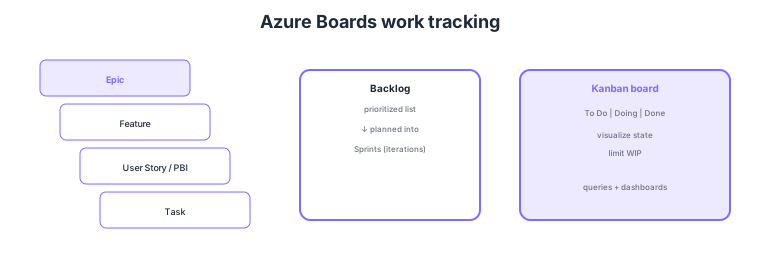
- Work item hierarchy: decompose work as Epic → Feature → Story/PBI → Task.
- Backlog: a prioritized list of work; start with the highest value.
- Sprints/iterations: plan and execute in fixed time-boxes (Scrum).
- Kanban: visualize states (To Do/Doing/Done) and limit work in progress (WIP).
Common on AZ-400: work hierarchy = Epic/Feature/Story/Task, prioritized list = backlog, time-boxing = sprints, state visualization + WIP limits = Kanban. Azure Boards links to repos and pipelines for traceability from work to deployment.
AZ-400 probes "how to design DevOps culture and process" more than tool clicks. Azure Boards picks a process template (Agile / Scrum / CMMI / Basic) to define work item types and workflow, organized by area paths (team/component split) and iteration paths (sprint timeboxes). The backlog is value-ordered, sprint planning pulls in what fits capacity, and Kanban tunes flow via column customization, WIP limits, swimlanes, and Definition of Done. Visualize with queries (WIQL), dashboard widgets, and Analytics (OData), and link work items to branches/commits/PRs/builds/releases to establish traceability from requirement to deployment. For process improvement, measure lead/cycle time and flow efficiency, find bottlenecks (columns with long wait) and fix them with WIP limits and pull-based flow. Boards also integrates with GitHub Issues, resolving work items from commit messages via AB# links. The key is to pick the template and hierarchy that fit the team’s process, make the flow measurable, and thread traceability from requirement → code → deployment.
| Goal | Boards feature | Key point |
|---|---|---|
| Decompose work | Work item hierarchy | Epic → Feature → Story → Task |
| Prioritize/plan | Backlog + sprints | Value-ordered; pull by capacity |
| Visualize/control flow | Kanban (WIP limits) | Columns/swimlanes; limit WIP |
| Trace requirement→deploy | Work item links | Link to commits/PRs/builds/releases |
Scenario: The team delivers slowly and you can’t tell where work stalls. → Set WIP limits per column on the Kanban board to cap work in progress, and measure cycle/lead time via Analytics. If a column with long wait (e.g., awaiting code review) is the bottleneck, improve flow by adding reviewers or smaller PRs. Link work items to PRs/builds so change rationale is traceable.
FAQ: Scrum vs Agile process template? They differ mainly in work item types and workflow states. Scrum tracks Product Backlog Items and Bugs, with states New→Approved→Committed→Done that map directly onto Scrum ceremonies. Agile tracks User Stories, with states New→Active→Resolved→Closed so development and test work can be followed separately. Kanban boards, WIP limits and sprint planning exist in every template — choosing Agile "because we run Kanban" is the wrong criterion; choose by the terminology and work item types your team actually uses. You can also change a project's process later: only *inherited* processes are customizable, so create an inherited process for the target (e.g. Scrum) and switch via Boards → Process → Projects → Change process. The switch is blocked if the project still holds work items of a custom type that the target process does not define.
Exam trap: Trying to achieve DevOps improvement through "tool adoption" alone is wrong—AZ-400 emphasizes culture, process, and measurement. Visualizing states on Kanban without WIP limits won’t improve flow. And "can’t see progress" is solved not by resource locks or tags but by visualization via Boards queries/dashboards/Analytics.
1.1.2Section summary
- Planning = Azure Boards (work items/backlog/sprints)
- Visualization = Kanban (states + WIP limits)
Sign in to track progress — Log in.
Quick check
(just a quick review)Q1. Manage team work as a prioritized list and start from the top. What in Azure Boards?
Q2. Visualize work states (To Do/Doing/Done) and limit work in progress. What?
Q3. Decompose a large feature from epic down to tasks. What do you use?
Keep track of your progress
The full study guide is free to read. Sign up free to practice with the question bank, track what you have read, review your mistakes, and highlight passages.