

What's changed: Deepened AZ-204 Chapter 3 to Associate depth (tables, scenarios, FAQ, traps; localized figures)
3.2Secret Management (Key Vault, Managed Identity)
Understand secret management with Azure Key Vault, key-free authentication via managed identities, and Key Vault references from App Service/Functions.
Store passwords/API keys in Azure Key Vault, not in code. Best practice is to access it with a managed identity that holds no credentials.
3.2.1Key Vault and managed identity
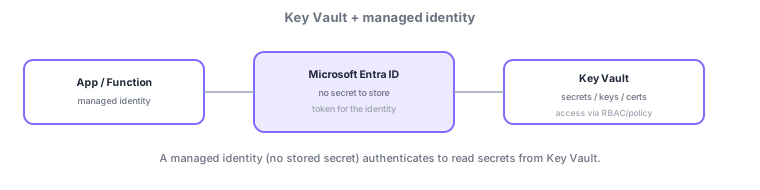
- Key Vault: securely store secrets, keys, certificates; control/audit access via RBAC/access policies.
- Managed identity: an Entra ID-managed identity; access Key Vault, etc., without storing credentials.
- Key Vault references: reference secrets directly from App Service/Functions settings via @Microsoft.KeyVault(...).
Common on AZ-204: store secrets securely = Key Vault, access without storing credentials = managed identity, reference secrets from app settings = Key Vault references. Hard-coding connection strings is wrong.
Never put secrets in code—store them in Key Vault and access via a managed identity. Key Vault holds secrets (e.g., connection strings), keys (encryption/signing, HSM-backed too), and certificates, with access via RBAC (preferred) or access policies, and operations logged for audit. A managed identity is an Entra ID identity with no stored credentials: system-assigned (1:1 with a resource, lifecycle-bound) or user-assigned (an independent resource shareable across many). In App Service/Functions, Key Vault references (@Microsoft.KeyVault(...) in app settings) inject secrets without code changes, resolved internally by the managed identity. Use soft delete + purge protection for recovery and rotation to refresh keys. The axes: "store secrets = Key Vault," "keyless access = managed identity," "reference from settings = Key Vault references," "resource-specific = system-assigned / shared = user-assigned." Putting connection strings/keys in code or plaintext env vars is wrong.
| Goal | Use |
|---|---|
| Store secrets (connection strings, etc.) | Key Vault secrets |
| Access without credentials | Managed identity |
| Inject secrets from settings | Key Vault references |
| Share an identity across resources | User-assigned managed identity |
Scenario: multiple Functions/App Services need the same DB credentials and crypto key securely. Centralize them in Key Vault. Since several resources use them, create a user-assigned managed identity, assign it to each, and grant read via RBAC on the vault. Inject app settings via Key Vault references (no code change). Enable soft delete + purge protection and rotate keys periodically.
Q. Store secrets? Key Vault. Q. Keyless access? Managed identity. Q. Reference from settings? Key Vault references. Q. Identity shared across resources? User-assigned. Q. Lifecycle-bound identity? System-assigned. Q. Recover from deletion? Soft delete + purge protection.
Watch the mix-ups: (1) System-assigned (1:1) ≠ user-assigned (shareable)—use user-assigned to share across resources. (2) A managed identity still needs access granted on the vault (RBAC/policy)—enabling the identity alone doesn’t grant reads. (3) Don’t put connection strings/keys in code or plaintext env vars (use Key Vault references). (4) With purge protection on, permanent deletion has a waiting period.
A system-assigned managed identity is tied to the resource lifecycle; a user-assigned one can be shared across resources. Choose by requirement.
3.2.2Section summary
- Key Vault (storage) + managed identity (key-free access)
- Fetch directly via Key Vault references in app settings
Sign in to track progress — Log in.
Quick check
(just a quick review)Q1. Which Azure service securely stores passwords, API keys, and certificates?
Q2. What is the most recommended way for an app to access Key Vault without storing credentials?
Q3. What lets App Service app settings reference Key Vault secrets directly?