

What's changed: Deepened AZ-204 Chapter 3 to Associate depth (tables, scenarios, FAQ, traps; localized figures)
3.1Authentication and Authorization (Entra ID, MSAL)
Understand implementing auth: app authentication with Microsoft Entra ID, acquiring OAuth2 tokens with MSAL, app registrations and scopes/roles, and protecting APIs. The starting point for "Implement Azure security" in AZ-204.
Delegate app authentication to Microsoft Entra ID and acquire OAuth2 tokens with MSAL (Microsoft Authentication Library). Use tokens to call APIs securely.
3.1.1The token flow
Authenticate and authorize users and apps with the Microsoft identity platform (Microsoft Entra ID), acquiring tokens via OAuth 2.0/OIDC and calling Microsoft Graph. Centralize app settings and feature flags (Feature Manager) in Azure App Configuration, using Key Vault for secret values.
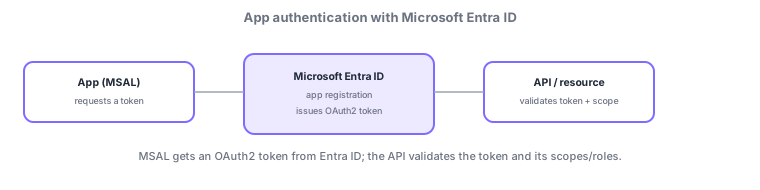
- App registration: register the app in Entra ID and configure redirect URIs, scopes, and API permissions.
- MSAL: acquire tokens interactively/silently and handle caching/refresh.
- Delegated vs. app permissions: on behalf of a user (delegated) vs. the app itself (app permissions / client-credentials flow).
- API protection: APIs validate the token’s signature, audience, and scopes/roles to authorize access.
Common on AZ-204: acquire token = MSAL, on behalf of a user = delegated, daemon/background = app permissions (client credentials), APIs validate token scopes/roles. SPAs use auth-code flow + PKCE.
Delegate authentication to Microsoft Entra ID and acquire OAuth2/OIDC tokens with MSAL. First do an app registration (client ID, redirect URIs, exposed scopes, API permissions), then pick a flow by use: authorization code flow for web/native, auth code + PKCE for SPAs, client-credentials flow (app permissions) for user-less daemons, and On-Behalf-Of to call other APIs on a user’s behalf. Use delegated permissions (on behalf of the signed-in user; effective = user ∩ app) vs. application permissions (the app itself; needs admin consent). Distinguish the access token (to call APIs), ID token (authentication info), and refresh token (to renew); protected APIs authorize by validating signature, issuer, audience, expiry, and scopes/roles. Prefer a certificate / federated credential (workload identity) over a client secret. App Service can add auth code-free via Easy Auth. The axes: "acquire token = MSAL," "on behalf of a user = delegated," "daemon = app permissions," "SPA = auth code + PKCE."
| Scenario | Flow/permission |
|---|---|
| Web/native user sign-in | Auth code flow (delegated) |
| SPA (browser) | Auth code flow + PKCE |
| User-less daemon/batch | Client credentials (app permissions) |
| API calls another API on behalf of | On-Behalf-Of flow |
Scenario: a SPA + backend API + nightly batch. The SPA acquires tokens via auth code + PKCE and calls the API. The API runs with delegated permissions on behalf of the signed-in user and validates the token scopes. The user-less nightly batch uses client credentials (app permissions) + a certificate. Handle credentials via Key Vault/managed identity—no hard-coded secrets.
Q. Acquire tokens? MSAL. Q. On behalf of a user? Delegated (auth code flow). Q. Daemon? App permissions (client credentials). Q. SPA? Auth code + PKCE. Q. API authorization checks? Signature/issuer/audience/scopes-roles. Q. Safer than a secret? Certificate/workload identity.
Watch the mix-ups: (1) Delegated (on behalf of a user) ≠ application permissions (the app itself)—daemons use app permissions, not delegated. (2) Access tokens and ID tokens differ (call APIs vs. authentication info)—don’t authorize APIs with an ID token. (3) Implicit flow is discouraged for SPAs—use auth code + PKCE. (4) APIs must also validate audience/issuer (signature alone is insufficient).
App Service "built-in authentication (Easy Auth)" can add Entra ID sign-in without writing code.
3.1.2Section summary
- Auth = Entra ID + MSAL (OAuth2 tokens)
- Use delegated/app permissions; APIs validate scopes/roles
Sign in to track progress — Log in.
Quick check
(just a quick review)Q1. Which library acquires OAuth2 tokens from Microsoft Entra ID in an app?
Q2. Which permission type lets a background daemon access resources as itself without a user?
Q3. What should a protected API validate to authorize access?