

What's changed: Deepened AZ-204 Chapter 2 to Associate depth (tables, scenarios, FAQ, traps; localized figures)
2.2Developing for Cosmos DB
Understand developing for Azure Cosmos DB: partition-key design, throughput (RU/s; provisioned/serverless), consistency levels (strong to eventual), and the change feed.
Azure Cosmos DB is a globally distributed, low-latency NoSQL database. Development centers on partition keys, RU/s, and consistency levels.
2.2.1Keys, throughput, consistency
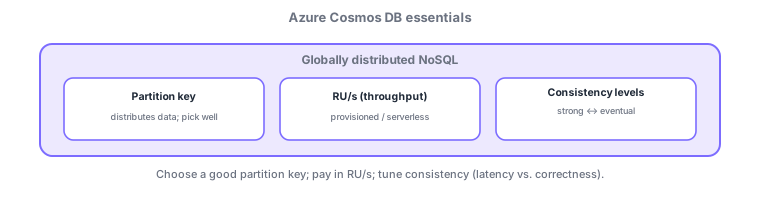
- Partition key: distributes data physically; design it to avoid skew and hot partitions.
- RU/s (request units): the throughput unit; provisioned (fixed/autoscale) or serverless.
- Consistency levels: five levels from strong to eventual; stronger is more accurate but higher latency/cost.
- Change feed: read container changes in order for event-driven processing (e.g., with Functions).
Common on AZ-204: distribution = partition key (skew → hot partition / RU exhaustion), throughput = RU/s (intermittent = serverless), consistency is a strong↔eventual trade-off, read changes in order = change feed.
Cosmos DB is globally distributed, low-latency NoSQL. The design core is the partition key—pick a high-cardinality value that spreads reads/writes evenly; skew causes hot partitions and 429s. Throughput is RU/s (request units): choose provisioned (manual/autoscale; predictable load) or serverless (intermittent, pay-per-use), with database shared RU across containers. Consistency levels span five—strong / bounded staleness / session (default) / consistent prefix / eventual—stronger being more accurate but higher latency/cost (session is a good balance for many apps). Multi-region writes lower latency globally, and APIs include NoSQL/MongoDB/Cassandra/Gremlin/Table. The change feed reads container changes in order for Functions integration. On 429 (TooManyRequests), retry with exponential backoff and revisit RU/key design. The axes: "distribution = partition key," "intermittent load = serverless," "consistency trades off with latency," "read changes = change feed."
| Requirement/issue | Approach |
|---|---|
| Distribute data evenly | High-cardinality partition key |
| Intermittent load, min cost | Serverless |
| Good balance for many apps | Session consistency (default) |
| Process changes in order | Change feed → Functions |
Scenario: a global e-commerce cart needing low latency without skew to specific users. Use userId as the partition key (high cardinality, well distributed). Use serverless for unpredictable staging and autoscale RU/s in production. Choose session consistency (read-your-writes). Propagate inventory changes via change feed → Functions. On 429, back off exponentially in the app and revisit RU/key if it persists.
Q. Key to distribution? Partition key (high cardinality). Q. Intermittent load, min cost? Serverless. Q. Default consistency? Session. Q. Process changes in order? Change feed. Q. Handle 429? Backoff + revisit RU/key. Q. Global low-latency writes? Multi-region writes.
Watch the mix-ups: (1) The partition key is hard to change later—choose cardinality/distribution carefully up front. (2) Skew causes hot partitions/RU exhaustion (429)—pick an evenly distributing key. (3) Stronger consistency isn’t always better (latency/cost/availability trade-off). (4) Insufficient RU/s is the main 429 cause—use autoscale or revisit the key.
On RU exhaustion (429: TooManyRequests), retry with exponential backoff in the app, and revisit throughput or key design if needed.
2.2.2Section summary
- Partition key (distribute) / RU/s (throughput) / consistency levels
- Read changes in order = change feed; 429 = backoff
Sign in to track progress — Log in.
Quick check
(just a quick review)Q1. Which design element distributes data physically and drives Cosmos DB performance?
Q2. What unit expresses Cosmos DB throughput?
Q3. Which Cosmos DB feature reads container changes in order for event-driven processing?