

What's changed: Deepened AZ-204 Chapter 2 to Associate depth (tables, scenarios, FAQ, traps; localized figures)
2.1Developing for Blob Storage
Understand developing for Blob storage: SDK operations (client → container → blob; upload/download/list), access tiers and lifecycle, and secure access via SAS and Entra ID. The starting point for "Develop for Azure storage" in AZ-204.
Blob storage holds unstructured data (images, logs, files). For development, learn the SDK client hierarchy and secure access.
2.1.1SDK, tiers, and access
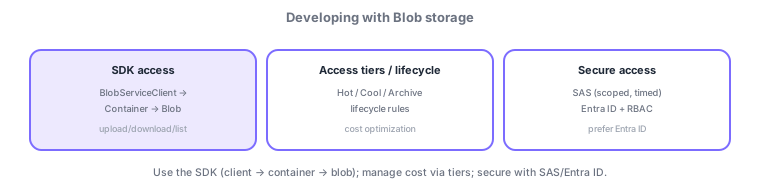
- SDK client hierarchy: navigate BlobServiceClient → container → blob to upload/download/list.
- Tiers/lifecycle: choose Hot/Cool/Archive and auto-tier with lifecycle rules for cost.
- Secure access: SAS (scoped/timed delegation) and Entra ID + RBAC; prefer Entra ID, guard keys.
Common on AZ-204: client → container → blob hierarchy, time-limited delegated access = SAS, prefer key-free Entra ID + RBAC, rarely used long-term = Archive tier.
For development, navigate the SDK hierarchy BlobServiceClient → container (BlobContainerClient) → blob (BlobClient) to upload/download/list and handle metadata. Blob types: block blobs (general files; upload large ones in parallel blocks), append blobs (logs), and page blobs (virtual disks). Optimize cost with access tiers (Hot/Cool/Cold/Archive) and a lifecycle management policy; note Archive requires rehydration to read. Secure access via "Entra ID + RBAC (preferred, key-free)," "SAS (delegated, scoped by target/operation/expiry; user delegation SAS is safest; revoke in bulk with a stored access policy)," or account keys (last resort, rotate). Route blob-created events to Functions, etc. via Event Grid; guard with soft delete/versioning and immutable storage. The axes: "permanent/keyless = Entra ID + RBAC," "temporary delegation = SAS," "long-term = Archive tier," "event integration = Event Grid."
| Goal | Use |
|---|---|
| Permanent, key-free access | Entra ID + RBAC |
| Time/scope-limited delegation | SAS (prefer user delegation SAS) |
| Rarely used long-term | Archive tier (needs rehydration) |
| Route blob events downstream | Event Grid → Functions |
Scenario: generate thumbnails for uploaded images and store old ones cheaply. Upload to a container via the SDK (large images in blocks). Trigger Functions on blob-created via Event Grid to make thumbnails. Move old images Cool→Archive with a lifecycle management policy. Share externally with a short user delegation SAS (read), and use Entra ID + RBAC (keyless) for internal apps.
Q. SDK hierarchy? BlobServiceClient → container → blob. Q. Temporary delegation? SAS (user delegation SAS is safest). Q. Permanent/keyless? Entra ID + RBAC. Q. Long-term storage? Archive tier (needs rehydration). Q. Blob event integration? Event Grid. Q. Large files? Block upload.
Watch the mix-ups: (1) Archive isn’t instantly readable (needs rehydration). (2) A SAS is hard to revoke individually once issued—invalidate via a stored access policy or key regeneration. (3) Account keys grant full access (large blast radius)—prefer Entra ID/SAS. (4) Don’t confuse blob types (general = block, logs = append, VHD = page).
Upload large files in blocks; use change notifications (Event Grid) to route blob-created events to downstream (e.g., Functions).
2.1.2Section summary
- SDK = client → container → blob; optimize cost with tiers
- Access via SAS / Entra ID + RBAC (preferred)
Sign in to track progress — Log in.
Quick check
(just a quick review)Q1. What is the correct SDK hierarchy from client to a blob in Blob storage?
Q2. You want to grant a third party time-limited, scoped access to a specific blob. What fits best?
Q3. Which is the most recommended (key-free) way to access Blob storage?