

What's changed: Deepened AZ-104 Chapter 5 to Associate depth (tables, scenarios, FAQ, traps; localized figures)
5.3Management and Automation (CLI, Templates)
Understand management options (Portal, CLI, PowerShell, Cloud Shell) and repeatable deployments via Infrastructure as Code (IaC) with ARM templates / Bicep.
To build the same configuration identically, repeatedly, automation beats manual work. Azure can be managed/automated with CLI / PowerShell and templates (IaC).
5.3.1Management and automation options
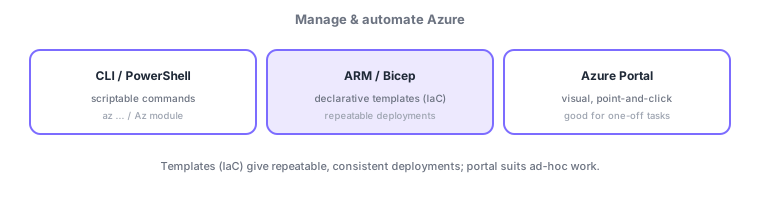
- Azure Portal: visual operations; good for one-off tasks and inspection.
- Azure CLI / PowerShell: command-driven; can be scripted and repeated. Cloud Shell runs them right in the browser.
- ARM templates / Bicep: declarative templates (IaC); deploy the same configuration with repeatability and consistency.
Common on AZ-104: repeatable, consistent deployments = ARM templates/Bicep (IaC), scripted automation = CLI/PowerShell, one-off operations = Portal. Bicep is a more concise language for ARM.
Pick a management option by "one-off = portal / repeated = scripts / repeatable = templates (IaC)." The Azure Portal is visual for one-off tasks/inspection; Azure CLI (az)/Azure PowerShell (Az module) are scriptable for repeated automation, with Cloud Shell ready in the browser (already authenticated). ARM templates (JSON)/Bicep (a more concise Azure-specific IaC language that compiles to ARM) declaratively define the desired state for repeatable, consistent deployments, with what-if to preview diffs before applying. For multi-cloud, Terraform is an option. Apply config continuously with Azure Automation (runbooks) plus Azure Machine Configuration (the older Automation State Configuration/DSC was retired in 2025), and enforce org rules with the prior chapter’s Azure Policy. IaC pairs well with version control, review, and CI/CD, curbing drift (divergence from manual changes) and easing rebuilds after a disaster. The axes: "repeatable deployment = ARM/Bicep," "scripted automation = CLI/PowerShell," "one-off = portal," "ongoing config = Automation."
| Goal | Use |
|---|---|
| Repeatable deployment | ARM templates / Bicep (IaC) |
| Scripted, repeated automation | Azure CLI / PowerShell |
| One-off operation/inspection | Azure Portal |
| Ongoing config/ops automation | Azure Automation (runbooks) |
Scenario: reproduce the same config quickly across dev/test/prod and eliminate manual drift. Define config in Bicep (IaC), preview with what-if before applying, and deploy from a CI/CD pipeline. Automate routine ops (nightly stop, patching) with Azure Automation runbooks and enforce org rules with Azure Policy. Use the portal only for ad-hoc checks and run automation scripts via CLI/PowerShell (Cloud Shell).
Q. Repeatable deployment? ARM templates/Bicep. Q. Preview diffs? what-if. Q. Scripted automation? CLI/PowerShell. Q. Run in the browser? Cloud Shell. Q. Automate routine ops? Azure Automation (runbooks). Q. Enforce org rules? Azure Policy.
Watch the mix-ups: (1) Manual portal work isn’t repeatable—mass-produce identical config with IaC (ARM/Bicep). (2) Bicep compiles to ARM (Azure-specific); Terraform is multi-cloud—choose by use. (3) Manually changing an IaC-managed environment causes drift and may be overwritten on the next apply. (4) Azure Policy (enforce rules) and IaC (deploy desired config) play different roles.
IaC (templates) can be version-controlled and reviewed, reducing environment drift and easing rebuilds after a disaster.
5.3.2Section summary
- Portal (one-off) / CLI, PowerShell (scripts) / templates (IaC)
- Repeatable deployments = ARM templates / Bicep
Sign in to track progress — Log in.
Quick check
(just a quick review)Q1. You want to repeatedly deploy the same set of resources with consistency. Which fits best?
Q2. Which lets you use CLI/PowerShell to operate Azure right from the browser?
Q3. Which Azure-specific IaC language writes ARM templates with more concise syntax?
Keep track of your progress
The full study guide is free to read. Sign up free to practice with the question bank, track what you have read, review your mistakes, and highlight passages.