

What's changed: Deepened AZ-104 Chapter 5 to Associate depth (tables, scenarios, FAQ, traps; localized figures)
5.2Backup and Disaster Recovery
Understand the difference between Azure Backup (backup/restore via Recovery Services vault) and Azure Site Recovery (replication/failover to another region).
Protecting against data loss and disasters is a key admin duty. Azure has two pillars: Azure Backup (backup) and Azure Site Recovery (business continuity/DR).
5.2.1Backup and DR
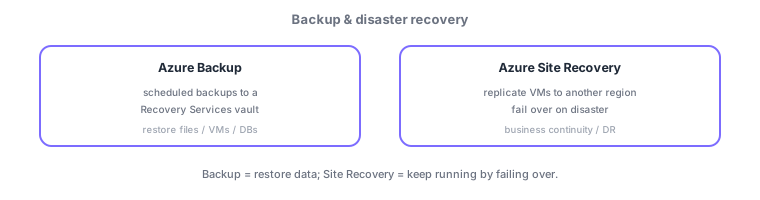
- Azure Backup: scheduled backups of files, VMs, DBs, etc., with restore when needed; stored in a Recovery Services vault.
- Azure Site Recovery (ASR): replicates VMs to another region and fails over on disaster to keep running (BC/DR).
A common AZ-104 distinction: enable restoring data = Azure Backup, keep running by switching to another region on disaster = Azure Site Recovery. Backup = restore; ASR = failover.
Business continuity separates "being able to restore data (Backup)" from "keeping things running (Site Recovery)." Azure Backup periodically backs up VMs, Azure Files, SQL/SAP, etc., per a backup policy (schedule + retention), stored in a Recovery Services vault (or Backup vault) for restore when needed; configure soft delete, immutable vaults, and long-term retention (LTR). Azure Site Recovery (ASR) continuously replicates VMs to another region and fails over on disaster (planned/unplanned; validate non-disruptively with a test failover), then fails back after recovery. Metrics are RPO (acceptable data loss) and RTO (recovery time); ASR achieves RPO of minutes while Backup may lose up to the backup interval. The axes: "restore lost data = Backup," "keep running through a region disaster = Site Recovery," "validate DR without disruption = test failover." Combine both (Backup for data, ASR for availability).
| Requirement | Service |
|---|---|
| Restore deleted files/VMs | Azure Backup |
| Stay running through a region disaster | Azure Site Recovery |
| Validate DR non-disruptively | ASR test failover |
| Tamper-proof/long-term | Immutable vault / LTR |
Scenario: protect a mission-critical VM from both mistakes and a region-wide disaster. Guard against deletion/corruption with Azure Backup (daily, retention + soft delete) so data is restorable. Protect against a region disaster with Azure Site Recovery replicating to another region, validating the runbook non-disruptively via an annual test failover. Set replication frequency/config to your RPO/RTO and use both together.
Q. Restore lost data? Azure Backup (Recovery Services vault). Q. Keep running in a region disaster? Azure Site Recovery (failover). Q. Validate DR non-disruptively? Test failover. Q. Data-loss/recovery-time metrics? RPO/RTO. Q. Guard deletion? Soft delete + retention.
Watch the mix-ups: (1) Backup (restore) ≠ Site Recovery (failover)—use Backup to restore data, ASR to keep running. (2) Backup can lose up to the backup interval (match RPO to requirements). (3) Validate with a test failover before a real one. (4) Without soft delete, deleted backups can’t be recovered.
Define retention and schedule with a backup policy; long-term retention can be set to meet compliance requirements.
5.2.2Section summary
- Azure Backup = backup/restore (Recovery Services vault)
- Azure Site Recovery = cross-region replication + failover (DR)
Sign in to track progress — Log in.
Quick check
(just a quick review)Q1. You want to be able to restore accidentally deleted files or VMs later. Which service fits best?
Q2. You want to fail over to another region to keep operating during a region-wide disaster. What do you use?
Q3. Where is Azure Backup data stored?
Keep track of your progress
The full study guide is free to read. Sign up free to practice with the question bank, track what you have read, review your mistakes, and highlight passages.