

What's changed: In-scope coverage: added ops/notification/governance (EventBridge/SNS/SQS/Health Dashboard/Trusted Advisor/Well-Architected/Management Console/Control Tower)
5.3Troubleshooting and Optimizing Connectivity
Isolate and fix—understand route tables, security groups (stateful), NACLs (stateless), MTU/jumbo frames, and asymmetric routing. Systematically find the cause.
When something "can’t connect," isolate systematically: check route → security group → NACL, then confirm with REJECT entries in flow logs.
5.3.1Order of isolation
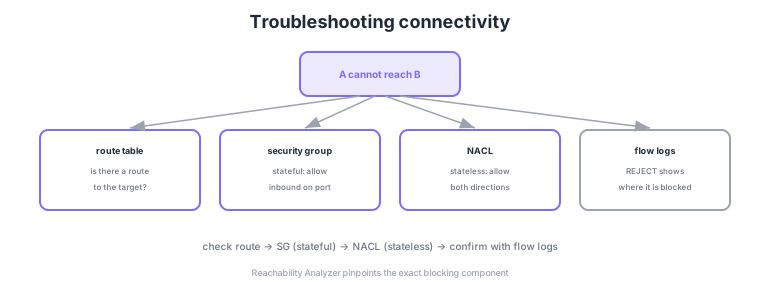
- Route table: is there a route to the target (IGW/NAT/TGW/peering/endpoint)?
- Security group: stateful. Allow inbound and the return traffic is automatically allowed.
- NACL: stateless. Must explicitly allow both inbound and outbound (incl. ephemeral ports).
- MTU/asymmetric routing: mind jumbo frames/MTU for large packets; different forward/return paths can break flows.
Common on ANS-C01: SG is stateful (return auto-allowed), NACL is stateless (allow both directions, mind ephemeral ports), isolate route → SG → NACL first, and exact blocking point = Reachability Analyzer. A classic root cause: a NACL blocking ephemeral return ports.
Jumbo frames (MTU 9001) work within a VPC but may be limited to 1500 across an internet gateway or some connections. Keep MTU consistent end to end.
ANS-C01 ops questions probe MTU, asymmetric routing, and hybrid-specific pitfalls deeply. Memorize the MTU boundaries: up to 9001 within a VPC, 1500 over an internet gateway or VPC peering, 8500 over Transit Gateway, and up to 1500 over Site-to-Site VPN (less in practice due to IPsec overhead). When a packet exceeds a smaller MTU on the path and the DF (Don’t Fragment) bit is set, ICMP "Fragmentation Needed (Type 3 Code 4)" drives path MTU discovery; blocking that ICMP in an SG/NACL causes the classic failure where the connection establishes but large transfers hang. Asymmetric routing arises when forward and return take different paths (e.g., out via TGW, back via a different VPN), so a stateful firewall or NAT drops the return as an unknown session. In inspection designs, pin forward/return to the same appliance (appliance mode) to fix it; enabling Transit Gateway appliance mode keeps a flow on the same-AZ inspection endpoint, preventing asymmetry. In hybrid setups, expect to isolate cases like name resolution failing only because bidirectional DNS (Route 53 Resolver inbound/outbound endpoints) between on-prem and VPC is unconfigured, or TGW routes colliding due to overlapping CIDRs.
| Path | Max MTU | Note |
|---|---|---|
| Within a VPC | 9001 (jumbo) | Same VPC, supported instances |
| IGW / VPC peering | 1500 | Jumbo does not cross |
| Transit Gateway | 8500 | VPN attachments are 1500 |
| Site-to-Site VPN | 1500 (effective less) | IPsec overhead |
Scenario: over an on-prem↔VPC VPN, small SSH exchanges work but large file transfers/responses hang midway. → Classic blocking of the ICMP "Fragmentation Needed" used by path MTU discovery in an SG/NACL. Allow that ICMP (Type 3 Code 4) or apply TCP MSS clamping to lower the effective segment size, matching the path’s smallest MTU (VPN is under 1500).
FAQ: Q. Return packets dropped in an inspection VPC? A. Asymmetric routing—enable Transit Gateway appliance mode to pin a flow to the same-AZ appliance. Q. Ping works but TCP won’t establish? A. Suspect NACL ephemeral (return) ports being blocked even though the SG is stateful, MTU/MSS, or asymmetry.
Trap: "if ping (ICMP) works, TCP must work too" is false—ICMP and TCP are different protocols with separate SG/NACL allows and different MTU effects. Conversely, "blocking all ICMP is harmless" is wrong: blocking the ICMP needed for path MTU discovery makes large transfers hang. Allow the necessary ICMP.
5.3.2In-scope services for operations, notification, and governance
Operating a network also tests event integration, notification, and governance. To respond automatically to config changes or failure events, Amazon EventBridge filters events via rules to targets (Lambda/SNS, etc.) and can trigger on a schedule. Fan-out notification uses Amazon SNS (pub/sub to email/SMS/HTTP), while decoupling/buffering between components uses an Amazon SQS queue—distinguish their roles (notify vs queue). For operational awareness, AWS Health Dashboard personalizes notifications of how AWS-side issues/maintenance affect your resources; AWS Trusted Advisor runs automated best-practice checks; and the AWS Well-Architected Tool provides six-pillar systematic review. The GUI for day-to-day operations is the AWS Management Console, and AWS Control Tower automates a multi-account landing zone with guardrail governance.
5.3.3Section summary
- Isolate = route → SG (stateful) → NACL (stateless)
- Confirm = REJECT in flow logs / Reachability Analyzer
- Integrate = EventBridge; notify = SNS; queue = SQS; govern = Control Tower/Trusted Advisor/Well-Architected
Sign in to track progress — Log in.
Quick check
(just a quick review)Q1. You allowed inbound in the SG but traffic failed—turns out a NACL caused it. Which is true of NACLs?
Q2. An instance in a private subnet cannot reach the internet. What should you check first?
Q3. What does it mean that a security group is stateful?
Keep track of your progress
The full study guide is free to read. Sign up free to practice with the question bank, track what you have read, review your mistakes, and highlight passages.