

What's changed: In-scope coverage: added ops/notification/governance (EventBridge/SNS/SQS/Health Dashboard/Trusted Advisor/Well-Architected/Management Console/Control Tower)
5.2Monitoring Tools and Reachability
Measure state—understand CloudWatch metrics/alarms, Reachability Analyzer, Network Access Analyzer, and Traffic Mirroring. Choose the tool that matches your question.
There are several tools for network monitoring. Choose based on what you want to know—a trend, reachability, or packet contents.
5.2.1Match the tool to the question
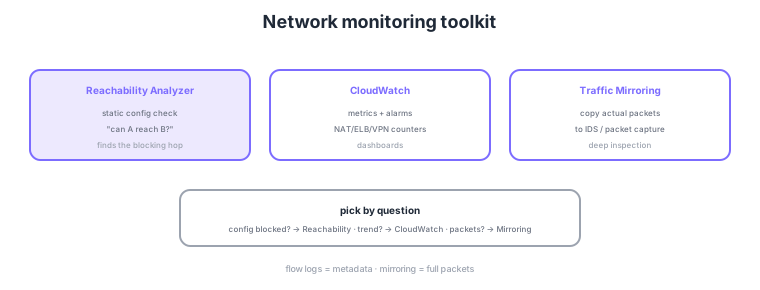
- CloudWatch metrics/alarms: monitor metrics over time for NAT/ELB/VPN and alert on thresholds.
- Reachability Analyzer: statically analyzes config (routes/SG/NACL) to determine "can A reach B?".
- Network Access Analyzer: checks for paths that should not be reachable, finding unintended exposure.
- Traffic Mirroring: copies actual packets to IDS/packet capture for deep analysis.
Common on ANS-C01: find why something is unreachable from config = Reachability Analyzer, check for unintended reachable paths = Network Access Analyzer, metric trends/alerts = CloudWatch, and packet analysis = Traffic Mirroring. Note the difference between live testing and static config analysis.
ANS-C01 tests whether each tool actually sends traffic or analyzes config, and which metrics to watch. Reachability Analyzer and Network Access Analyzer analyze only configuration without sending packets (charged per analysis), so they judge reachability or exposure without affecting production. Reachability returns "can a given source reach a destination, and if not, the first blocking component"; Network Access Analyzer defines a scope to surface paths that are reachable when they should not be (e.g., from the internet or a range). For CloudWatch, memorize key network metrics: NAT gateway ErrorPortAllocation (port exhaustion) and BytesOutToDestination; Site-to-Site VPN TunnelState (1=UP/0=DOWN) to detect tunnel loss; Direct Connect ConnectionState and ConnectionBpsEgress; ELB HTTPCode_ELB_5XX and TargetResponseTime; Transit Gateway BytesIn/Out. For deeper flow-level trends use CloudWatch Network Monitor or Internet Monitor (internet-side latency/availability trends). Traffic Mirroring copies packets from a source ENI to a monitoring ENI/NLB and can filter the subset, but mind the mirrored bandwidth and cost.
| Tool | Live traffic? | Question it answers |
|---|---|---|
| Reachability Analyzer | No (static analysis) | Is A→B reachable; where is it blocked |
| Network Access Analyzer | No (static analysis) | Any path reachable that should not be |
| CloudWatch | Collects metrics | Trends and threshold alerts |
| Traffic Mirroring | Copies real packets | Deep payload inspection |
Scenario: a Site-to-Site VPN intermittently drops; detect disconnects immediately and auto-page on-call. → Alarm on the VPN TunnelState metric in CloudWatch and notify via SNS when it hits 0 (DOWN). To separate config from transient issues, also verify configured reachability with Reachability Analyzer after recovery.
FAQ: Q. Reachability Analyzer says reachable but it actually fails? A. Static analysis only checks config (routes/SG/NACL); the app layer, host firewall, and OS settings are out of scope—check live issues via mirroring or on the instance. Q. Continuously audit excess exposure? A. Run Network Access Analyzer scopes on a schedule and aggregate findings in Security Hub.
Trap: "you can pinpoint why something is unreachable using flow logs alone" is false. Flow logs only show that a REJECT occurred, not whether the SG, NACL, or route caused it. Reachability Analyzer precisely identifies the blocking component. Likewise, proving "nothing is exposed" via flow logs is wrong—that is Network Access Analyzer’s job.
5.2.2Section summary
- Reachability = Reachability/Network Access Analyzer; trends = CloudWatch
- Packets = Traffic Mirroring
Sign in to track progress — Log in.
Quick check
(just a quick review)Q1. EC2 cannot reach RDS. Statically pinpoint where (route/SG/NACL) it is blocked from config. What?
Q2. Monitor NAT gateway bandwidth and ELB error counts over time and alert on thresholds. What?
Q3. Check whether any path exists to resources that should not be reachable. What?
Keep track of your progress
The full study guide is free to read. Sign up free to practice with the question bank, track what you have read, review your mistakes, and highlight passages.