

What's changed: In-scope coverage: added ops/notification/governance (EventBridge/SNS/SQS/Health Dashboard/Trusted Advisor/Well-Architected/Management Console/Control Tower)
5.1Visibility with VPC Flow Logs
See your traffic—understand VPC Flow Logs, capture scope (VPC/subnet/ENI), ACCEPT/REJECT, destinations (CloudWatch/S3), and how they differ from Traffic Mirroring.
VPC Flow Logs record metadata about traffic through network interfaces (ENIs)—source/destination IP, ports, accept/reject—but not the packet contents.
5.1.1Scope and destinations
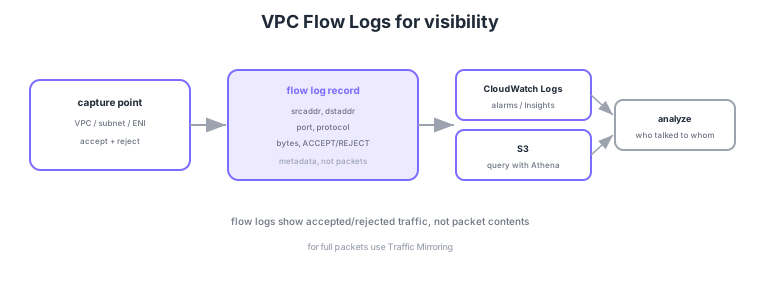
- Scope: enable at the VPC, subnet, or ENI level. Can record both ACCEPT and REJECT.
- Contents: metadata such as source/destination IP, port, protocol, bytes, and accept/reject.
- Destinations: CloudWatch Logs (alarms/Logs Insights) or S3 (query with Athena).
- If you need packet contents: not via flow logs. Use Traffic Mirroring to capture actual packets.
Common on ANS-C01: see accepted/rejected traffic = VPC Flow Logs (metadata), packet contents = Traffic Mirroring, and output to CloudWatch Logs or S3 (Athena). A common trap: flow logs do not include packet contents.
ANS-C01 tests how to read flow logs and their limits. In the default format the action field shows ACCEPT/REJECT, but that is the combined final verdict of security group and NACL—it does not say which one denied. Also, log-status can be NODATA (no traffic in the window) or SKIPDATA (some records dropped by internal constraints); keep these in mind operationally. Besides CloudWatch Logs and S3, you can deliver to Amazon Data Firehose, and the format is extensible with custom fields: adding tcp-flags (SYN/ACK connection flags), pkt-srcaddr/pkt-dstaddr (the real IP behind NAT/relays), flow-direction, and traffic-path (egress path type) lets you analyze the true source behind NAT and signs of asymmetric flows where only one TCP direction arrives. A key limit: flow logs do not record DHCP/Amazon DNS (the VPC+2 resolver), window metadata, or some link-local (169.254.x.x) traffic. To see DNS query contents, use Route 53 Resolver query logging. Records arrive aggregated over minutes (default 10, minimum 1), so they are unsuited to real-time blocking detection.
| What you want | Use | Granularity |
|---|---|---|
| Who talked to whom (accept/reject) | VPC Flow Logs | Metadata, minutes-aggregated |
| Packet contents | Traffic Mirroring | Real packets, real-time |
| DNS query names | Route 53 Resolver query logging | Per query |
| Real IP behind NAT | Flow Logs + pkt-srcaddr | Custom field |
Scenario: for egress through a NAT gateway, identify which internal instance reached which destination. → Add the custom field pkt-srcaddr to the flow log. The standard srcaddr becomes the NAT’s IP, but pkt-srcaddr records the pre-translation instance IP, so you can query the S3 destination with Athena and aggregate by internal source.
FAQ: Q. No REJECT appears though it should be denied? A. NACL denials show as REJECT, but inbound implicitly denied by an SG may not reach a logged point; judge with flow-direction and packet direction. Q. Does action tell whether SG or NACL denied? A. No—only the final verdict. Use Reachability Analyzer to localize the cause.
Trap: "use VPC Flow Logs to inspect DNS query contents or payloads" is false. Flow logs are metadata only; DNS query names come from Route 53 Resolver query logging and payloads from Traffic Mirroring. Also, traffic to the Amazon-provided DNS itself does not appear in flow logs—another common trap.
5.1.2Section summary
- Visibility = flow logs (metadata, ACCEPT/REJECT)
- Output = CloudWatch/S3; packet contents = mirroring
Sign in to track progress — Log in.
Quick check
(just a quick review)Q1. Check whether a subnet has "rejected traffic," by source/destination IP and port. What?
Q2. For intrusion detection, copy actual packet contents to an IDS appliance. What?
Q3. Ad-hoc SQL analysis of VPC Flow Logs. Which destination + analysis combo?
Keep track of your progress
The full study guide is free to read. Sign up free to practice with the question bank, track what you have read, review your mistakes, and highlight passages.