

What's changed: Deepened SOA-C02 Chapter 6 to Associate depth (tables, scenarios, FAQ, traps; localized figures)
6.2Resource and Performance Optimization
Understand right-sizing with Compute Optimizer, pricing models (Savings Plans / Reserved / Spot), and optimizing performance/cost with caching and storage tiers.
Cost and performance are not strictly a trade-off—right sizing, pricing models, and caching can achieve both. Operations continuously reduce waste.
6.2.1Optimization levers
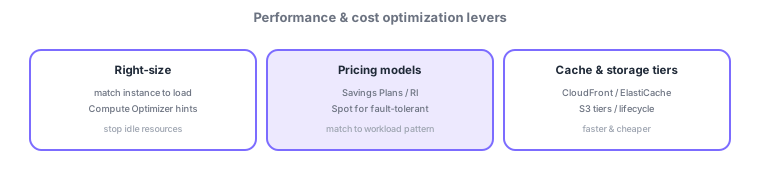
- Right-sizing: pick the minimal instance for the load; Compute Optimizer gives recommendations.
- Pricing models: Savings Plans / Reserved for steady load, Spot for interruptible batch.
- Cache/storage tiers: speed up with CloudFront/ElastiCache; optimize cost with S3 classes/lifecycle.
Common on SOA: underused large instance = right-size (Compute Optimizer), discount for steady load = Savings Plans/RI, interruptible batch = Spot, infrequently accessed data = cheaper S3 classes/lifecycle.
Optimization multiplies "cut waste (right-size) × optimize how you buy (pricing models) × offload (cache/tiers)." Right-sizing shrinks underused large instances, and Compute Optimizer recommends over/under-provisioning fixes for EC2/EBS/Lambda/ASG. Choose pricing by load pattern: 24×7 steady load → Savings Plans (Compute SP is flexible; EC2 Instance SP discounts more) or Reserved Instances; interruptible batch/stateless → Spot (up to ~90% off); irregular → On-Demand. Balance performance and cost with caching (CloudFront at the edge, ElastiCache in front of the DB) and storage tiers (S3 Standard/IA/Glacier with a lifecycle policy for auto-transition, or Intelligent-Tiering when unsure; move EBS to gp3 for savings). Routinely review idle resources (EBS attached to stopped EC2, unused EIPs, old snapshots) via Trusted Advisor/Compute Optimizer to keep cost trending down.
| Load pattern | Best choice |
|---|---|
| 24×7 steady load | Savings Plans / Reserved |
| Interruptible batch | Spot (up to ~90% off) |
| Underused large EC2 | Right-size (Compute Optimizer) |
| Infrequently accessed data | S3 IA/Glacier, lifecycle |
Scenario: the bill keeps rising. Identify over-provisioned instances with Compute Optimizer and right-size. Move always-on production to Savings Plans and nightly batch to Spot. Reduce DB load on read-heavy APIs with ElastiCache/CloudFront, and auto-transition old logs IA→Glacier via an S3 lifecycle policy. Delete EBS on stopped EC2 and unused EIPs flagged by Trusted Advisor.
Q. Shrink over-provisioned instances? Right-size (Compute Optimizer). Q. Discount for steady load? Savings Plans/RI. Q. Cheapest interruptible batch? Spot. Q. Infrequently accessed data? S3 IA/Glacier + lifecycle. Q. Reduce DB read load? ElastiCache/CloudFront.
Watch the mix-ups: (1) Spot can be interrupted—not for stateful production (use SP/RI for steady). (2) Savings Plans/RI require a commitment—bad for short-lived workloads. (3) Mind S3 retrieval cost/minimum duration (frequent access on Glacier is expensive). (4) EBS keeps billing even when the EC2 is stopped.
Regularly reviewing Trusted Advisor / Compute Optimizer recommendations and routinely stopping/deleting idle resources keeps cost trending down.
6.2.2Section summary
- Optimize with right-sizing (Compute Optimizer) / pricing models / cache & S3 tiers
- Steady = Savings Plans/RI, interruptible = Spot
Sign in to track progress — Log in.
Quick check
(just a quick review)Q1. You want to cut cost on an underused large EC2 instance. Which approach fits best?
Q2. You want to significantly cut cost for a steady workload running 1–3 years. What do you use?
Q3. You want to run interruptible, re-runnable batch jobs cheapest. Which purchase option?
Keep track of your progress
The full study guide is free to read. Sign up free to practice with the question bank, track what you have read, review your mistakes, and highlight passages.