

What's changed: Deepened SOA-C02 Chapter 6 to Associate depth (tables, scenarios, FAQ, traps; localized figures)
6.1Cost Visibility and Management
Understand cost management ops: visualization/analysis with Cost Explorer, budget alerts with Budgets, cost allocation tags and the Cost and Usage Report (CUR), and consolidated billing in Organizations. The starting point for "Cost and Performance Optimization" in SOA-C02.
In operations, visualizing cost and catching overruns before they happen matters. AWS supports this with Cost Explorer (analysis) and Budgets (alerts).
6.1.1Cost management tools
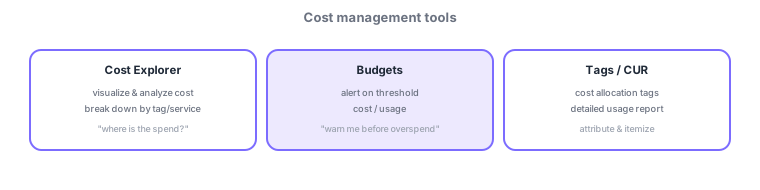
- Cost Explorer: visualize/analyze cost and break it down by tag or service.
- Budgets: send alerts when a budget threshold is exceeded (cost/usage).
- Cost allocation tags: classify resources to attribute cost by department/project. CUR is the most detailed itemized report.
- Consolidated billing in Organizations: aggregate usage across accounts for volume discounts.
Common on SOA: analyze/break down cost = Cost Explorer, alert before overrun = Budgets, attribute by department = cost allocation tags, most detailed itemization = CUR, multi-account discounts = consolidated billing.
Cost management is a cycle: "visualize → attribute → alert → remediate." Cost Explorer visualizes and analyzes past cost with breakdowns by service/tag/account and forecasts. For granular detail, output a CUR (Cost and Usage Report) to S3 and analyze with Athena/QuickSight. Attribute with cost allocation tags (AWS-generated and user-defined; they appear in reports only once activated and don’t apply retroactively), and enforce a tagging convention via AWS Organizations tag policies. Prevent overruns with AWS Budgets (threshold alerts on cost/usage/RI-SP coverage, plus Budget Actions to auto-stop or restrict permissions). For multiple accounts, consolidated billing in Organizations gives volume discounts and shared RI/SP, and Cost Anomaly Detection flags ML-detected spikes. Billing alarms can also be set in CloudWatch, but Budgets is the modern standard.
| Goal | Use |
|---|---|
| Visualize/analyze trends | Cost Explorer |
| Most detailed itemization | CUR (→ Athena/QuickSight) |
| Attribute by dept/project | Cost allocation tags (must activate) |
| Alert/auto-act before overrun | Budgets (+ Budget Actions) |
Scenario: understand cost per department and prevent budget overruns. Tag resources with cost allocation tags (e.g., team) and activate them; review breakdowns by tag in Cost Explorer. Set Budgets threshold alerts per department, and for dev environments use Budget Actions to restrict launches past the cap. For detailed audit, emit a CUR to S3 and analyze with Athena.
Q. Analyze trends? Cost Explorer. Q. Most detailed itemization? CUR. Q. Attribute by dept? Cost allocation tags (must activate; not retroactive). Q. Alert/auto-stop before overrun? Budgets (+ Budget Actions). Q. Multi-account discounts? Organizations consolidated billing.
Watch the mix-ups: (1) Cost Explorer = analysis / Budgets = alerts—don’t swap. (2) Cost allocation tags must be activated and aren’t retroactive (tag early). (3) CUR is the most detailed (Cost Explorer is more aggregate). (4) Consolidated billing is for discounts and shared RI/SP; account isolation (permissions) is separate.
Cost allocation tags only appear in reports once activated. A tagging convention makes later attribution/analysis easier.
6.1.2Section summary
- Cost Explorer (analysis) / Budgets (alerts) / tags & CUR (attribution & detail)
- Multi-account discounts via consolidated billing
Sign in to track progress — Log in.
Quick check
(just a quick review)Q1. You want an alert when you are about to exceed a budget. What do you use?
Q2. You want to attribute and group cost by department or project. What fits best?
Q3. You want to visualize past cost and analyze trends by service or tag. What do you use?
Keep track of your progress
The full study guide is free to read. Sign up free to practice with the question bank, track what you have read, review your mistakes, and highlight passages.