

What's changed: Deepened SOA-C02 Chapter 5 to Associate depth (tables, scenarios, FAQ, traps; localized figures)
5.2Route 53 and DNS Routing
Understand Route 53 hosted zones and records, health checks, and choosing routing policies (failover/latency/geolocation/weighted/simple).
Amazon Route 53 controls which endpoint a domain name resolves to. Choosing the right routing policy for the requirement is the operational point.
5.2.1Routing policies
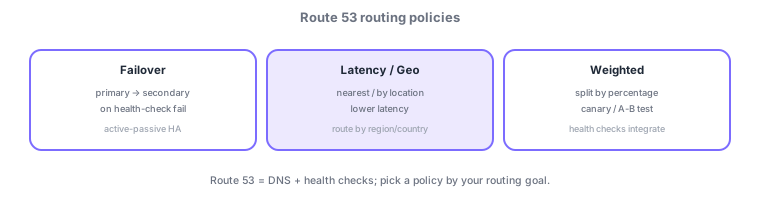
- Failover: switch to secondary on primary failure via health checks (active-passive).
- Latency/Geo: route to the lowest-latency region or by geographic location.
- Weighted: split traffic by percentage (canary/A-B test). Simple is a single record.
- Health checks: monitor endpoint health and integrate with failover, etc.
Route 53 is "DNS + health checks"; pick a routing policy by requirement. Simple is a single record (multiple values returned in no particular order); failover switches to a secondary on primary failure via health checks (active-passive); latency routes to the lowest-latency region; geolocation routes by the user’s country/region; geoproximity uses location plus a bias; weighted splits traffic by percentage (canary/A-B). For AWS resources (ALB/CloudFront/S3 website) use Alias records (work at the zone apex, no extra charge); use CNAME for external targets. The key to availability is health checks (endpoint, calculated, or CloudWatch-alarm based), integrated with failover and "drop unhealthy targets." A small TTL speeds switchover but increases queries. DNS propagates eventually, so design with TTL in mind.
| Requirement | Policy |
|---|---|
| Failover to another site | Failover |
| Nearest (low-latency) region | Latency |
| Serve by country/region | Geolocation |
| Gradual % rollout | Weighted |
Scenario: Tokyo primary, Osaka standby for region-wide failure. Use failover routing + health checks so traffic auto-switches to Osaka (secondary) when Tokyo (primary) is unhealthy. Since the endpoint is an ALB, point to it with an Alias record. Set a smaller TTL for faster switchover, and use weighted routing for gradual rollout of a new version.
Q. Failover to another site? Failover + health checks. Q. Nearest region? Latency. Q. By country? Geolocation. Q. 10% to a new version? Weighted. Q. Point to ALB/CloudFront? Alias record (works at zone apex, free).
Watch the mix-ups: (1) Latency (speed) ≠ geolocation (location)—"nearest = geolocation" is a common error (speed = latency). (2) You can’t put a CNAME at the zone apex (example.com)—use Alias. (3) Failover requires health checks. (4) A long TTL slows switchover (DNS isn’t instant).
Common on SOA: failover to another site = failover, nearest region = latency, gradual % release = weighted, serve by country/region = geolocation. Use Alias records for ALB/CloudFront.
5.2.2Section summary
- Pick failover/latency/geo/weighted by requirement
- Use health checks to enable failover
Sign in to track progress — Log in.
Quick check
(just a quick review)Q1. You want to auto-switch to a secondary endpoint when the primary is down. Which Route 53 routing?
Q2. You want to send only 10% of traffic to a new version for gradual rollout. Which routing?
Q3. You want to direct users to the lowest-latency region. Which routing?
Keep track of your progress
The full study guide is free to read. Sign up free to practice with the question bank, track what you have read, review your mistakes, and highlight passages.