

What's changed: Deepened SOA-C02 Chapter 5 to Associate depth (tables, scenarios, FAQ, traps; localized figures)
5.1Operating VPC Networking
Understand operating a VPC: public/private subnets, IGW and NAT gateway, security groups vs. NACLs, VPC endpoints, and troubleshooting with VPC flow logs. The starting point for "Networking and Content Delivery" in SOA-C02.
Network connectivity issues are common in operations. Correctly understanding VPC subnets, routing, and security groups vs. NACLs is key to isolating them.
5.1.1Connectivity and controls
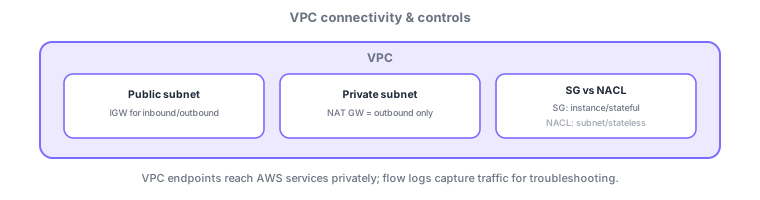
- IGW: internet access for public subnets. NAT gateway: outbound-only for private subnets.
- Security group: instance (ENI)/stateful/allow-only. NACL: subnet/stateless/allow+deny.
- VPC endpoint: private connectivity to AWS services (e.g., S3) without the internet.
- VPC flow logs: record accepted/rejected traffic for isolating connectivity issues.
Common on SOA: isolate a connectivity failure = check SG/NACL/route table/flow logs, NACL is stateless so return traffic needs explicit allow, private access to AWS services = VPC endpoint.
Network troubleshooting follows "check the path top-down." The order: (1) route table (is there a route to the destination—public subnets via IGW, private via a NAT gateway) → (2) NACL (subnet boundary, stateless so return traffic needs an explicit allow, evaluated by rule number) → (3) security group (per-ENI, stateful so return traffic is auto-allowed, allow-only). SGs are "allow-only"; NACLs do "allow + deny," so blocking a specific IP is the NACL’s job. To reach AWS services without the internet, use VPC endpoints (gateway type for S3/DynamoDB, added to the route table; interface type via PrivateLink/ENI for others). Confirm actual traffic with VPC flow logs (ACCEPT/REJECT) and validate reachability logically with the Reachability Analyzer. A NAT gateway is managed and per-AZ (deploy one per AZ for redundancy), preferred over a self-managed NAT instance.
| Aspect | Security group | NACL |
|---|---|---|
| Scope | Instance (ENI) | Subnet |
| State | Stateful | Stateless |
| Rules | Allow only | Allow + deny |
| Block a specific IP | No | Yes |
Scenario: can’t reach a web server. Check top-down: route table (route to IGW/NAT) → NACL (allow both inbound and outbound = return ports) → security group (allow the port). Corroborate with VPC flow logs REJECTs and validate the logical path with the Reachability Analyzer. Block an attacker IP via a NACL Deny.
Q. Return traffic needs an allow where? NACL (stateless); SGs are stateful (auto-allow). Q. Block a specific IP? A NACL Deny (SGs are allow-only). Q. Outbound for private subnets? NAT gateway. Q. Private access to S3? Gateway VPC endpoint. Q. Confirm actual traffic? Flow logs.
Watch the mix-ups: (1) NACLs are stateless—return traffic (ephemeral ports) needs an explicit allow (SGs auto-allow). (2) SGs are allow-only and can’t express a deny—block via NACL. (3) Gateway endpoints (S3/DynamoDB) must be added to the route table or they’re unreachable. (4) Put a NAT gateway in each AZ for AZ-failure resilience.
Security groups are stateful and auto-allow return traffic; NACLs are stateless, so you must allow both inbound and outbound.
5.1.2Section summary
- For isolation, check SG (instance/stateful) / NACL (subnet/stateless)
- Investigate with flow logs; private AWS access via VPC endpoints
Sign in to track progress — Log in.
Quick check
(just a quick review)Q1. You want to isolate why traffic does not reach an instance. Which set should you check?
Q2. Which statement about NACLs is correct?
Q3. What lets EC2 in a private subnet reach the internet for updates (outbound only)?
Keep track of your progress
The full study guide is free to read. Sign up free to practice with the question bank, track what you have read, review your mistakes, and highlight passages.