

What's changed: Deepened SOA-C02 Chapter 4 to Associate depth (tables, scenarios, FAQ, traps; localized figures)
4.3Compliance and Threat Detection (Config, GuardDuty)
Understand governance operations: AWS Config for configuration recording, rule evaluation, and auto-remediation; GuardDuty for threat detection; and Trusted Advisor best-practice checks.
In operations, continuously verify compliance with rules and absence of threats. AWS Config, GuardDuty, and Trusted Advisor are the staple tools.
4.3.1Config, GuardDuty, and Trusted Advisor
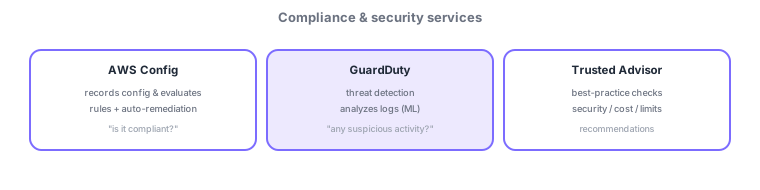
- AWS Config: records resource config and evaluates compliance via rules; can auto-remediate non-compliance.
- GuardDuty: analyzes CloudTrail, VPC flow logs, and DNS logs to detect threats.
- Trusted Advisor: best-practice checks for security, cost, performance, and service limits.
Common on SOA: is config compliant = AWS Config (+ auto-remediation), detect suspicious activity = GuardDuty, best-practice/service-limit checks = Trusted Advisor. Watch for swapped roles.
The three services have distinct roles—don’t swap them. AWS Config records configuration and evaluates compliance: Config rules (managed/custom) continuously check "is it encrypted?" or "is it public?", and non-compliance can be fixed via auto-remediation (SSM Automation runbooks). Aggregate across accounts with conformance packs + an aggregator. GuardDuty analyzes CloudTrail, VPC flow logs, and DNS logs with ML and threat intel to detect threats (suspicious API calls, port scans, malware traffic)—it doesn’t evaluate config. Aggregate findings in Security Hub and wire EventBridge to notify/auto-respond. Trusted Advisor does best-practice checks (cost, security, fault tolerance, performance, service limits), useful for deciding limit increases. Remember: "compliant? = Config," "threat? = GuardDuty," "checks/recommendations = Trusted Advisor." Inspector scans vulnerabilities and Macie finds sensitive data.
| Question | Service |
|---|---|
| Is it compliant? | AWS Config (+ auto-remediation) |
| Any threats? | GuardDuty |
| Best practices/limits? | Trusted Advisor |
| Vulnerabilities/sensitive data? | Inspector / Macie |
Scenario: forbid public S3 buckets and auto-fix them. Detect non-compliance with an AWS Config managed rule (e.g., s3-bucket-public-read-prohibited) and auto-remediate the public setting via an SSM Automation runbook. Monitor account-wide threats with GuardDuty + Security Hub, and pre-empt service-limit pressure with Trusted Advisor.
Q. Evaluate/auto-fix compliance? AWS Config (+ SSM Automation). Q. Detect threats? GuardDuty (ML log analysis). Q. Best practices/service limits? Trusted Advisor. Q. Vulnerability scan? Inspector. Q. Find sensitive data? Macie.
Watch the mix-ups: (1) Config = config compliance / GuardDuty = threat detection—don’t swap (GuardDuty doesn’t evaluate config). (2) Full Trusted Advisor checks need Business/Enterprise support (Basic gets a subset). (3) Both Config and GuardDuty are enabled per Region—easy to forget enabling all Regions.
AWS Config non-compliance can be auto-remediated by combining with EventBridge/SSM Automation (the remediation pipeline from Chapter 1).
4.3.2Section summary
- Config = compliance/auto-remediation / GuardDuty = threat detection / Trusted Advisor = checks
- Config non-compliance can drive auto-remediation
Sign in to track progress — Log in.
Quick check
(just a quick review)Q1. You want to continuously evaluate config compliance and auto-remediate non-compliance. What do you use?
Q2. You want to analyze account logs to detect suspicious activity (threats). What do you use?
Q3. You want best-practice checks and recommendations for security, cost, and service limits. What do you use?
Keep track of your progress
The full study guide is free to read. Sign up free to practice with the question bank, track what you have read, review your mistakes, and highlight passages.