

What's changed: Deepened SOA-C02 Chapter 4 to Associate depth (tables, scenarios, FAQ, traps; localized figures)
4.1IAM and Access Management (Operations View)
Understand IAM identity-based/resource-based policies, evaluation logic (explicit deny wins, default deny), roles and temporary credentials, and least-privilege operations. The starting point for "Security and Compliance" in SOA-C02.
In operations, correctly managing who can access what—and understanding the evaluation logic when troubleshooting—is key. Know IAM policy types and the evaluation order.
4.1.1Policies and evaluation logic
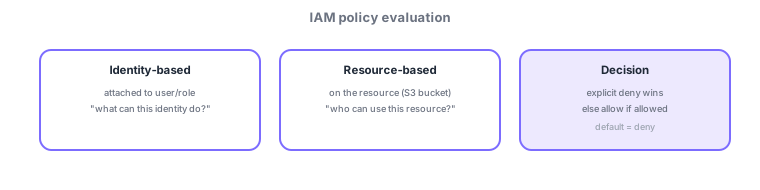
- Identity-based: attached to users/groups/roles. Resource-based: on the resource (e.g., S3 bucket policy).
- Evaluation: explicit Deny wins; with no deny and an allow present, access is granted. Default is implicit deny.
- Roles + temporary credentials: attach roles to EC2/Lambda; never embed keys.
Common on SOA: explicit deny wins, default is deny, when access fails, suspect a Deny and boundaries (SCP/permissions boundary) first, cross-account access = resource-based policy + roles.
Troubleshooting in operations means "walking the evaluation order." Access is allowed only when all hold: (1) an explicit Deny denies immediately; (2) the org SCP permits it; (3) it’s within the permissions boundary; and (4) an Allow exists in the identity or resource policy—if no Allow exists anywhere, it’s an implicit deny. When "allowed but still failing," suspect a Deny, SCP, permissions boundary, VPC endpoint policy, or session policy first. Verify who has what with the IAM Policy Simulator and Access Analyzer (detects external exposure); find unused permissions via the Access Advisor (last-accessed info). Give EC2/Lambda a role (temporary credentials) rather than long-lived keys, and do cross-account access via the other side’s resource-based policy + AssumeRole. Condition keys (aws:SourceIp, aws:MultiFactorAuthPresent, etc.) enable fine-grained control.
| Symptom/goal | Check/means |
|---|---|
| Allowed but access fails | Check explicit Deny / SCP / boundary |
| Verify permissions | Policy Simulator / Access Analyzer |
| Cross-account access | Resource-based + AssumeRole |
| Trim unused permissions | Access Advisor |
Scenario: a developer expects S3 access but gets 403. The role has an Allow—so check the SCP and permissions boundary; the org SCP restricted that Region/service. Or the bucket’s resource-based policy has an explicit Deny. Reproduce the evaluation with the Policy Simulator to pinpoint the cause (Deny/boundary) and fix it.
Q. Allowed but failing? Suspect an explicit Deny or SCP/boundary. Q. Default behavior? Implicit deny. Q. Cross-account? Resource-based + AssumeRole. Q. Verify permissions? Policy Simulator / Access Analyzer. Q. Embed keys? No—use roles for temporary credentials.
Watch the mix-ups: (1) An explicit Deny beats every Allow. (2) No allow = implicit deny (no explicit Deny needed). (3) SCPs/boundaries are a "ceiling" and don’t grant permissions (you still need an Allow). (4) Never embed long-lived access keys—use roles.
Organizations SCPs and permissions boundaries set a ceiling: even if an identity is allowed, access fails unless the SCP/boundary also permits it.
4.1.2Section summary
- Explicit deny wins, default deny; ceiling is SCP/permissions boundary
- Cross-account uses resource-based policy + roles
Sign in to track progress — Log in.
Quick check
(just a quick review)Q1. A user has an allow but still cannot access. What should you suspect first?
Q2. Which policy type is attached to an S3 bucket to control access?
Q3. How is an action with neither an explicit allow nor deny treated in IAM?
Keep track of your progress
The full study guide is free to read. Sign up free to practice with the question bank, track what you have read, review your mistakes, and highlight passages.