

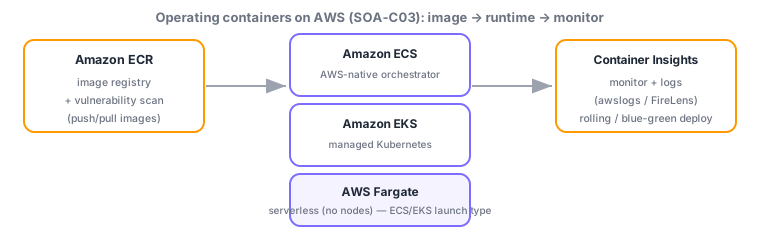
What's changed: Added figure aws-container-ops (ECR→ECS/EKS/Fargate→Container Insights) to container-ops section s4. The cloned base chapters inherit SOA-C02 figures; s4 was the only section lacking one, now filled.
3.4Operating containers (ECS/EKS/ECR)
Learn container operations, which carry more weight in SOA-C03: choosing among Amazon ECS, EKS, and Fargate; image management and vulnerability scanning with Amazon ECR; deployment strategies (rolling / blue-green); service auto scaling; monitoring and logging via Container Insights (awslogs / FireLens); and least privilege with task roles—from an operations perspective.
SOA-C03 (CloudOps Engineer) places more weight on container operations than SOA-C02. Operators must handle the runtime choice, image management, safe deployment, scaling, and monitoring of containers end to end.
3.4.1Runtime choice: ECS, EKS, Fargate
- Amazon ECS: AWS-native container orchestrator—simpler, deeply integrated with AWS.
- Amazon EKS: managed Kubernetes—use when you need the Kubernetes ecosystem/portability.
- AWS Fargate: serverless compute for ECS/EKS (no EC2 to manage)—a launch type that removes node operations.
3.4.2Amazon ECR—image management and vulnerability scanning
Amazon ECR (Elastic Container Registry) stores container images. In operations, image scanning (basic/enhanced = Amazon Inspector integration) detects known vulnerabilities, lifecycle policies auto-delete old images, and immutable tags prevent overwrites. Pull access is controlled by IAM and repository policies.
3.4.3Deployment and scaling
Update containers safely with rolling updates (default) or blue-green deployment (via CodeDeploy for switchover and instant rollback). Scale to load with service auto scaling (target tracking to a CPU/memory/ALB-request target). Front it with an Application Load Balancer and use health checks to automatically replace unhealthy tasks.
3.4.4Monitoring, logging, and least privilege
Monitor with CloudWatch Container Insights (metrics and performance for clusters/services/tasks/pods). Aggregate logs with the awslogs driver or FireLens (flexible routing via Fluent Bit) to CloudWatch Logs and others. Separate task roles (IAM role for the app in the container) from the task execution role (for pulling images and emitting logs), keeping both least-privilege.
| Operations topic | Feature | Key point |
|---|---|---|
| Runtime | ECS / EKS / Fargate | ECS for AWS-native, EKS for K8s, Fargate for serverless |
| Images | ECR (scan/lifecycle/immutable) | Vulnerability detection and retention |
| Deployment | Rolling / blue-green (CodeDeploy) | Safe switchover and instant rollback |
| Scaling | Service auto scaling (target tracking) | Track CPU/memory/ALB requests |
| Monitoring/logging | Container Insights / awslogs, FireLens | Metrics visibility + log aggregation |
| Permissions | Task role / task execution role | Separate roles; least privilege |
Watch the mix-ups: (1) ECS (AWS-native) / EKS (Kubernetes) / Fargate (serverless launch type)—Fargate is a way to run ECS/EKS, not a separate orchestrator. (2) task role (for the app in the container) vs task execution role (for pulling images and emitting logs). (3) ECR vulnerability scanning (known image vulns) vs Container Insights (runtime metrics monitoring).
Map requirement → feature: "run containers without managing EC2" = Fargate; "detect image vulnerabilities" = ECR scanning (Inspector enhanced); "update with no downtime and instant rollback" = blue-green (CodeDeploy); "scale task count to load" = service auto scaling; "see cluster/service metrics" = Container Insights; "least privilege for the in-container app" = task role.
3.4.5Section summary
- Runtime: ECS (AWS-native) / EKS (K8s) / Fargate (serverless); ECR scans and retains images
- Deploy via rolling/blue-green (CodeDeploy); scale via service auto scaling; front with ALB + health checks
- Monitor with Container Insights; log via awslogs/FireLens; separate task role / task execution role with least privilege
Sign in to track progress — Log in.
Quick check
(just a quick review)Q1. Which serverless launch type for ECS/EKS runs containers without managing EC2 instances?
Q2. Which AWS service detects known image vulnerabilities and can auto-delete old images via lifecycle policies?
Q3. Which deployment approach updates a container service with no downtime and instant rollback on problems?
Q4. Which CloudWatch capability visualizes metrics and performance for ECS/EKS clusters, services, and tasks?
Q5. Which IAM role grants least privilege to the application running inside a container?
Q6. Which automatically adjusts task count to track a load target (CPU, memory, ALB request count)?
Keep track of your progress
The full study guide is free to read. Sign up free to practice with the question bank, track what you have read, review your mistakes, and highlight passages.