

What's changed: Added figure aws-container-ops (ECR→ECS/EKS/Fargate→Container Insights) to container-ops section s4. The cloned base chapters inherit SOA-C02 figures; s4 was the only section lacking one, now filled.
3.2Fleet Management with Systems Manager
Understand large-scale operations automation with Systems Manager: Run Command (commands at scale), Patch Manager (patching), Parameter Store (config/secrets), and maintenance windows.
AWS Systems Manager (SSM) operates many instances securely and at scale without SSH, unifying command execution, patching, and config management.
3.2.1SSM operations features
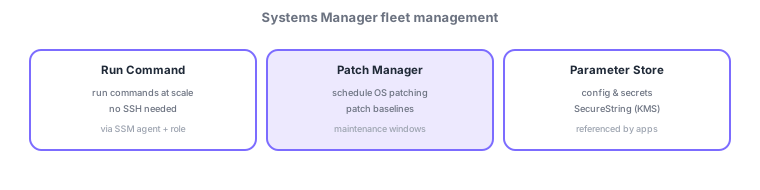
- Run Command: run commands at scale without SSH across many instances.
- Patch Manager: standardize/schedule patching with patch baselines and maintenance windows.
- Parameter Store: store config/secrets (SecureString is KMS-encrypted), referenced by apps.
- Session Manager: get a shell from the browser/CLI without opening SSH ports.
SSM is a unified toolset to "operate at scale without opening SSH/RDP." As prerequisites, each instance needs the SSM agent (preinstalled on Amazon Linux, etc.) and an IAM role (instance profile) with SSM permissions—missing this is the classic "node doesn’t appear as managed" issue. Run Command runs commands at scale based on an SSM Document; State Manager continuously enforces desired state; Patch Manager standardizes patching with patch baselines (approval rules) and maintenance windows (apply windows). Session Manager gives shell access with no inbound ports or bastion, logging actions to CloudTrail/S3/CloudWatch Logs for strong audit. Parameter Store hierarchically manages config (String/StringList) and secrets (SecureString = KMS-encrypted), referenced from CloudFormation or apps (a simple, free tier; use Secrets Manager when you need advanced rotation). Inventory surfaces software assets and Compliance shows patch compliance.
| Goal | Use |
|---|---|
| Shell without SSH | Session Manager |
| Commands at scale | Run Command |
| Standardize/schedule patching | Patch Manager (baselines + windows) |
| Store config/secrets | Parameter Store (SecureString = KMS) |
Scenario: retire bastions and operate with no SSH open at all. Give instances the SSM agent + IAM role, get shells via Session Manager (no open ports, actions to audit logs). Change config via Run Command and automate weekly patching with Patch Manager maintenance windows. Keep DB credentials in Parameter Store SecureString, referenced by the app.
Q. Node not in SSM? Missing agent or IAM role. Q. Shell without SSH? Session Manager. Q. Commands at scale? Run Command. Q. Standardize patching? Patch Manager (baselines + windows). Q. Need auto-rotation? Secrets Manager (Parameter Store is simpler).
Watch the mix-ups: (1) SSM failures usually mean a missing SSM agent, missing IAM role (instance profile), or no endpoint reachability. (2) Session Manager needs no inbound ports (don’t open SSH). (3) Advanced auto-rotation is Secrets Manager (Parameter Store SecureString encrypts at rest but rotation is limited).
3.2.2Section summary
- Run Command/Session Manager (no SSH) / Patch Manager / Parameter Store
- SSM needs the agent + an IAM role
Sign in to track progress — Log in.
Quick check
(just a quick review)Q1. You want to run commands across many EC2 without opening SSH. What do you use?
Q2. You want to standardize OS patching with baselines and a schedule. What do you use?
Q3. You want shell access to an instance from the browser/CLI without opening SSH ports. What do you use?
Keep track of your progress
The full study guide is free to read. Sign up free to practice with the question bank, track what you have read, review your mistakes, and highlight passages.