

What's changed: Deepened SOA-C02 Chapter 2 to Associate depth (tables, scenarios, FAQ, traps; localized figures)
2.1Scalability and High Availability
Understand HA operations: load balancers and Auto Scaling groups (spread across AZs, self-healing via health checks, min/desired/max), and scaling policies.
To keep a service up, make it redundant across AZs and scale automatically with load. A load balancer and an Auto Scaling group are central.
2.1.1Load balancer and Auto Scaling
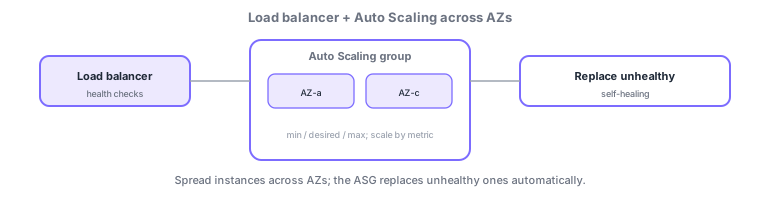
- Load balancer: uses health checks to send traffic only to healthy targets.
- Auto Scaling group (ASG): spreads across AZs, manages count with min/desired/max, and auto-replaces unhealthy instances.
- Scaling policies: target tracking (e.g., CPU 50%), step, or scheduled scaling.
Common on SOA: spread across AZs = survive a single-AZ failure, auto-replace on failure = ASG self-healing, follow CPU, etc. = target tracking policy. Note ELB health checks integrating with ASG health checks.
HA comes from "spreading across AZs" and "self-healing." An Auto Scaling group (ASG) manages count via min/desired/max and survives a single-AZ failure by spanning multiple AZs. Health checks come in two kinds—EC2 status checks (hardware/reachability) and ELB health checks (app layer, e.g., HTTP); setting the ASG health-check type to ELB lets it replace instances that are unhealthy over HTTP even if the process is alive. There are three scaling policies: target tracking (e.g., hold CPU at 50%—simplest, recommended), step scaling (vary the change by threshold band), and scheduled scaling (for predictable time-based load). For ops, warm pools for sudden spikes, warmup/cooldown before new instances count, and lifecycle hooks to drain work before termination also matter. ELBs include the L7 ALB and L4 NLB, health-checking per target group.
| Policy | When to use |
|---|---|
| Target tracking | Hold a metric at a target (simplest) |
| Step scaling | Vary change by threshold band |
| Scheduled | Predictable time-based load |
| ELB health check | Replace app-layer (HTTP) failures too |
Scenario: instances stay in service returning HTTP 500 though the process is alive. Switch the ASG health-check type to ELB, and the ASG auto-replaces instances the ELB marks unhealthy over HTTP. Use target tracking (CPU 50%) to follow load and scheduled scaling to pre-empt a daily batch surge.
Q. Survive a single-AZ failure? Spread the ASG across AZs. Q. Replace HTTP failures too? Set ASG health checks to ELB. Q. Hold CPU steady? Target tracking. Q. Predictable surges? Scheduled scaling.
Watch the mix-ups: (1) EC2 status checks alone miss app-layer (HTTP) failures—use ELB health checks. (2) "desired" is a target bounded by min/max. (3) Use lifecycle hooks / connection draining so scale-in doesn’t drop in-flight work.
Setting ASG health checks to use ELB lets it replace instances unhealthy at the app layer (HTTP)—failures EC2 status checks alone miss.
2.1.2Section summary
- HA and self-healing with multi-AZ + ASG + ELB
- Scale via target tracking / step / scheduled policies
Sign in to track progress — Log in.
Quick check
(just a quick review)Q1. You want to keep a service running through a single-AZ failure. Which placement fits best?
Q2. What is it called when an Auto Scaling group detects and replaces an unhealthy instance?
Q3. You want to keep CPU around a target (e.g., 50%) by scaling. Which policy fits?
Keep track of your progress
The full study guide is free to read. Sign up free to practice with the question bank, track what you have read, review your mistakes, and highlight passages.