

What's changed: Deepened SC-900 Chapter 4 to the AZ-900 baseline (Service Trust Portal vs Purview/Compliance Manager with shared-responsibility mapping & table; sensitivity labels/DLP/retention classify→protect→lifecycle flow & table; insider risk/eDiscovery/audit table & scenario; FAQ, traps). Localized 3 figures
4.2Information Protection and Data Lifecycle Management
Understand sensitivity labels, data loss prevention (DLP), and retention policies for classifying, protecting, and retaining/deleting sensitive data.
Data is protected by "classify → protect → retain/delete for the right period." Microsoft Purview provides these capabilities.
4.2.1Key capabilities
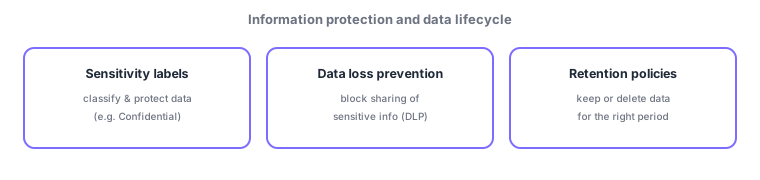
- Sensitivity labels: classify data/email and apply protection by label—encryption, watermarks, usage restrictions (e.g., Confidential). Labels travel with the file, so protection persists even outside the org.
- Data loss prevention (DLP): detect and block improper sharing/sending of sensitive info (credit card or ID numbers) across email, Teams, SharePoint, etc.
- Retention policies / labels: keep data for the required period and delete it when no longer needed—addressing both legal retention duties and "keeping too much" risk.
These work as a flow: classify → protect → lifecycle. First, sensitivity labels classify data importance (manually or auto via pattern detection) and protect it by label (e.g., encryption). Then DLP prevents that sensitive data from being shared externally in an improper way. Finally, retention policies keep data only for the required period and delete it, managing its lifecycle. The three are not independent but a coherent way to protect sensitive data.
| Capability | Role | Example |
|---|---|---|
| Sensitivity labels | Classify + protect | Apply "Confidential", encrypt |
| DLP | Prevent sensitive sharing | Block card numbers leaving |
| Retention | Manage retention/deletion | Auto-delete after 7 years |
Scenario: protecting contracts. Apply a sensitivity label "Confidential" to contract files and encrypt them (only authorized employees can read). If someone tries to attach the content to an external email, DLP detects and blocks or warns. Since contracts must be kept seven years by law, a retention policy keeps them for seven years, then auto-deletes. Classify → protect → lifecycle, end to end.
Watch the mix-ups: (1) Sensitivity labels (classify and attach protection) vs DLP (detect/block sensitive sharing)—labels "attach and protect," DLP "keep it from leaving." (2) Retention manages both keeping and deleting (not only deletion). (3) These are Microsoft Purview features.
Q. Sensitivity labels vs DLP? Labels classify and attach protection (e.g., encryption); DLP prevents improper sharing of that sensitive data—commonly used together. Q. Is retention only deletion? No—"keep, don’t delete, for the required period" is also retention’s role, meeting legal duties. Q. Do labels work outside the org? Yes—labels with encryption travel with the file, so protection persists externally.
Common mappings: classify/protect = sensitivity labels, block sharing of sensitive info = DLP, retain/delete timing = retention policies. Also know the "classify → protect → lifecycle" flow and that labels travel with the file (protection persists externally).
4.2.2Section summary
- Sensitivity labels (classify/protect) / DLP (block sharing) / retention (keep/delete)
Sign in to track progress — Log in.
Quick check
(just a quick review)Q1. Which classifies documents (e.g., Confidential) and applies protection like encryption/usage limits?
Q2. Which detects and blocks improper sharing of sensitive info like credit card numbers?
Q3. Which manages keeping data for a required period and then deleting it?
Keep track of your progress
The full study guide is free to read. Sign up free to practice with the question bank, track what you have read, review your mistakes, and highlight passages.