

What's changed: Deepened SC-900 Chapter 4 to the AZ-900 baseline (Service Trust Portal vs Purview/Compliance Manager with shared-responsibility mapping & table; sensitivity labels/DLP/retention classify→protect→lifecycle flow & table; insider risk/eDiscovery/audit table & scenario; FAQ, traps). Localized 3 figures
4.1Compliance Management Tools
Understand the Service Trust Portal for Microsoft’s compliance info, and Microsoft Purview (Compliance Manager and Compliance Score) for managing your own compliance.
Compliance has two sides: "how Microsoft itself complies" and "how you manage your own compliance." The Service Trust Portal shows the former; Microsoft Purview handles the latter.
4.1.1Two tools
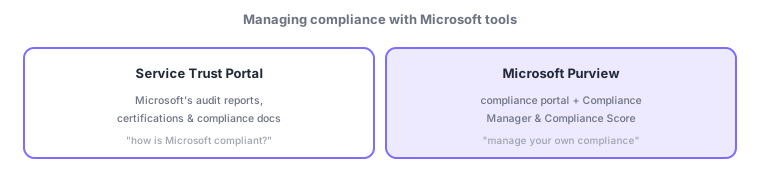
- Service Trust Portal: a portal to obtain Microsoft’s audit reports (ISO, SOC), certifications, and compliance documents—verifying the "cloud-side" compliance.
- Microsoft Purview: an integrated suite to manage your own compliance (including information protection, data lifecycle, and risk management).
- Compliance Manager / Compliance Score: assess posture against regulations (GDPR, ISO) and score improvement actions to help prioritize.
These map well to the shared responsibility model from Chapter 1. The Service Trust Portal evidences how the provider (Microsoft) side fulfills its duties (audit reports, etc.). Microsoft Purview and Compliance Manager assess and improve how well the customer side meets its duties. Compliance is not "hand it to the cloud provider and you’re done"—the customer side must be managed continuously.
Scenario: audit response. If a partner asks to see the cloud platform’s ISO certification, obtain Microsoft’s audit reports/certifications from the Service Trust Portal and submit them. Assess your own GDPR progress with Compliance Manager, starting with low Compliance Score actions. You can demonstrate compliance on both the cloud and customer sides.
Watch the mix-ups: (1) Service Trust Portal (verify Microsoft’s compliance = obtain docs) vs Compliance Manager (assess/score your own)—opposite subjects. (2) Compliance Score reflects the "customer responsibility" side (distinct from Secure Score = security posture). (3) Purview is the umbrella for compliance, including the information protection and risk management in later sections.
Q. Compliance Score vs Secure Score? Compliance Score (Purview) shows regulatory progress; Secure Score (Defender for Cloud, previous chapter) shows security configuration quality. Q. Why the Service Trust Portal? To obtain evidence of Microsoft’s third-party audits/certifications for your own audits and partner explanations. Q. Scope of Microsoft Purview? It spans compliance broadly—information protection, data lifecycle, insider risk, eDiscovery, and audit.
Common mappings: obtain Microsoft’s audit reports/certifications = Service Trust Portal, manage and score your own compliance = Microsoft Purview (Compliance Manager/Score). Also: shared responsibility "cloud side = Trust Portal / customer side = Compliance Manager."
4.1.2Section summary
- Service Trust Portal = Microsoft’s audit/certification docs
- Microsoft Purview = manage your compliance (Manager/Score)
Sign in to track progress — Log in.
Quick check
(just a quick review)Q1. Where can you obtain Microsoft’s audit reports, certifications, and compliance documents?
Q2. Which Microsoft Purview capability assesses your regulatory posture and scores improvement actions?
Q3. Which is Microsoft’s integrated suite for managing your own compliance?
Keep track of your progress
The full study guide is free to read. Sign up free to practice with the question bank, track what you have read, review your mistakes, and highlight passages.