

What's changed: Deepened SAP-C02 Chapter 4 (added comparison tables, scenarios, FAQs, exam traps, deep-dive paragraphs to each section; localized figures to Japanese)
4.2Tools to Execute Migrations
Understand migration tools—Application Migration Service (MGN), DMS/SCT (DB migration), DataSync (online bulk transfer), the Snow Family (offline bulk), and Transfer Family. Choose by data type and connectivity.
Pick migration tools by what you move: servers = MGN, databases = DMS, files = DataSync, huge data over thin links = Snow.
4.2.1Choosing migration tools
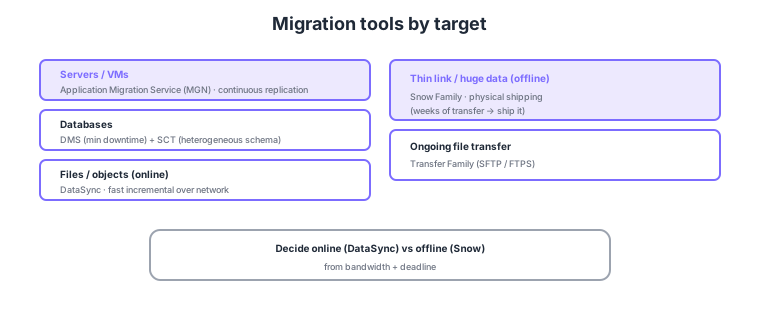
- Application Migration Service (MGN): rehost servers via continuous replication (the workhorse for lift & shift).
- DMS / SCT: migrate databases with minimal downtime; convert schemas for heterogeneous engines with SCT.
- DataSync: transfer files/objects fast and incrementally over the network.
- Snow Family: for thin links/huge data, offline transfer via physical devices. Transfer Family handles ongoing SFTP, etc.
Common on SAP-C02: server lift & shift = MGN, DB migration = DMS, heterogeneous schema conversion = SCT, bulk online file transfer = DataSync, thin-link/PB-scale offline = Snow Family, ongoing SFTP = Transfer Family. Decide online (DataSync) vs offline (Snow) from bandwidth and deadline.
If a network transfer would take weeks or more, Snow Family offline shipping is faster and reliable. For same-engine DBs, SCT is unnecessary—DMS alone suffices.
Tool choice is the cross-product of "target type" and "downtime tolerance, link, data volume." MGN installs an agent on source servers, does block-level continuous replication, and keeps cutover downtime to minutes—test-launch to validate before switching. DMS keeps the source running and syncs via full load + ongoing replication (CDC), tracking deltas until just before cutover. For heterogeneous engines (e.g., Oracle → Aurora PostgreSQL), SCT converts schema and stored procedures and reports what cannot be converted (SCT is unnecessary for same-engine moves). For online file/object migration, DataSync transfers fast over an agent with incremental, integrity-checked copies across NFS/SMB/S3/EFS/FSx. For thin links, tight deadlines, or PB scale, Snow Family (e.g., Snowball Edge) ships encrypted devices physically. Transfer Family is less a migration tool than a managed service for ongoing SFTP/FTPS/FTP file exchange with external partners against S3/EFS.
| Migration target | Tool | Deciding factor |
|---|---|---|
| Servers/VMs as-is | MGN | Continuous replication, minimal-downtime rehost |
| DB (same/heterogeneous) | DMS (+SCT if heterogeneous) | CDC syncs while live |
| Files/objects online | DataSync | Adequate bandwidth, incremental |
| Huge data over thin link | Snow Family | Offline shipping is faster |
Scenario: Migrate on-prem Oracle to Aurora PostgreSQL without downtime, and also move a 200 TB video archive over a thin site link. → Convert schema with SCT, then sync live via DMS CDC, catching up deltas right before cutover. Since the link bottlenecks the video, ship it offline with Snow Family. If servers themselves need rehosting, pair in MGN.
FAQ: DataSync vs Snow Family? Decide by "data volume ÷ available bandwidth = transfer time" versus the deadline. If the link is adequate and online fits the timeline, use DataSync; if transfer would take weeks-to-months, the link is thin, or it is a one-time bulk move, Snow Family offline shipping is the reliable choice.
Exam trap: Requiring SCT for same-engine migration (e.g., MySQL → MySQL) is wrong—SCT is only for heterogeneous schema conversion; same-engine moves need DMS alone. Also, choosing DMS for "server lift & shift" is wrong—that is MGN’s domain.
4.2.2Section summary
- Servers = MGN / DB = DMS (+SCT) / files = DataSync
- Bulk offline = Snow Family / ongoing transfer = Transfer Family
Sign in to track progress — Log in.
Quick check
(just a quick review)Q1. You want to migrate Oracle to Amazon Aurora (PostgreSQL-compatible) with minimal downtime, including schema conversion. What?
Q2. You must move 80 TB from a site with limited bandwidth to AWS within a practical timeframe. Best option?
Q3. You want to rehost on-prem servers to EC2 with continuous replication and minimal downtime. What?
Keep track of your progress
The full study guide is free to read. Sign up free to practice with the question bank, track what you have read, review your mistakes, and highlight passages.