

What's changed: Service coverage: added a catalog section (s4) for developer tools and operations management (CI/CD, Grafana/Prometheus, Proton, Amplify/Device Farm)
3.2Performance and Cost Optimization
Understand optimizing existing workloads—right-sizing, purchase options (On-Demand/RI/Savings Plans/Spot), Compute Optimizer/Cost Explorer/Budgets/Trusted Advisor, and CloudFront/caching. Keep performance while cutting waste.
Cost optimization rests on right-sizing and choosing purchase options. Boost performance with caching and content delivery.
3.2.1Cost and performance optimization
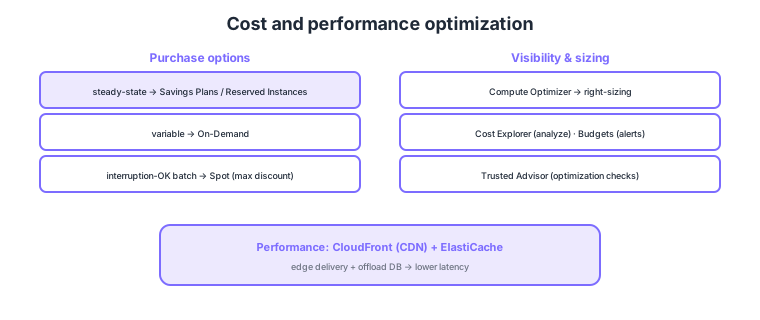
- Purchase options: steady = Savings Plans/RI (commit for discount), variable = On-Demand, interruption-OK batch = Spot (max discount).
- Right-sizing: Compute Optimizer detects over/under-provisioned resources and recommends sizes.
- Cost visibility: Cost Explorer (analysis), Budgets (alerts), Trusted Advisor (optimization checks).
- Performance: CloudFront (CDN) for edge delivery, ElastiCache to offload the DB and cut latency.
Common on SAP-C02: discount for always-on = Savings Plans/RI, cheapest interruption-tolerant batch = Spot, sizing recommendations = Compute Optimizer, spend analysis = Cost Explorer / budget alerts = Budgets, delivery acceleration = CloudFront. Use commitment plans for steady load, Spot for burst batch.
Spot can be interrupted, so it suits stateless, checkpointable workloads. A classic mix covers steady always-on with Savings Plans and absorbs overflow with On-Demand.
SAP-C02 probes the fine distinctions between purchase options. Savings Plans commit to an hourly spend ($/h) for 1–3 years: Compute Savings Plans apply automatically across instance family, region, and OS—and even Fargate/Lambda—while EC2 Instance Savings Plans are limited to a family but offer a deeper discount. Reserved Instances (RIs) split into zonal RIs (with a capacity reservation) and flexible regional RIs (no capacity guarantee). Spot gives a 2-minute interruption notice and can pre-empt evictions via capacity rebalancing; an EC2 Auto Scaling mixed-instances policy blends On-Demand/RI/Spot to balance availability and cost. On the visibility side, Cost Explorer surfaces RI/Savings Plans purchase recommendations plus coverage/utilization, Budgets alerts on cost, usage, or RI utilization, and Trusted Advisor runs cross-cutting checks for idle and underutilized resources.
| Demand pattern | Best purchase option | Why |
|---|---|---|
| Steady for 1–3 yrs | Savings Plans / RI | Deepest discount via commitment |
| Short-term / unpredictable | On-Demand | No commitment, instant flex |
| Interruption-OK batch/CI | Spot | Max discount, 2-min interruption notice |
| Dedicated for licensing/compliance | Dedicated Hosts | Dedicated physical host, BYOL |
Scenario: A steady always-on web tier coexists with large nightly video encoding (interruption-OK). Minimize cost. → Cover the web tier with Compute Savings Plans so it follows family changes; run encoding on Spot in an Auto Scaling group with a mixed-instances policy; set a monthly cap alert with Budgets; and periodically right-size the web tier with Compute Optimizer.
FAQ: Savings Plans or RIs? For flexibility, Compute Savings Plans (auto-apply across family/region/OS, covering Fargate/Lambda). If you need a capacity reservation in a specific family, use a zonal RI. Discounts are broadly comparable, and Savings Plans are generally recommended today.
Exam trap: Choosing Spot to cheapen a "stateful, can-not-be-interrupted production database" is wrong—an interruption can lose state. Steady workloads call for Savings Plans/RI; Spot assumes interruption tolerance.
3.2.2Section summary
- Purchase = Savings Plans/RI (steady) / On-Demand (variable) / Spot (interruptible)
- Visibility = Cost Explorer/Budgets/Trusted Advisor; performance = CloudFront/ElastiCache
Sign in to track progress — Log in.
Quick check
(just a quick review)Q1. You want maximum savings on compute for a production workload running steadily for 3 years. What?
Q2. You want to run large interruption-tolerant batch jobs at the lowest possible cost. What?
Q3. You want analysis of whether EC2/EBS are over-provisioned, with right-size recommendations. What?
Keep track of your progress
The full study guide is free to read. Sign up free to practice with the question bank, track what you have read, review your mistakes, and highlight passages.