

What's changed: In-scope coverage: added auto scaling (EC2 Auto Scaling), app integration (MQ/Step Functions/AppSync/AppFlow), migration/transfer (Application Migration Service/DMS/DataSync/Transfer Family/Snow Family), and hybrid connectivity (Direct Connect/Site-to-Site VPN/Client VPN/Transit Gateway/PrivateLink) across sections
2.3Backup and Disaster Recovery
Understand designing for disaster recovery: backups/snapshots, RTO and RPO, and multi-region failover (Route 53).
Resilience includes deciding how fast to recover (RTO) and how much data loss is acceptable (RPO), then designing backup/DR to match.
2.3.1Backup and DR elements
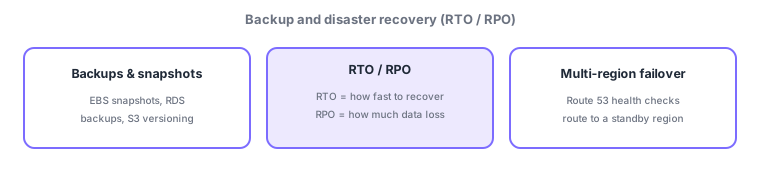
- Backups/snapshots: protect data with EBS snapshots, RDS automated backups, and S3 versioning / cross-region replication.
- RTO (recovery time objective): how fast to recover. RPO (recovery point objective): how far back you can recover = acceptable data loss.
- Four DR strategies: backup & restore (cheap/slow) → pilot light → warm standby → multi-site (costly/fast). Shorter RTO/RPO costs more.
- Multi-region: use Route 53 health checks + failover routing to switch to another region.
DR design starts by setting RTO (how fast to recover) and RPO (how much data loss is acceptable) as business requirements, then choosing a matching strategy. AWS’s four classic strategies trade cost against recovery speed: backup & restore (cheapest/slowest), pilot light (minimal always-on), warm standby (scaled-down always-on), multi-site/hot standby (full, fastest). Tighter RTO/RPO means more always-on resources and higher cost. For region-wide failures, replicate data via cross-region replication and use Route 53 health checks + failover routing to switch regions automatically.
| DR strategy | Always-on | RTO/RPO & cost |
|---|---|---|
| Backup & restore | None (restore on demand) | Long / cheapest |
| Pilot light | Minimal (e.g., DB only) | Medium |
| Warm standby | Scaled-down running | Short |
| Multi-site | Full running | Shortest / costliest |
Scenario: pick DR to fit requirements. If "a few hours of downtime and data loss back to the last backup" is acceptable, backup & restore suffices (low cost). If "recover within minutes with near-zero data loss" is required, use warm standby/multi-site + cross-region replication + Route 53 failover. Work backward from RTO/RPO to meet needs without over-investing.
Watch the mix-ups: (1) RTO = recovery speed (time) / RPO = how far back (data loss)—don’t swap. (2) Shorter RTO/RPO = higher cost (the four-strategy trade-off). (3) Route 53 = DNS-level failover (region switch). (4) Protect data with S3 cross-region replication/versioning.
Q. RTO vs RPO? RTO is "how fast to recover (time)"; RPO is "the point you can recover to = acceptable data loss." Q. How to choose a DR strategy? Balance tolerance for downtime/data loss (RTO/RPO) against cost, from backup & restore to multi-site. Q. Prepare for a region failure? Cross-region replication + Route 53 failover.
Common on SAA: RTO (recovery speed) vs RPO (acceptable data loss), the four DR strategies (backup & restore → multi-site) cost/speed trade-off, Route 53 failover routing, and S3 versioning/cross-region replication.
2.3.2Other key in-scope services (migration, transfer, hybrid connectivity)
For backup/DR and migration, services that move data and servers into AWS are central. AWS Application Migration Service lifts and shifts on-prem servers into AWS as-is; AWS Database Migration Service (DMS) migrates running databases with minimal downtime (including heterogeneous engines). AWS DataSync transfers large file sets fast and automatically between on-prem and AWS (S3/EFS/FSx); AWS Transfer Family moves files to S3/EFS over SFTP/FTPS/FTP for existing workflows. For limited bandwidth or offline bulk movement, use AWS Snow Family (physical devices to ship data).
For hybrid/multi-VPC connectivity, choose among these. AWS Direct Connect gives a dedicated line connecting on-prem to AWS with low latency and steady bandwidth (more consistent than VPN). AWS Site-to-Site VPN connects on-prem to a VPC over an encrypted tunnel across the internet (quick, low cost). AWS Client VPN gives secure remote access from individual user devices into a VPC. AWS Transit Gateway connects many VPCs and on-prem in a hub-and-spoke, and AWS PrivateLink provides private connectivity from a VPC to a service without traversing the internet (interface endpoints).
| What you want | Service |
|---|---|
| Migrate on-prem servers | AWS Application Migration Service |
| Migrate databases | AWS Database Migration Service |
| Fast bulk file transfer | AWS DataSync |
| SFTP/FTPS transfer | AWS Transfer Family |
| Offline bulk movement | AWS Snow Family |
| Dedicated-line connectivity | AWS Direct Connect |
| Encrypted tunnel to on-prem | AWS Site-to-Site VPN |
| Remote user access | AWS Client VPN |
| Hub for many VPCs | AWS Transit Gateway |
| Private connectivity to services | AWS PrivateLink |
2.3.3Section summary
- Set RTO (recovery speed) / RPO (acceptable data loss) as requirements and design matching DR
- Four strategies (backup & restore → multi-site) + Route 53 multi-region failover + S3 replication
Sign in to track progress — Log in.
Quick check
(just a quick review)Q1. Which metric expresses "how fast you must recover after a failure"?
Q2. Which metric expresses "how much data loss is acceptable"?
Q3. Which AWS service helps automatically fail over to another region?
Keep track of your progress
The full study guide is free to read. Sign up free to practice with the question bank, track what you have read, review your mistakes, and highlight passages.