

What's changed: Deepened PL-900 Chapter 1 to the AZ-900 baseline (low-code/citizen developer, four products + table, M365/Dynamics/Azure integration; foundation Dataverse/connectors/AI Builder + table, vs Excel; scenarios, FAQ, traps). Localized 2 figures
1.2Core Components (Dataverse, Connectors, AI Builder)
Understand Power Platform’s shared foundation—Dataverse for data, connectors to link services, and AI Builder to add AI easily.
The four products are backed by a shared foundation: Dataverse for data, connectors to link services, and AI Builder to add AI.
1.2.1The shared foundation
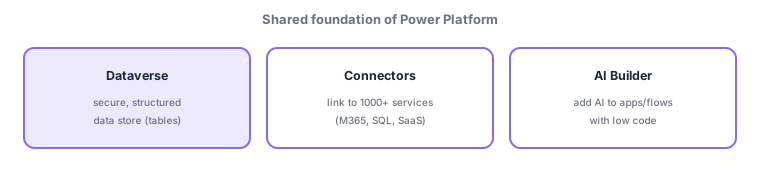
- Dataverse: a secure, structured data store (tables) with permissions and relationships; the data backbone of Power Platform.
- Connectors: components linking to 1000+ external services (Microsoft 365, SQL, SaaS); available as standard and advanced premium connectors.
- AI Builder: add AI with low code (form/invoice reading, prediction, object detection, classification) to apps/flows.
The four products (Power BI/Apps/Automate/Copilot Studio) run on this shared foundation. At the center is Dataverse—unlike a spreadsheet, it is a secure database for business data with typed columns, table relationships, and row/column-level security. Connectors are "connection components" to external services, letting Power Apps and Power Automate work with Microsoft 365, SQL, and SaaS data. AI Builder embeds AI (e.g., reading amounts from invoices) into apps/flows without expertise. Because the foundation is shared, data and connections made in one product can be reused in others.
| Foundation | Role | Example |
|---|---|---|
| Dataverse | Secure structured data store | Request data, customer table |
| Connectors | Connect to external services | Outlook, SQL, Salesforce |
| AI Builder | Add AI with low code | Invoice reading, prediction |
Scenario: an invoice-processing app. Read received invoices with AI Builder to extract amount/date → store in a Dataverse table → integrate to the accounting system via a connector (SQL/SaaS) → run approvals with Power Automate → visualize payment status in Power BI. The shared foundation lets each product use the same data and connections smoothly.
Watch the mix-ups: (1) Dataverse (a secure, structured business DB) differs from Excel (it has types, relationships, security). (2) Connectors (connection components) vs AI Builder (add AI)—different roles. (3) Connectors are standard or premium; premium may require additional licensing.
Q. Dataverse vs Excel/SharePoint lists? Dataverse is a business-grade database with types, relationships, and fine-grained security—better for large/complex data. Q. Standard vs premium connectors? Premium covers more advanced targets (some SaaS, Dataverse) and may need extra licensing. Q. What can AI Builder do? Form/invoice reading, prediction, classification, object detection—added with low code.
Common mappings: data backbone = Dataverse (secure, table-based DB), connect to services = connectors (standard/premium), add AI with low code = AI Builder. The four products run on this shared foundation.
1.2.2Section summary
- Foundation: Dataverse (secure structured data) / connectors (standard & premium) / AI Builder (low-code AI)
- The four products run on this foundation, sharing data and connections
Sign in to track progress — Log in.
Quick check
(just a quick review)Q1. Which is Power Platform’s secure, structured data store (tables)?
Q2. Which links Power Platform to external services like Microsoft 365, SQL, and SaaS?
Q3. Which adds AI (form processing, prediction) to apps/flows with low code?
Keep track of your progress
The full study guide is free to read. Sign up free to practice with the question bank, track what you have read, review your mistakes, and highlight passages.