

What's changed: Deepened PL-900 Chapter 1 to the AZ-900 baseline (low-code/citizen developer, four products + table, M365/Dynamics/Azure integration; foundation Dataverse/connectors/AI Builder + table, vs Excel; scenarios, FAQ, traps). Localized 2 figures
1.1The Business Value of Power Platform
Understand how Power Platform delivers business improvements with "low-code," and the roles of its four main products (Power BI / Power Apps / Power Automate / Copilot Studio). The starting point for PL-900.
Power Platform is Microsoft’s low-code/no-code platform for analyzing data, building apps, automating workflows, and creating chat assistants. Its biggest value: even non-developers—business-savvy "citizen developers"—can improve their own work, building apps and workflows mostly via drag-and-drop and configuration, with little code. PL-900 is an entry-level credential testing the big picture of "which product is for what, how they combine, and what they integrate with," more than deep development skills.
1.1.1The four main products
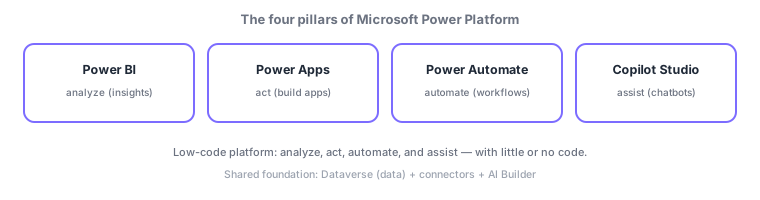
- Power BI: analyze and visualize data for insights.
- Power Apps: build low-code apps to streamline work.
- Power Automate: automate repetitive work (workflows).
- Copilot Studio (formerly Power Virtual Agents): build chatbots/assistants.
| Goal | Product | Keyword |
|---|---|---|
| Analyze/visualize data | Power BI | Insights, dashboards |
| Build a business app | Power Apps | Low-code apps |
| Automate repetitive work | Power Automate | Workflows, flows |
| Build a chatbot | Copilot Studio | Conversational assistant |
1.1.2Integration with other services
Power Platform’s value grows by integrating with existing Microsoft services, not in isolation. You can embed it in Microsoft 365 data/surfaces (Teams, SharePoint, Excel), use it as the basis for Dynamics 365 business apps (sales, customer service), and connect to Azure for advanced development/AI. Typical uses: running a Power Apps app inside Teams, or auto-generating an app from a SharePoint list. The business value is "improve with low code by leveraging existing assets."
Scenario: frontline-led improvement. Replacing paper-and-Excel supply requests without IT: a frontline owner (citizen developer) builds a request app in Power Apps, automates approvals with Power Automate, stores data in Dataverse, visualizes status in Power BI, and answers FAQs with a Copilot Studio bot—embedded in Teams for everyone. The four products plus the foundation work together.
Watch the mix-ups: (1) analyze = Power BI / apps = Power Apps / automate = Power Automate / chatbot = Copilot Studio. (2) Copilot Studio is formerly Power Virtual Agents. (3) Low-code = "little code," no-code = "no code needed"—not always literally zero. (4) Power Platform shines when integrated with M365/Dynamics 365/Azure, not alone.
Q. What is a citizen developer? A non-professional developer who uses business knowledge to build low-code apps/flows. Q. Low-code vs no-code? Low-code allows minimal code; no-code is configuration-only. Q. Copilot Studio’s former name? Power Virtual Agents.
Common mappings: analyze = Power BI, build apps = Power Apps, automate = Power Automate, chatbots = Copilot Studio (formerly Power Virtual Agents). Theme: low-code so even citizen developers can improve work, integrating with M365/Dynamics 365/Azure.
1.1.3Section summary
- Power Platform = low-code/no-code for analyze, apps, automate, assist (citizen developers)
- Four products: Power BI (analyze) / Power Apps (apps) / Power Automate (automate) / Copilot Studio (bots)
- Integrates with M365, Dynamics 365, Azure to leverage existing assets
Sign in to track progress — Log in.
Quick check
(just a quick review)Q1. Which best describes the common trait of Power Platform?
Q2. Which Power Platform product fits automating repetitive work (workflows)?
Q3. Which Power Platform product fits analyzing/visualizing data for insights?
Keep track of your progress
The full study guide is free to read. Sign up free to practice with the question bank, track what you have read, review your mistakes, and highlight passages.