

What's changed: Initial version (topic G4)
4.2Recovering a corrupted cluster
Learn the procedures for recovering a corrupted database cluster: PITR (point-in-time recovery) as the central technique, pg_resetwal which rebuilds WAL control information, the startup troubleshooting flags ignore_system_indexes and ignore_checksum_failure, pg_xact which holds the commit log, emergency single-user mode, and VACUUM FREEZE as the countermeasure for transaction ID wraparound.
When the cluster itself is corrupted—filesystem damage, an accidental DROP, or a looming transaction ID wraparound crisis—an ordinary startup or backup restore may not be enough. Gold requires understanding both halves of the picture: dedicated recovery tools (PITR, pg_resetwal, startup flags, single-user mode) for restoring a broken cluster to a working state with as little data loss as possible, and VACUUM FREEZE, which prevents the catastrophic event of wraparound from happening in the first place.
4.2.1PITR and startup troubleshooting
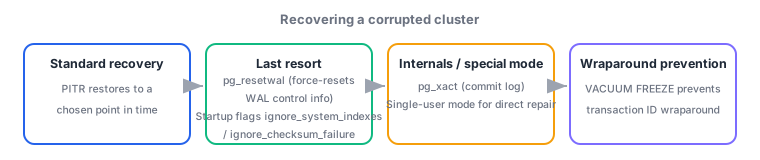
- PITR (point-in-time recovery)—applies the WAL archive on top of a base backup to restore the cluster to an arbitrary point in time (e.g., just before a mistaken operation). Its biggest advantage: after an accident like "a production table was mistakenly DROPped," you can roll back to the instant just before that operation.
- pg_resetwal—a last-resort tool that forcibly rebuilds WAL control information (the contents of pg_control). Use it only when WAL is corrupted and normal startup or crash recovery is impossible; running it forfeits consistency guarantees from that point on and can involve data loss, so it is the option of last resort when nothing else works.
- Startup troubleshooting flags—ignore_system_indexes (attempts to start up while ignoring corrupted indexes on system catalogs) and ignore_checksum_failure (continues instead of erroring out when a checksum mismatch is detected, with
data-checksumsenabled). Both are temporary emergency measures for rescuing data from a corrupted cluster, not settings for permanent operation.
4.2.2The commit log, single-user mode, and wraparound prevention
- pg_xact—the commit log (formerly pg_clog) recording whether each transaction committed or aborted. If this information is corrupted, PostgreSQL cannot even determine whether a given tuple is valid, making this an especially severe category of cluster corruption.
- Single-user mode—a special startup form that accepts no network connections and lets you operate directly and locally as a single backend process (
postgres --single). It is used for emergency repairs in corruption states that ordinary client connections cannot handle, and to break through situations—described below—where VACUUM is refused because transaction ID wraparound is imminent. - VACUUM FREEZE—as a countermeasure against transaction ID (XID) wraparound, it marks old rows as "frozen" (always visible)—since PostgreSQL 9.4 via a frozen bit in the tuple header rather than rewriting the XID to FrozenXID. PostgreSQL's XID is a 32-bit circular counter; if it wraps around, future transactions can appear to be in the past, making committed data invisible—a fatal form of corruption—so autovacuum forces emergency VACUUMs as wraparound approaches, and if that still cannot keep up, the database refuses new writes as a self-protection measure.
The staples: PITR restores to an arbitrary point using a base backup plus the WAL archive; pg_resetwal is a last resort and can involve data loss; ignore_system_indexes/ignore_checksum_failure are temporary emergency flags; pg_xact records committed/aborted status; single-user mode is a standalone backend that accepts no network connections; VACUUM FREEZE is the countermeasure for XID wraparound, which is fatal corruption if it occurs. VACUUM FREEZE is a especially classic Gold exam topic, so be ready to explain the wraparound mechanism and the self-protection sequence (emergency autovacuum → refusing writes) in full.
Let's trace a real incident centered on the risk of transaction ID wraparound. One day, the log starts showing WARNING: database "app" must be vacuumed within 1000000 transactions. This is an early sign of approaching XID wraparound: if ignored, autovacuum automatically interrupts with an emergency-mode run, and if that still cannot keep up, the system reaches the stage where it refuses new writes with ERROR: database is not accepting commands to avoid wraparound data loss. Once things reach that point, trying to run VACUUM over an ordinary client connection fails because starting a new transaction itself is refused, so the emergency procedure is to boot single-user mode with postgres --single and run VACUUM FREEZE directly to escape wraparound. This is a textbook illustration of why it matters to monitor autovacuum-related warning logs during normal operations and preempt the write-refusal stage with regular VACUUM FREEZE runs. A different kind of corruption—say, a filesystem partially damaged by a disaster, leaving WAL control information itself unreadable—follows a different path than wraparound prevention. If a base backup and archived WAL exist, the first choice is to restore to the last healthy point with PITR. If there is no backup, or the WAL itself is lost too, the last resort is to forcibly rebuild WAL control information with pg_resetwal, just to get the cluster into a startable state. If system catalog index or checksum errors then block startup, you would boot anyway using temporary flags like ignore_system_indexes or ignore_checksum_failure, rescue the data with pg_dump while it is still readable, and then move it to a proper cluster without those flags—prioritizing data rescue over fixing the corruption itself. Across every scenario, the shared priority is: secure a readable state and evacuate the data before trying to fix what is broken.
| Tool/technique | Purpose | Nature |
|---|---|---|
| PITR | Restore to an arbitrary point in time | Requires a base backup plus the WAL archive |
| pg_resetwal | Forcibly rebuild WAL control information | Last resort; can involve data loss |
| VACUUM FREEZE | Prevent/escape XID wraparound | Wraparound is fatal corruption, so periodic runs matter |
Trap: "pg_resetwal can be used routinely as part of normal crash recovery" is wrong—pg_resetwal is a last resort that forfeits consistency guarantees; ordinary crash recovery happens automatically via WAL replay when you run pg_ctl start. Also, "transaction ID wraparound is only a minor issue that eats disk space" is wrong—wraparound is fatal corruption that makes committed data invisible, which is why autovacuum's emergency intervention and the strong self-protection of refusing new writes are built in. "Leaving ignore_checksum_failure permanently enabled means you never have to worry about checksum corruption" is also wrong—it is a temporary emergency-rescue flag, and leaving it enabled permanently means corruption goes unnoticed.
4.2.3Section summary
- PITR restores to an arbitrary point using a base backup plus the WAL archive. pg_resetwal is a last resort (forcibly rebuilds WAL control information; can involve data loss)
- ignore_system_indexes/ignore_checksum_failure are temporary emergency startup flags; pg_xact records commit status; single-user mode allows emergency operation as a standalone backend
- VACUUM FREEZE prevents XID wraparound. Wraparound is fatal corruption, and ignoring it leads to autovacuum's emergency intervention and, eventually, a refusal of new writes
Sign in to track progress — Log in.
Quick check
(just a quick review)Q1. An operator accidentally DROPped an important production table. What is the most appropriate way to restore the database to the state it was in just before the incident?
Q2. The server log shows "database is not accepting commands to avoid wraparound data loss," and attempting to run VACUUM over an ordinary client connection is refused because starting a new transaction is itself blocked. What is the appropriate procedure to break through this?
Q3. Which statement correctly describes the role VACUUM FREEZE plays as a countermeasure for transaction ID wraparound?
Keep track of your progress
The full study guide is free to read. Sign up free to practice with the question bank, track what you have read, review your mistakes, and highlight passages.