

What's changed: Initial version (topic G1)
1.2Operational Management Commands
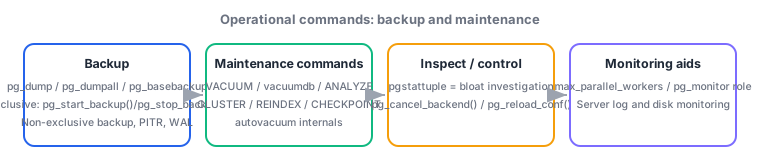
Go deep on the backup/recovery and daily-maintenance command set: non-exclusive backups, PITR, and WAL mechanics; pg_dump, pg_dumpall, pg_basebackup; pg_start_backup()/pg_stop_backup(), valid in versions 12-14; VACUUM, vacuumdb, ANALYZE, CLUSTER, REINDEX, CHECKPOINT; autovacuum internals; bloat investigation with pgstattuple; pg_cancel_backend()/pg_reload_conf(); parallelism via max_parallel_workers; and the monitoring role pg_monitor.
This is the single heaviest-weighted subtopic in the Gold exam. It concentrates the two areas an operator touches most: recovering from failure (backup, PITR) and keeping a cluster healthy day to day (the VACUUM family). How deeply you understand this section directly determines how fast you can respond to a real incident.
1.2.1Non-exclusive backups and PITR
- Logical backup: pg_dump (dumps a single database in SQL or custom format) and pg_dumpall (dumps the entire cluster, including all databases and role definitions). Restore with
pg_restore(for custom/directory format) orpsql(for plain SQL). - Physical backup: pg_basebackup takes a full copy of the cluster's files, streamed remotely. Key options include
-D(destination),-F(tar/plain), and-X(how WAL is bundled:stream/fetch). - Non-exclusive low-level backup (valid in versions 12-14): call pg_start_backup() to declare the start (forces a checkpoint, generates a backup label) → copy files at the filesystem level → call pg_stop_backup() to declare the end and finalize the WAL range needed for archiving. Unlike the exclusive method, this allows concurrent backups and auto-terminates on session disconnect.
- PITR (Point-In-Time Recovery) combines a base backup with the subsequent WAL (Write-Ahead Log) archive to roll forward to any target moment.
archive_commandcopies WAL segments to an archive destination; at recovery time,recovery_target_time(and similar settings) specifies the target point.
1.2.2The VACUUM command family and autovacuum
- VACUUM reclaims space from dead tuples (the plain form takes no table lock and runs concurrently with normal activity). ANALYZE refreshes planner statistics. vacuumdb is a command-line wrapper for both (
-afor all databases,-zto also run ANALYZE, etc.). - CLUSTER physically reorders a table's rows to match a specified index (requires a strong exclusive lock; the table is unusable during the operation). REINDEX rebuilds a bloated or corrupted index. CHECKPOINT manually forces a checkpoint, flushing changes up to that point to the data files.
- autovacuum is a background daemon that automatically runs VACUUM/ANALYZE. Its trigger threshold is
autovacuum_vacuum_thresholdplusautovacuum_vacuum_scale_factor × row count, so heavily updated tables get vacuumed more often. It can be tuned per table with e.g.ALTER TABLE ... SET (autovacuum_vacuum_scale_factor = 0.05). - pgstattuple is an extension whose functions (e.g.,
pgstattuple('table')) directly measure a table/index's actual bloat—dead-tuple ratio, free-space ratio. It returns measured values rather than estimated statistics.
1.2.3Session control and the monitoring role
- pg_cancel_backend(pid) cancels only the currently running query of a given backend (the session itself continues). Actually disconnecting the session is
pg_terminate_backend(pid)(outside this section's core scope, contrasted here as a related function). - pg_reload_conf() reloads
postgresql.confwithout a restart (the SQL-callable equivalent ofpg_ctl reload). Note it has no effect on parameters likemax_connectionsthat require a full restart. - max_parallel_workers caps the total number of parallel workers usable cluster-wide (bounded by
max_worker_processes). pg_monitor is a built-in role bundling read access to many monitoring views/functions—grant it withGRANT pg_monitor TO monitoring_userto delegate monitoring access without handing out superuser privileges.
Most-tested mappings: logical = pg_dump/pg_dumpall, physical = pg_basebackup; non-exclusive low-level backup = pg_start_backup() → copy files → pg_stop_backup() (valid in 12-14); cancel only the query = pg_cancel_backend, reload config without a restart = pg_reload_conf; measured bloat investigation = pgstattuple. The locking contrast between VACUUM (concurrent) and CLUSTER (strong exclusive lock) is also a staple.
Trace a practical recovery flow after a production incident. Suppose a disk failure wipes the cluster overnight. Step one is unpacking the most recent physical backup (assume it was taken ahead of time with pg_basebackup -D /backup/base -F tar -X stream) onto new storage. Next, gather the WAL archive that archive_command has been shipping off, set recovery.signal (or standby.signal) plus restore_command and recovery_target_time in postgresql.conf, and start the server—WAL since the base backup rolls forward, recovering up to just before the specified time (PITR). If low-level backups are instead taken with a custom script, start one with SELECT pg_start_backup('nightly', false); (the second argument, false, means non-exclusive), copy the data directory at the filesystem level with something like rsync, then finalize the WAL range needed for archiving with SELECT pg_stop_backup(); once the copy completes. The non-exclusive method is safer than the exclusive one—it supports concurrent backups and cleans up automatically if the session drops.
For day-to-day operations after recovery, measure bloat with pgstattuple before acting. If SELECT * FROM pgstattuple('orders'); shows a high dead_tuple_percent, try a plain VACUUM orders; first; if severe bloat (including physical index fragmentation) persists, schedule maintenance time and consider CLUSTER orders USING orders_pkey; or REINDEX INDEX orders_pkey;. CLUSTER takes a strong exclusive lock, so avoid running it during business hours. If autovacuum's cadence does not match the workload (stats going stale on a heavily updated table), raise its sensitivity per table with ALTER TABLE orders SET (autovacuum_vacuum_scale_factor = 0.02);. To stop a long-running problem query while letting the rest of that session continue, use SELECT pg_cancel_backend(12345);, and to apply a config change without restarting the whole server, call SELECT pg_reload_conf();. For a dashboard monitoring account, grant only what is needed with GRANT pg_monitor TO dashboard_user;.
| Command/function | Category | Key point |
|---|---|---|
| pg_dump / pg_dumpall | Logical backup | Single DB / whole cluster |
| pg_basebackup | Physical backup | Streamed remotely |
| pg_start_backup()/pg_stop_backup() | Non-exclusive low-level backup | Concurrent-safe; valid in 12-14 |
| VACUUM | Maintenance | Concurrent; reclaims dead tuples |
| CLUSTER | Maintenance | Strong exclusive lock; physical reorder |
| pgstattuple | Bloat investigation | Returns measured values |
Trap: "pg_cancel_backend() disconnects the session itself" is wrong—it only stops the currently running query; the session continues (disconnecting is pg_terminate_backend()). Also wrong: "both VACUUM and CLUSTER are lightweight, concurrency-friendly operations"—plain VACUUM is concurrent-safe, but CLUSTER takes a strong exclusive lock and makes the table unusable while it runs, a critical difference.
1.2.4Section summary
- Logical = pg_dump/pg_dumpall / physical = pg_basebackup / non-exclusive low-level = pg_start_backup() → copy → pg_stop_backup() (valid in 12-14). PITR rolls forward from a base backup plus the WAL archive
- VACUUM (concurrent) / CLUSTER (strong exclusive lock, physical reorder) / REINDEX / CHECKPOINT. autovacuum sensitivity can be tuned per table via scale_factor; pgstattuple measures actual bloat
- pg_cancel_backend() = stops only the query / pg_reload_conf() = reloads config without a restart. Delegate monitoring access safely via the pg_monitor role
Sign in to track progress — Log in.
Quick check
(just a quick review)Q1. You run custom scripts to take low-level backups. Multiple backup jobs may run concurrently, and you want safe cleanup even if a session disconnects. Which approach should you adopt on versions 12-14?
Q2. You suspect a table is bloated and want to directly measure the actual dead-tuple ratio rather than rely on estimated statistics. Which extension should you use?
Q3. A single long-running query is causing a problem. You want to stop only that query without affecting the rest of that session. Which function should you use?
Keep track of your progress
The full study guide is free to read. Sign up free to practice with the question bank, track what you have read, review your mistakes, and highlight passages.