

What's changed: Deepened MLS-C01 Chapter 6 (component roles/spot training/Experiments/Debugger/Pipelines, AI service Custom features & decision/Textract vs Rekognition/Forecast vs DeepAR, Ground Truth workforces/auto-labeling/build-buy spectrum + tables, scenarios, FAQ, traps; ja figures)
6.1The SageMaker Workflow
A unified ML platform—understand SageMaker Studio, built-in algorithms, training jobs, Processing, and the prepare → train → deploy → monitor flow.
SageMaker is a managed platform covering the entire ML lifecycle from data prep to deployment and monitoring. Studio is the unified IDE.
6.1.1One platform for the whole lifecycle
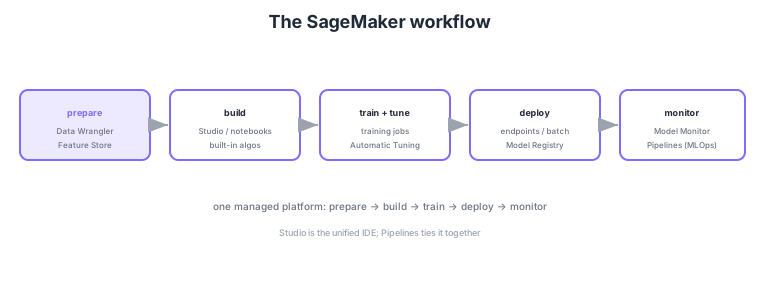
- Studio: the unified IDE (with notebooks) for prep, training, deployment, and monitoring.
- Built-in algorithms: XGBoost/K-Means/DeepAR etc., provided ready to use.
- Training jobs: run training on managed instances and save artifacts (models) to S3.
- Processing: run pre/post-processing (feature engineering, evaluation) as managed jobs.
Common on MLS-C01: unified ML IDE = SageMaker Studio, ready-to-use algorithms = built-in algorithms, managed training = training jobs (artifacts to S3), and pre-processing/evaluation jobs = Processing. Don’t mix up the roles (prepare/train/deploy/monitor).
Continue reading — free sign-up
You're reading the free preview. Sign up free to read this section in full, plus every chapter (including 4+) and all questions.