

What's changed: In-scope coverage: added core service explanations
1.3Storage and Data Formats
Store efficiently—understand columnar (Parquet/ORC), partitioning, S3 storage classes, and SageMaker input modes. Format and layout drive cost and speed.
For large training data, format and layout greatly affect usability. Columnar formats and partitioning help analytics and training.
1.3.1Format and layout
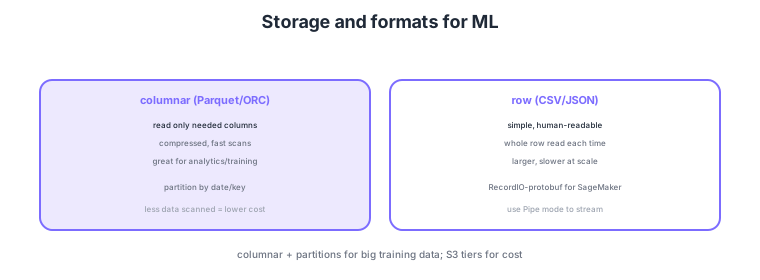
- Columnar (Parquet/ORC): read only the needed columns, fast and cheap for analytics/training.
- Partitioning: split by date/key to scan less and cut cost (e.g., Athena).
- S3 storage classes: use Standard/IA/Glacier by access frequency to optimize cost.
- SageMaker input modes: for large data, use Pipe mode (streaming)/RecordIO-protobuf for efficiency.
Common on MLS-C01: efficient analytics/training = columnar (Parquet/ORC) + partitioning, cost optimization = S3 storage classes, and efficient large-scale training = SageMaker Pipe mode/RecordIO-protobuf. Athena cost depends on data scanned, so columnar + partitions help.
MLS-C01 tests SageMaker input modes and designing data delivery for faster training. Distinguish three input modes: File mode copies the whole dataset to the instance EBS before training—simple but slow to start and storage-hungry; Pipe mode streams directly from S3, speeding the start of reads and handling large data well; and the current Fast File mode lazy-loads while presenting POSIX-like files, combining File’s ease with Pipe’s speed. Additionally, FSx for Lustre backs a high-throughput parallel file system by S3 to feed training, avoiding repeated S3 downloads when running many jobs or hyperparameter searches over the same data. Many built-in algorithms handle RecordIO-protobuf most efficiently (especially for sparse data). Choose formats by: columnar (Parquet/ORC, read only needed columns, predicate pushdown) for analytics, RecordIO for streaming training, and CSV/JSON for interoperability. To curb Athena/Glue cost and scanned data, use columnar + appropriately granular partitioning (over-partitioning causes the small-files problem) + file-size optimization (avoid tiny files; compact). For S3 tiers, keep actively used training data in Standard, use Intelligent-Tiering for unpredictable mixes, and move old raw data to IA or Glacier via lifecycle—alongside encryption (SSE-KMS) and versioning.
| Input mode | Mechanism | Fit |
|---|---|---|
| File mode | Copies all data to EBS before training | Small/medium, simple / slow start |
| Pipe mode | Streams directly from S3 | Large data, fast start |
| Fast File mode | Lazy-loads, POSIX-like | File’s ease + Pipe’s speed |
| FSx for Lustre | Parallel FS backed by S3 | Reuse across repeated jobs/HPO |
Scenario: with several TB of training data, File-mode copying is slow every time, and hyperparameter search reads the same data dozens of times. → Use Pipe or Fast File mode to speed startup, and for reusing the same data across many jobs use FSx for Lustre (S3-integrated) for parallel high-throughput delivery, eliminating repeated S3 downloads.
FAQ: Q. Pipe vs Fast File? A. Pipe streams sequentially; Fast File lazy-loads the needed parts with a POSIX-like view—often easier. Q. Finer partitions are always better? A. Too fine creates many small files, hurting metadata load and scan efficiency—match granularity to query patterns. Q. Best format for built-in algorithms? A. Often RecordIO-protobuf (good for sparse data).
Trap: "Pipe mode is always the answer for faster training" is false—File/Fast File suits small data or POSIX-style random access, and FSx for Lustre helps when reusing the same data across many jobs. "Columnar is always faster" is also wrong—streaming training or sequential reads that use whole rows don’t benefit from columnar. Choose by use case.
1.3.2In-scope services for data and infrastructure
ML data engineering spans a variety of in-scope infrastructure services. Large distributed processing uses Amazon EMR (Spark/Hadoop), real-time stream processing uses Amazon Managed Service for Apache Flink, fine-grained data-lake permissions use AWS Lake Formation, and full-text/vector search uses Amazon OpenSearch Service. For runtime, run containerized workloads on Amazon Elastic Container Service (ECS) or AWS Fargate (serverless execution), and do local inference at the edge with AWS IoT Greengrass. For storage, the standard for training data/models is Amazon S3, and concurrent sharing from many instances is Amazon Elastic File System (EFS).
1.3.3Section summary
- Efficiency = columnar (Parquet) + partitioning
- Cost = S3 storage classes; large-scale training = Pipe mode
- Process = EMR/Flink; search = OpenSearch; run = ECS/Fargate/Greengrass; store = S3/EFS
Sign in to track progress — Log in.
Quick check
(just a quick review)Q1. Efficiently and cheaply scan large tabular data for Athena/training. Which format?
Q2. Which S3 data-layout technique reduces Athena query cost?
Q3. Read very large SageMaker training data efficiently without downloading all to disk. What?