

What's changed: Expanded content (added diagrams)
5.1GitHub Actions and Automation
GitHub Actions is a workflow platform for automating work, starting with CI/CD.
■ What CI/CD means • CI (continuous integration) = frequently integrate changes and catch issues early with automated builds/tests. • CD (continuous delivery/deployment) = keep software releasable and automate distribution/deployment.
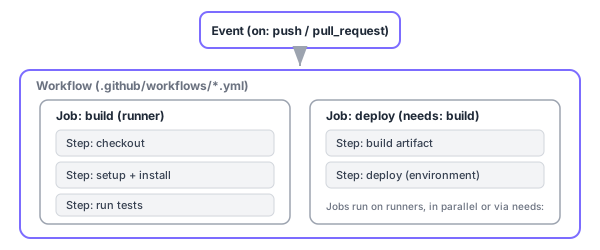
■ Workflow structure (see the diagram)
Workflows are defined as YAML in the .github/workflows folder. The on key specifies triggers (push, pull_request, schedule (cron), workflow_dispatch (manual), and more). The hierarchy is Workflow > Jobs > Steps, with jobs running on runners. Runners are either GitHub-hosted (provided/managed by GitHub) or self-hosted (provided/managed by you). Use needs: to express job ordering (dependencies).
■ Common features
• Secrets = store secrets like API keys encrypted and reference them as ${{ secrets.NAME }} (masked in logs).
• Artifacts = save/share build outputs (test reports, binaries, etc.).
• matrix = run a job across combinations of OSes/language versions in parallel.
• Environments = set per-target (staging/production) protections like required reviewers and wait timers.
• reusable workflows (workflow_call) = define a common workflow and reuse it.
Find community reusable Actions on the GitHub Marketplace and include them with uses: (pin a version for safety).
Sign in to track progress — Log in.
Quick check
(just a quick review)Q1. Correct hierarchy of an Actions workflow?
Q2. Which key specifies a workflow’s triggers?
Keep track of your progress
The full study guide is free to read. Sign up free to practice with the question bank, track what you have read, review your mistakes, and highlight passages.