

What's changed: Rewritten with structured blocks (diagrams, callouts, key points, quizzes)
4.2GitHub Security Features
Survey how GitHub protects code and the software supply chain: Code scanning for code, Secret scanning for secrets, Dependabot for dependencies, plus signed commits and audit logs at an awareness level.
GitHub provides features to protect code and the software supply chain (dependencies). Many are delivered as GitHub Advanced Security (GHAS) (in the 2025 repackaging, GHAS split into separately purchasable GitHub Secret Protection and GitHub Code Security products). Here, focus on "which feature protects what."
4.2.1Protect code and secrets
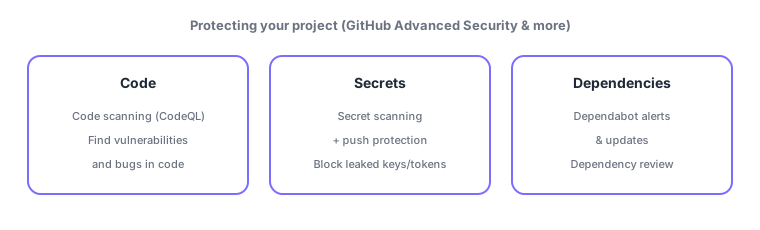
- Code scanning: statically analyzes code (e.g., with CodeQL) to find vulnerabilities and bugs. Results appear as alerts in the Security tab and can warn on PRs.
- Secret scanning: detects secrets like API keys/tokens in commits/pushes. With push protection, it blocks pushes containing secrets to prevent leaks up front.
A secret left in history is not invalidated by deletion. Always rotate (revoke and reissue) any leaked token or key.
4.2.2Protect dependencies
- Dependabot alerts: notify you when a dependency has a known vulnerability.
- Dependabot security updates: auto-open PRs to a fixed version.
- Dependabot version updates: open PRs to keep dependencies current on a schedule.
- Dependency review: surface added/updated dependencies and their known vulnerabilities/licenses in a PR so you can check before merging.
4.2.3Other protections
- Security advisories: privately discuss, fix, and disclose vulnerabilities before going public (responsible disclosure). Point reporters to
SECURITY.md. - Signed commits: sign with GPG/SSH so authorship can be verified, earning a "Verified" badge.
- Audit log: lets org/enterprise admins review "who did what when" after the fact.
- In GitHub Actions, use the auto-issued
GITHUB_TOKENwith least-privilege permissions.
Common points: match the feature to what it protects—Code scanning = code vulnerabilities, Secret scanning (+push protection) = detect/block secrets, Dependabot = dependency alerts/update PRs, dependency review = check dependencies in a PR. GHAS is tested at an awareness level on GH-900.
4.2.4Section summary
- Code scanning = code vulnerabilities; Secret scanning (+push protection) = detect/block secrets
- Dependabot = dependency alerts and update PRs; dependency review = check dependencies in a PR
- Signed commits (Verified) / audit log / least-privilege GITHUB_TOKEN; always rotate leaked secrets
Sign in to track progress — Log in.
Quick check
(just a quick review)Q1. Which feature statically analyzes code for vulnerabilities?
Q2. Which is NOT a Dependabot capability?
Q3. Which feature detects secrets in commits/pushes and prevents leaks up front?
Keep track of your progress
The full study guide is free to read. Sign up free to practice with the question bank, track what you have read, review your mistakes, and highlight passages.