

What's changed: Expanded content (added diagrams)
2.3Branches, Integration, and Undo
Branches are the core of parallel development: keep main stable while you try changes safely on a feature branch.
■ Create and switch
• git branch = create/list branches.
• git switch <branch> (formerly git checkout) = switch branches. git switch -c <name> creates and switches at once.
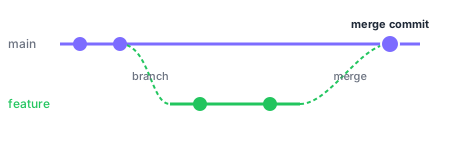
■ Integration: merge vs rebase (see the diagram) There are two ways to bring in a branch’s changes. • merge = integrate while preserving both histories, with a "merge commit" marking the join—history shows what happened. • rebase = replay your commits onto the target branch’s tip to linearize history—cleaner history, but rebasing already-shared commits causes divergence, so be careful. Editing the same spot differently causes a merge conflict; resolve the spot manually, then complete the integration.
■ Undo, shelve, mark
• git revert <commit> = add an "undo" commit—safe to undo even when shared.
• git reset = roll back history or staging (--hard discards changes—use with care).
• git stash = temporarily shelve uncommitted changes to restore later.
• git cherry-pick <commit> = apply just a specific commit onto the current branch.
• git tag = mark a point such as a release.
Note: avoid force-pushing shared branches—it overwrites history and can lose others’ work.
Sign in to track progress — Log in.
Quick check
(just a quick review)Q1. How to safely undo an already-pushed commit?
Q2. Which correctly contrasts merge and rebase?
Keep track of your progress
The full study guide is free to read. Sign up free to practice with the question bank, track what you have read, review your mistakes, and highlight passages.