

What's changed: Deepened DP-700 Chapter 3 (ja figures; comparison tables/scenarios/FAQ/traps/deep paragraphs in all sections)
3.2Performance Optimization
Understand Fabric performance optimization: Delta V-Order and OPTIMIZE (file compaction), Spark configuration, Warehouse statistics, and Power BI Direct Lake.
After finding bottlenecks via monitoring, optimize data layout, queries, and capacity. Fabric provides Delta table optimizations.
3.2.1Optimization techniques
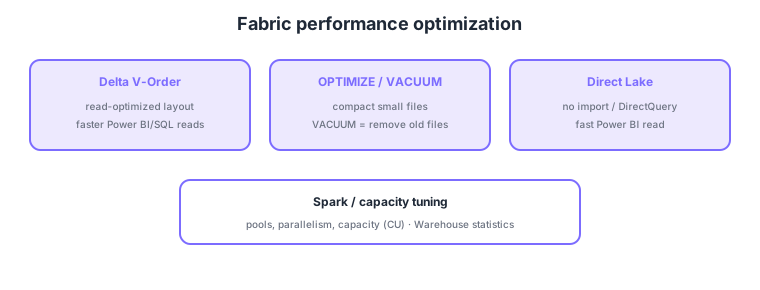
- V-Order: write Delta tables in a read-optimized layout, speeding Power BI/SQL reads.
- OPTIMIZE / VACUUM: compact small files (OPTIMIZE) and remove old unreferenced files (VACUUM).
- Spark/capacity config: tune pools, parallelism, and capacity (CU) to raise throughput.
- Direct Lake: Power BI reads OneLake Delta fast without import/DirectQuery (works well with V-Order).
Common on DP-700: read-optimized layout = V-Order, compact small files = OPTIMIZE (remove old = VACUUM), fast Power BI read = Direct Lake, overload = revisit capacity (CU). For the small-files problem, OPTIMIZE is the go-to.
Many small files (the small-files problem) slow reads; periodic OPTIMIZE compacts files to keep Direct Lake/SQL performant.
Optimize starting from data layout. V-Order writes Parquet in a read-optimized layout, speeding Power BI Direct Lake and SQL reads. Since many small files (the small files problem) slow reads, periodically run OPTIMIZE (compact small files into larger ones; optionally Z-Order to improve data skipping) and VACUUM (remove old unreferenced files to tidy storage/metadata—mind the time-travel retention). Partition design enables query pruning (over-partitioning backfires). For Spark, tune pool/node size/Native Execution Engine; for Warehouse, keep plans good via auto/manual statistics updates. On capacity, level CU consumption (spread schedules, shift heavy jobs, revisit SKU). With Direct Lake, watch for fallback (unsupported features revert to DirectQuery) and get max performance from V-Ordered Delta. Summary: “read layout = V-Order,” “small files = OPTIMIZE,” “old files = VACUUM,” “fast BI read = Direct Lake,” “overload = capacity/schedule tuning.”
| Problem | Remedy | Effect |
|---|---|---|
| Slow reads (layout) | Write with V-Order | Faster Direct Lake/SQL |
| Many small files | OPTIMIZE (+ Z-Order) | Fewer scans, better reads |
| Old files accumulate | VACUUM | Tidy storage/metadata |
| Capacity strained | Spread schedule / revisit SKU | Avoid throttling |
Scenario: streaming ingestion creates many small files in a Delta table and Power BI (Direct Lake) is slow. → Periodically OPTIMIZE to compact files, enable V-Order for read-optimized layout, and VACUUM old files. Check CU in Capacity Metrics and spread schedules if needed.
FAQ: Q. OPTIMIZE vs VACUUM? → A. OPTIMIZE compacts small files for faster reads; VACUUM removes old unreferenced files to tidy storage (mind time-travel retention). Q. Can Direct Lake get slow? → A. Yes—if unsupported features cause fallback to DirectQuery. Avoid with V-Ordered Delta and supported configurations.
Trap: “the remedy for the small-files problem is VACUUM” is wrong—OPTIMIZE compacts small files; VACUUM removes old unreferenced files (their roles are commonly swapped). Also “finer partitioning is always faster” is wrong—over-partitioning creates more small files and backfires.
3.2.2Section summary
- Optimization = V-Order, OPTIMIZE/VACUUM, capacity/Spark tuning
- Fast Power BI read = Direct Lake
Sign in to track progress — Log in.
Quick check
(just a quick review)Q1. Reads are slow due to many small files. What is the go-to remedy on Delta tables?
Q2. Which Power BI mode reads OneLake Delta fast without import or DirectQuery?
Q3. Which writes Delta tables in a read-optimized layout to speed Power BI/SQL reads?
Keep track of your progress
The full study guide is free to read. Sign up free to practice with the question bank, track what you have read, review your mistakes, and highlight passages.