

What's changed: Deepened DP-600 Chapter 1 (ja figures; comparison tables/scenarios/FAQ/traps/deep paragraphs in all sections)
1.3Preparing Data (Ingest and Transform)
Understand the basics of DP-600’s largest domain "prepare and serve data"—ingestion (pipelines, dataflows, shortcuts) and transformation (Spark, T-SQL, medallion), plus Delta table optimization.
Before serving (semantic models/reports), data must be ingested and transformed. This is DP-600’s largest domain.
1.3.1Ingest and transform
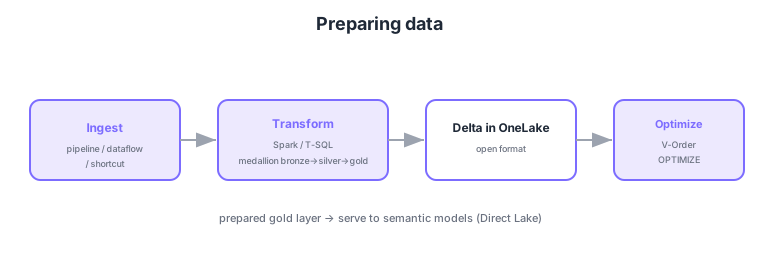
- Ingestion: choose pipelines (control), Dataflows Gen2 (no-code), shortcuts (reference).
- Transformation: shape with Spark (large), T-SQL (Warehouse) and raise quality via medallion.
- Delta tables: store results as Delta in OneLake, queryable via SQL/Power BI.
- Optimization: optimize reads with V-Order/OPTIMIZE for serving (Direct Lake).
Common on DP-600: ingest = pipelines/Dataflows/shortcuts, transform = Spark/T-SQL + medallion, results as Delta in OneLake, read optimization = V-Order/OPTIMIZE. The prepared gold layer feeds semantic models in the next chapter.
Choose ingestion by purpose: complex control flow/scheduling = data pipeline, no-code shaping = Dataflows Gen2 (Power Query), reference without moving = shortcut, bulk simple copy = Copy activity. Transform with Spark notebooks (PySpark/Spark SQL; large/ML; MERGE for incremental) or T-SQL (Warehouse, set-based), staging quality via the medallion (bronze=raw → silver=cleansed/joined → gold=aggregated/business-ready). All results are stored as Delta tables in OneLake (ACID, time travel, schema evolution). Pre-serving optimization matters: V-Order (read-optimized layout), OPTIMIZE (compact small files—the small-files-problem fix), and VACUUM (remove old files), readying for fast Direct Lake reads. In DP-600 this gold layer is the foundation for the next semantic model, so shaping it with the right grain, types, partitioning, and naming directly drives downstream DAX and report performance.
| Stage | Methods | Output |
|---|---|---|
| Ingest | Pipeline/Dataflow Gen2/shortcut/Copy | Raw data (bronze) |
| Transform | Spark / T-SQL (medallion) | Cleansed/aggregated (silver/gold) |
| Optimize | V-Order / OPTIMIZE / VACUUM | Serving-ready Delta |
Scenario: nightly, ingest raw data from several sources, shape and aggregate it, and hand it to a semantic model. → Schedule a data pipeline, build the medallion (bronze→silver→gold) with Spark/T-SQL, and optimize the gold Delta with V-Order/OPTIMIZE. In the next chapter, serve this gold layer as a Direct Lake semantic model.
FAQ: Q. Why optimize before serving? → A. Small files and non-optimal layout slow Direct Lake/SQL reads, so V-Order/OPTIMIZE speed reads before serving. Q. Why does gold-layer design matter? → A. It’s the semantic model’s foundation; grain, types, and naming drive downstream DAX and report performance.
Trap: “the fix for the small-files problem is VACUUM” is wrong—OPTIMIZE compacts small files; VACUUM removes old unreferenced files. Also “transform results are stored as arbitrary formats like CSV in OneLake” is wrong—the standard is Delta tables (ACID/time travel/Direct Lake-readable).
1.3.2Section summary
- Prepare = ingest → transform (medallion) → Delta → optimize
- Optimization = V-Order/OPTIMIZE (ready for Direct Lake serving)
Sign in to track progress — Log in.
Quick check
(just a quick review)Q1. In preparing data, which medallion layer is "aggregated, business-ready"?
Q2. In what format are transform results stored in OneLake and read via Direct Lake?
Q3. Before serving, you want faster Delta reads. What do you do?
Keep track of your progress
The full study guide is free to read. Sign up free to practice with the question bank, track what you have read, review your mistakes, and highlight passages.