

What's changed: Deepened DP-100 Chapter 1 (ja figures; comparison tables/scenarios/FAQ/traps/deep paragraphs in all sections)
1.2The ML Process and Responsible AI
Understand the ML lifecycle (data prep → train → evaluate → deploy → monitor), choosing among Automated ML (AutoML), the Designer, and code (SDK/CLI), plus Responsible AI (fairness, explainability).
ML is an iterative process. Azure ML offers multiple approaches from no-code to full code.
1.2.1ML process and approaches
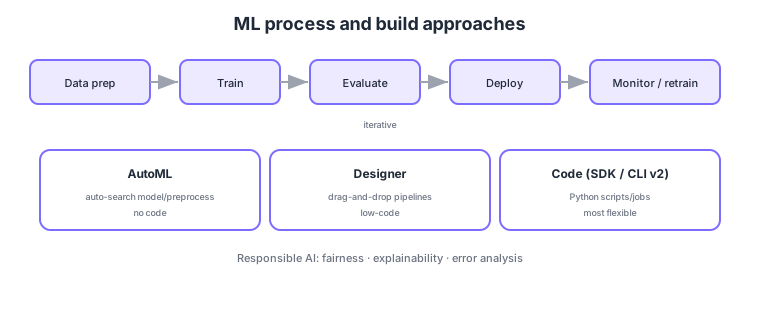
- Process: iterate data prep → train → evaluate → deploy → monitor, retraining as needed.
- AutoML: auto-searches the best algorithm and preprocessing (quality models without code).
- Designer: build pipelines via drag-and-drop (low-code).
- Code (SDK/CLI v2): maximum flexibility; define jobs/pipelines in scripts.
Common on DP-100: auto-search best model/preprocessing = AutoML, drag-and-drop = Designer, maximum flexibility = code (SDK/CLI v2), fairness/explainability = Responsible AI dashboard. Use AutoML for quick no-code trials, code for fine control.
The Responsible AI dashboard consolidates explainability (feature importance), error analysis, and fairness assessment.
ML iterates CRISP-DM style: frame the problem → data prep (cleansing, feature engineering, splitting) → train → evaluate (metrics: classification = precision/recall/F1/AUC; regression = RMSE/MAE/R²) → deploy → monitor → retrain. Choose the approach by requirements: AutoML for quick quality models (auto-searches preprocessing/algorithm/hyperparameters and compares on a leaderboard), the Designer for visual low-code, and code (SDK/CLI v2) for maximum control/reproducibility. Responsible AI is consolidated in the RAI dashboard: interpretability (feature importance via SHAP, etc.), error analysis (failures per cohort), fairness (Fairlearn), and counterfactual/causal analysis. To avoid overfitting, use train/validation/test splits and cross-validation, and watch for data leakage. Even with AutoML, when regulation/accountability applies, RAI explanations and fairness assessment matter. Summary: “fast no-code = AutoML, visual = Designer, fine control = code,” “fairness/explainability = RAI dashboard.”
| Approach | Code | Best for |
|---|---|---|
| AutoML | No-code | Quickly search for quality models |
| Designer | Low-code | Build pipelines visually |
| Code (SDK/CLI v2) | Full code | Max control, reproducibility, CI/CD |
Scenario: quickly build a classification model on tabular data and, for accountability, review feature importance and fairness. → Use AutoML to auto-search multiple algorithms and pick the best from the leaderboard, then check explainability (feature importance), error analysis, and fairness in the Responsible AI dashboard. Move to code (SDK/CLI v2) when fine control or CI/CD is needed.
FAQ: Q. Does AutoML remove the need for Responsible AI? → A. No—fairness and explainability still matter; assess them in the RAI dashboard. Q. How to prevent overfitting? → A. Use train/validation/test splits and cross-validation to check generalization, and avoid data leakage.
Trap: “choose AutoML when you need maximum flexibility/reproducibility” is wrong—fine control/CI-CD is code (SDK/CLI v2); AutoML is for quick auto-search. Also “AutoML removes the need for fairness assessment” is wrong—accountability requires evaluation in the RAI dashboard.
1.2.2Section summary
- Process = prep → train → evaluate → deploy → monitor (iterate)
- Approaches = AutoML (auto) / Designer (low-code) / code (flexible)
Sign in to track progress — Log in.
Quick check
(just a quick review)Q1. You want quality models by auto-searching the best algorithm/preprocessing without code. What?
Q2. You want to build ML pipelines low-code via drag-and-drop. What do you use?
Q3. You want to review fairness, explainability, and error analysis together. What in Azure ML?