

What's changed: Deepened DP-100 Chapter 1 (ja figures; comparison tables/scenarios/FAQ/traps/deep paragraphs in all sections)
1.1Azure Machine Learning Workspace and Resources
Understand the core ML platform Azure Machine Learning (Azure ML): the workspace, compute (instances/clusters), datastores/data assets, and dev surfaces (Studio, SDK, CLI). The starting point for DP-100.
Azure Machine Learning is the hub for ML on Azure. From a workspace, you centrally manage compute, data, models, and experiments.
1.1.1Azure ML building blocks
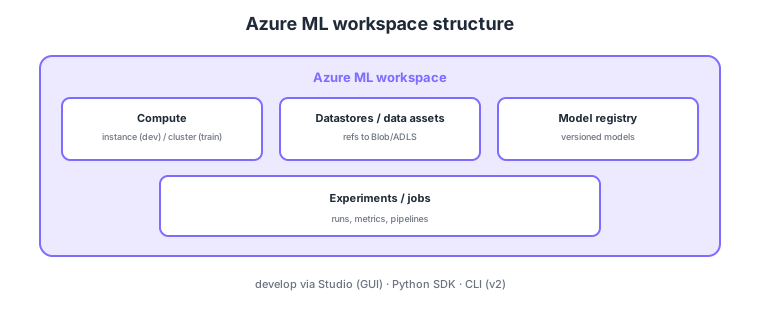
- Workspace: the hub managing ML artifacts (data, models, experiments, endpoints).
- Compute: a compute instance (for dev) and a compute cluster (to scale training).
- Datastores/data assets: connection info to Blob/ADLS and reusable data references.
- Dev surfaces: build experiments/pipelines via Studio (GUI), Python SDK, CLI (v2).
Common on DP-100: ML hub = Azure ML workspace, dev = compute instance, training scale = compute cluster, data connection = datastore, reusable reference = data asset, interact via Studio/SDK/CLI v2. Autoscale clusters for variable training load.
A compute cluster can scale down to 0 nodes when idle, lowering training-job cost.
When you create a workspace, associated resources are linked: a storage account (default datastore), Key Vault (secrets), Application Insights (monitoring), and a Container Registry (environment images). Compute comes in flavors: a compute instance for dev/notebooks (personal; stop to save cost), a compute cluster to scale training (autoscale, 0 nodes when idle, low-priority VMs), managed online endpoints for real-time inference / batch endpoints for batch, and attached compute (existing AKS, etc.). Data is handled via datastores (connections to Blob/ADLS Gen2 with credentials in Key Vault) and data assets (three types uri_file/uri_folder/mltable, versioned) for reuse and reproducibility. Environments define dependencies (conda/Docker) to make jobs reproducible. Interact via Studio (GUI), Python SDK v2, and CLI v2 (jobs defined in YAML); SDK/CLI v2 is the current standard. The cost knack: autoscale clusters for variable training and stop instances used for routine dev.
| Compute | Use | Notes |
|---|---|---|
| Compute instance | Dev/notebooks | Personal; stop to save cost |
| Compute cluster | Scale training | Autoscale, 0 nodes, low-priority VMs |
| Online endpoint | Real-time inference | Always-on, low latency |
| Batch endpoint | Bulk batch inference | Async on a cluster |
Scenario: a data scientist develops in notebooks, scales heavy training, and controls cost. → Use a compute instance for dev (stop when idle) and a compute cluster for training (autoscale, 0 nodes when idle, low-priority VMs if appropriate). Version data with data assets and pin dependencies via environments for reproducibility.
FAQ: Q. Compute instance vs cluster? → A. An instance is for individual dev (single; billed if left running); a cluster scales training (autoscale, 0 nodes when idle). Q. Datastore vs data asset? → A. A datastore is connection info; a data asset is a reusable, versioned reference to specific data.
Trap: “use a compute instance for large parallel training” is wrong—scaled training uses a compute cluster (instances are for individual dev). Also “fix the cluster at max nodes to save cost” is wrong—autoscaling to 0 nodes when idle is the basis of savings.
1.1.2Section summary
- Azure ML = workspace-centric (compute/data/models/experiments)
- Compute = instance (dev) / cluster (training)
Sign in to track progress — Log in.
Quick check
(just a quick review)Q1. Which service centrally manages ML artifacts (data, models, experiments) on Azure?
Q2. Which compute scales on demand to run training jobs in parallel/at scale?
Q3. Which Azure ML element holds connection info to Blob/ADLS for secure data access?