

What's changed: Covered in-scope services: Elastic Disaster Recovery, Resilience Hub, Compute Optimizer, FSx (4 types), Aurora Serverless v2, DocumentDB, MemoryDB for Redis, Redshift, EKS Distro, ROSA, DMS, Transit Gateway, PrivateLink, Client VPN, Site-to-Site VPN
3.1Scalability and Elasticity
Understand demand-following design—Auto Scaling (dynamic/predictive/scheduled), ELB, scaling policies (target-tracking/step), and lifecycle hooks. Scale automatically with load.
The first step to resilience is elasticity that follows demand. Auto Scaling and ELB automatically adjust capacity with load.
3.1.1Auto Scaling and scaling policies
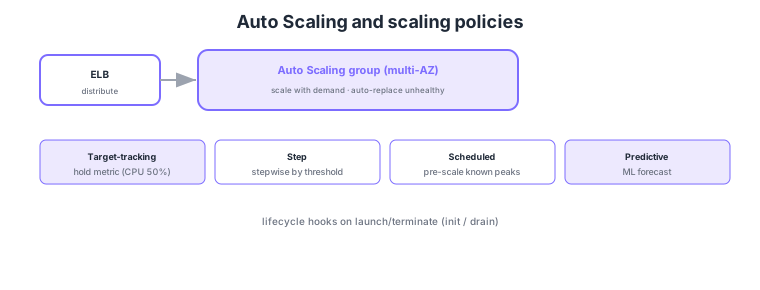
- Target-tracking: auto-adjust to hold a metric (e.g., CPU 50%); simplest.
- Step scaling: change capacity in steps by threshold bands.
- Scheduled/predictive: pre-scale for known peak times or via ML forecasts.
- Lifecycle hooks: run init/drain on launch/terminate; unhealthy instances auto-replaced.
Common on DOP-C02: hold a metric = target-tracking, stepwise = step, known peak = scheduled, ML forecast = predictive, launch/terminate handling = lifecycle hooks. Auto Scaling auto-replaces instances failing ELB/EC2 health checks.
DOP-C02 probes how to automate scaling that best fits the demand pattern. Target-tracking adjusts to hold a CloudWatch metric (CPU, ALB request count per target, etc.) at a target value; it is the simplest to configure and the default answer for many cases. Step scaling changes capacity in steps based on how far an alarm is breached, giving robust control under sharp load swings. Scheduled scales at set times (business open, campaigns), and predictive uses ML on historical cycles to provision ahead. Lifecycle hooks inject work in Pending:Wait/Terminating:Wait states to ensure launch-time configuration (bootstrap via State Manager or user data) and termination-time connection draining / log offload. A warm pool keeps pre-initialized instances stopped to cut scale-out latency. Instances are defined via a Launch Template, and a mixed-instances policy blends On-Demand and Spot to balance cost and availability. For ECS, the equivalent is service auto scaling; for Lambda, provisioned/reserved concurrency. For scaling health, adopting ELB health checks as the ASG health check type lets it detect and replace app-layer failures, not just instance-level ones.
| Demand pattern | Best policy | Key point |
|---|---|---|
| Hold a metric steady | Target-tracking | Simplest; default for many cases |
| Stepwise for sharp swings | Step scaling | Adjust amount by breach magnitude |
| Peaks at known times | Scheduled | Pre-scale for opens/campaigns |
| Cyclical but shifting | Predictive | ML provisions ahead |
Scenario: You target-track on CPU normally, but scale-out launches are slow and errors appear in the first minutes of a surge. → Use a warm pool to keep pre-initialized instances ready, cutting launch latency. Also add scheduled scaling to raise the minimum ahead of reliably busy windows, and protect against Spot interruptions with a mixed-instances policy that keeps an On-Demand baseline.
FAQ: Target-tracking or step? Consider target-tracking first (just hold a metric at target; simple to operate). If you need fine-grained stepped control—e.g., "scale harder the larger the breach"—use step scaling. They can also coexist on the same ASG.
Exam trap: If the ASG health check is EC2-only, it cannot detect an "unhealthy-but-running" instance where the OS is up but the app is down. To self-heal at the app layer, adopt ELB health checks as the ASG health check type.
3.1.2Compute Optimizer — right-sizing recommendations
Compute Optimizer uses machine learning to analyze actual usage of EC2 instances, Auto Scaling groups, Lambda functions, and EBS volumes, then detects over-provisioning (wasted cost) or under-provisioning (performance degradation) and recommends the right resource type and size. Recommendations are generated from 14 days (up to 3 months) of CloudWatch metrics (CPU, memory, throughput, etc.) and show estimated cost savings and performance risk relative to the current configuration. In a DevOps context its role is to "prepare the elasticity baseline"—by scaling from correctly-sized instances you eliminate over-provisioning waste and add capacity only when genuinely needed. Checking Compute Optimizer recommendations before setting scaling policies to ensure the baseline is correct is the practical approach DOP-C02 probes.
3.1.3FSx family — shared file storage by workload
Amazon FSx offers four managed file systems. FSx for Windows File Server integrates SMB protocol and Active Directory, used by Windows apps and .NET workloads as a shared drive. FSx for Lustre is a high-performance parallel file system suited to I/O-intensive batches (HPC, ML, video processing), with seamless S3 integration (reference an S3 bucket as a data repository and write results back). FSx for NetApp ONTAP delivers NetApp ONTAP capabilities (snapshots, deduplication, compression, multi-protocol NFS/SMB/iSCSI) as a managed service, ideal for lifting-and-shifting on-premises ONTAP workloads. FSx for OpenZFS is OpenZFS-based, suited to straightforwardly replacing a low-latency NFS file server. All four offer Multi-AZ or Single-AZ placement, and being fully managed you have no file-server OS to maintain.
| FSx type | Protocol / trait | Typical workload |
|---|---|---|
| FSx for Windows File Server | SMB / AD integration | Windows apps, DFS, .NET |
| FSx for Lustre | POSIX parallel FS / S3 link | HPC, ML, video processing |
| FSx for NetApp ONTAP | NFS/SMB/iSCSI; ONTAP features | On-prem ONTAP migration |
| FSx for OpenZFS | NFS / OpenZFS | Low-latency NFS server replacement |
3.1.4Data tier — scalable database selection
In the scalability and elasticity context, data-tier selection matters. Aurora Serverless v2 is the auto-scaling edition of Aurora (MySQL/PostgreSQL-compatible), scaling seamlessly up and down in 0.5 ACU increments with demand. It suits variable workloads with hard-to-predict peaks, minimizing idle cost. DocumentDB is a MongoDB-compatible document database for apps that migrate or build around nested JSON documents. Amazon MemoryDB (formerly MemoryDB for Redis; now Redis OSS / Valkey-compatible) is an in-memory database whose key distinction from ElastiCache is that every write is persisted to a Multi-AZ transaction log—ElastiCache is a cache tier (assumes another primary store), whereas MemoryDB has the durability to serve as a primary database. Redshift is a columnar data warehouse (DWH) that parallel-processes analytic queries over large structured datasets and can directly query external tables in S3 (Redshift Spectrum).
| Service | Trait | Typical use case |
|---|---|---|
| Aurora Serverless v2 | Auto-scales in ACU increments | Variable-load RDBMS |
| DocumentDB | MongoDB-compatible; document | JSON document DB |
| Amazon MemoryDB | Redis/Valkey-compatible; durable | In-memory as primary DB |
| Redshift | Columnar DWH; parallel analytics | Large-scale analytics / BI |
3.1.5EKS Distro — consistent Kubernetes in self-managed environments
EKS Distro is the open-source release of the same Kubernetes distribution (component binaries and container images) that Amazon EKS uses. It lets you run Kubernetes on self-managed infrastructure—on-premises or in other clouds—using the same versions, security patches, and components as AWS production EKS. This is useful for unifying Kubernetes versions across multi-cloud and hybrid configurations. You manage the control plane yourself, but can follow AWS's patch cadence.
When you want a fully managed Kubernetes platform, ROSA (Red Hat OpenShift Service on AWS) is an option. Jointly offered by AWS and Red Hat, this managed OpenShift brings the OpenShift ecosystem (developer CI/CD, builders, Operators) and operational experience onto AWS with the control plane operated for you. Organizations that want to migrate existing OpenShift workloads to AWS, or standardize on OpenShift, choose it instead of EKS (upstream Kubernetes).
3.1.6Database migration (Database Migration Service)
Database Migration Service (AWS DMS) migrates databases with minimal downtime. It continuously replicates data from a source (on-prem/other cloud/RDS, etc.) to RDS, Aurora, Redshift, DynamoDB, S3, and more, following in-flight changes via CDC (change data capture) so you can cut over without stopping production. For heterogeneous engine migrations (e.g., Oracle → Aurora PostgreSQL), pair it with schema conversion (SCT / DMS Schema Conversion). In DevOps, you can automate migration/DR data sync from a pipeline, embedding it as a repeatable migration procedure.
3.1.7Section summary
- Elasticity = Auto Scaling + ELB
- Policies = target-tracking/step/scheduled/predictive
- Right-sizing = Compute Optimizer (check baseline before scaling)
- File storage = FSx 4 types (Windows / Lustre / ONTAP / OpenZFS)
- Data tier = Aurora Serverless v2 / DocumentDB / MemoryDB / Redshift / migration = DMS
- K8s = EKS Distro (hybrid) / ROSA (managed OpenShift)
Sign in to track progress — Log in.
Quick check
(just a quick review)Q1. You want the simplest auto-scaling to hold average CPU around 50%. Which policy?
Q2. Traffic reliably spikes every Monday 9am. You want to pre-scale capacity. Which policy?
Q3. Before terminating an instance, you want to finish in-flight work, then remove it. What?
Keep track of your progress
The full study guide is free to read. Sign up free to practice with the question bank, track what you have read, review your mistakes, and highlight passages.