

What's changed: In-scope coverage: ops platform (ECS/EKS/CloudFormation/CDK/CLI/Code trio/SSM/Managed Grafana/Well-Architected/Cost Explorer/Budgets) + data-prep/ML (Glue DataBrew/SageMaker AI/Bedrock/Kendra)
3.1Operating Pipelines and Data Quality
Understand pipeline operations: monitoring (CloudWatch, job success/duration), automation via schedules and retries, and data-quality checks (Glue Data Quality, DLQ). The starting point for "Data Operations and Support" in DEA-C01.
A pipeline is not done once built—monitoring, auto-handling failures, and keeping data quality are key operations.
3.1.1Monitoring, automation, and quality
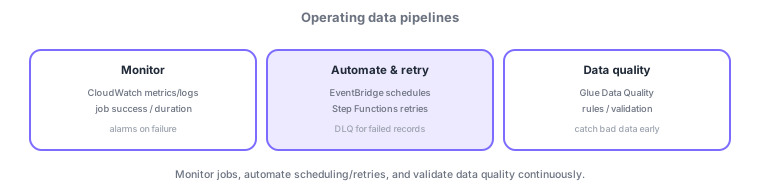
- Monitor: watch job success/duration/throughput in CloudWatch and alarm on failure.
- Automate/retry: schedule via EventBridge, retry with Step Functions, and isolate failed records in a DLQ.
- Data quality: validate with rules using Glue Data Quality to catch bad data early.
Common on DEA: detect/notify job failures = CloudWatch alarms, isolate failed records = DLQ, validate data-quality rules = Glue Data Quality, scheduled runs = EventBridge schedules.
Pipeline operations rest on three pillars: "monitoring, automation/retry, and data quality." Monitoring uses CloudWatch to watch job success, duration, and throughput, raising alarms (→ SNS, EventBridge) on failures or delays. Aggregate Glue/EMR/Step Functions logs in CloudWatch Logs and trace causes with Logs Insights. Automation/retry is hardened with EventBridge (schedule/event triggers) and Step Functions (per-step retries, exponential backoff, catch), isolating unprocessable records in a DLQ (dead-letter queue) for later reprocessing. The key to safe re-runs is idempotency (same input yields the same result). Data quality uses Glue Data Quality (define rules in DQDL—not-null/unique/range checks) to catch bad data early and quarantine it, protecting downstream. Beyond failure alerts, design for backfill (reprocessing history) and late-arriving data too.
| Operational need | Use |
|---|---|
| Detect/notify job failure | CloudWatch alarm → SNS |
| Schedule/retry | EventBridge / Step Functions |
| Isolate failed records | DLQ |
| Validate data quality | Glue Data Quality (DQDL) |
Scenario: a nightly ETL fails intermittently and bad data flows downstream. Trigger Step Functions on an EventBridge schedule with retries + exponential backoff per step. Send failed records to a DLQ. Validate not-null/range with Glue Data Quality before loading and quarantine bad rows. Notify job failures via a CloudWatch alarm to SNS and trace causes with Logs Insights.
Q. Notify job failure? CloudWatch alarm → SNS. Q. Isolate failed records? DLQ. Q. Validate data quality? Glue Data Quality (DQDL). Q. Schedule/retry? EventBridge / Step Functions. Q. Key to safe re-runs? Idempotency.
Watch the mix-ups: (1) Unbounded retries of non-idempotent processing cause duplicate inserts/double counting. (2) A DLQ is a holding area—you still need a reprocessing mechanism (monitor and replay). (3) Glue Data Quality "validates"—design the quarantine/notify follow-up for bad data. (4) Misconfigured alarm threshold/period causes false positives or misses.
Idempotent processing (re-runs do not change results) lets you retry/reprocess safely.
3.1.2In-scope services for the operations platform
The execution platform, IaC, CI/CD, and operations are also in scope for DEA-C01. For compute, beyond Amazon EC2, orchestrate containerized ETL with Amazon Elastic Container Service (ECS, AWS-native, minimal ops with Fargate) or Amazon Elastic Kubernetes Service (EKS, Kubernetes-standard). Define infrastructure declaratively from templates with AWS CloudFormation, from a programming language with the AWS Cloud Development Kit (CDK), and operate/automate via the AWS CLI. Automate releases with AWS CodeBuild (build/test) -> AWS CodeDeploy (controlled deploy) -> AWS CodePipeline (stage chaining). Manage fleet config, patching, and parameters with AWS Systems Manager; run OSS observability dashboards with Amazon Managed Grafana; and review architecture systematically with the AWS Well-Architected Tool. Visualize and forecast cost with AWS Cost Explorer and alert on budget thresholds with AWS Budgets.
| Area | Service | Key point |
|---|---|---|
| Container execution | ECS / EKS | AWS-native = ECS; K8s-standard = EKS |
| IaC | CloudFormation / CDK / CLI | Declarative / programmatic / command |
| CI/CD | CodeBuild / CodeDeploy / CodePipeline | Build / deploy / orchestrate |
| Ops & review | Systems Manager / Managed Grafana / Well-Architected Tool | Manage / visualize / review |
| Cost | Cost Explorer / Budgets | Visualize-forecast / budget alerts |
3.1.3Section summary
- Monitor (CloudWatch) / automate-retry (EventBridge, Step Functions, DLQ)
- Validate data quality with Glue Data Quality
- Platform = ECS/EKS; IaC = CloudFormation/CDK; CI/CD = Code trio; cost = Cost Explorer/Budgets
Sign in to track progress — Log in.
Quick check
(just a quick review)Q1. You want to detect and be notified when an ETL job fails. What fits best?
Q2. You want to isolate records that failed processing for later inspection/reprocessing. What do you use?
Q3. You want rule-based validation to ensure data quality. Which fits best?
Keep track of your progress
The full study guide is free to read. Sign up free to practice with the question bank, track what you have read, review your mistakes, and highlight passages.