

What's changed: In-scope coverage: added a management/governance/cost in-scope services block to Ch6 (Management Console/Control Tower/Service Catalog/Service Quotas/License Manager/CloudFormation/Systems Manager/Compute Optimizer/Cost and Usage Report)
6.2Support and Resources
Understand AWS Support plans (Basic / Developer / Business / Enterprise) and helpful tools/resources like Trusted Advisor, the AWS Health Dashboard, documentation, and AWS Marketplace.
Knowing the support you can rely on and the tools/resources that help operations lets you use AWS with confidence. Support tiers get richer from lower to higher, with faster response and dedicated help at the top. Also distinguish Trusted Advisor (checks your environment) from the Health Dashboard (AWS-side status).
6.2.1Support plans
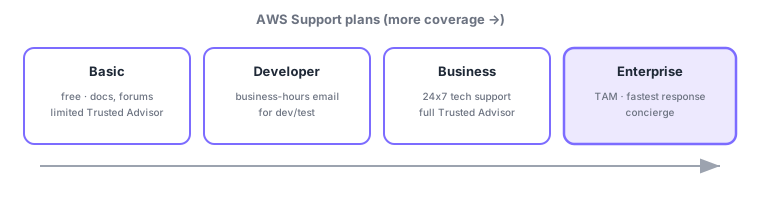
- Basic: free—docs, forums, a limited set of Trusted Advisor checks, and the Health Dashboard.
- Developer: for dev/test—business-hours email tech support.
- Business: for production—24×7 tech support (phone/chat/email) and the full Trusted Advisor checks.
- Enterprise On-Ramp / Enterprise: top tiers—a TAM (technical account manager), fastest response for critical cases, and concierge.
| Plan | Tech support | Highlights |
|---|---|---|
| Basic | None (docs/forums) | Free, limited TA checks |
| Developer | Business-hours email | For dev/test |
| Business | 24×7 phone/chat/email | Production, full TA checks |
| Enterprise | 24×7, fastest response | TAM, concierge |
6.2.2Helpful tools and resources
- Trusted Advisor: best-practice checks across cost, security, fault tolerance, performance, and service limits (for your environment).
- AWS Health Dashboard: shows AWS service health and events affecting your resources (AWS-side status).
- Documentation, whitepapers, AWS Knowledge Center, re:Post (Q&A) are primary references.
- AWS Marketplace to find and procure third-party software (billed via your AWS invoice).
Scenario: standing up production operations. Need 24×7 contact → Business or higher. A large enterprise needing a dedicated TAM and fastest response → Enterprise. Check daily improvements with Trusted Advisor, verify suspected AWS-side outages on the Health Dashboard, and procure needed software from Marketplace.
Watch the mix-ups: (1) Trusted Advisor = advice for your environment (checks) vs AWS Health Dashboard = AWS-side service health/incidents. (2) A TAM is only in the Enterprise tier. (3) 24×7 tech support starts at Business (Developer is business-hours email). (4) Marketplace procures third-party software, not AWS-built services.
Common points: support tiers (Basic < Developer < Business < Enterprise) / 24×7 from Business / TAM at Enterprise, Trusted Advisor = best-practice checks, Health Dashboard = service health, Marketplace = third-party software.
6.2.3Additional in-scope management, governance, and cost services
Beyond billing/support, CLF-C02 also covers management and governance services that control multiple accounts and standardize operations. The entry point is the AWS Management Console (browser GUI). For multi-account governance: AWS Control Tower auto-builds a best-practice environment, AWS Service Catalog distributes approved resources as a catalog, Service Quotas manages service limits, and AWS License Manager tracks license usage. For provisioning/operations: AWS CloudFormation codifies infrastructure (IaC) to build everything from templates, and AWS Systems Manager handles patching/configuration/operations across fleets. For cost optimization: AWS Compute Optimizer recommends right-sizing from past usage, and the AWS Cost and Usage Report outputs detailed billing line items. Map them: "GUI = Management Console / auto-set-up = Control Tower / catalog = Service Catalog / limits = Service Quotas / licenses = License Manager / IaC = CloudFormation / operations = Systems Manager / right-sizing = Compute Optimizer / line items = Cost and Usage Report."
6.2.4Section summary
- Support: Basic < Developer < Business (24×7, full TA) < Enterprise (TAM, fastest)
- Trusted Advisor = advice for you / Health Dashboard = AWS service health (don’t confuse)
- Resources: docs/whitepapers/Knowledge Center/re:Post; procurement: Marketplace
- Management/governance: Management Console/Control Tower/Service Catalog/Service Quotas/License Manager/CloudFormation/Systems Manager/Compute Optimizer/Cost and Usage Report
Sign in to track progress — Log in.
Quick check
(just a quick review)Q1. Which AWS Support plan includes a technical account manager (TAM)?
Q2. Which service checks and recommends best practices across cost, security, fault tolerance, etc.?
Q3. Which AWS service lets you find and procure third-party software?
Q4. Which is the lowest Support plan that provides 24×7 technical support?
Q5. Which shows AWS-side service incidents/maintenance and impact to your resources?
Keep track of your progress
The full study guide is free to read. Sign up free to practice with the question bank, track what you have read, review your mistakes, and highlight passages.