

What's changed: In-scope coverage: added a management/governance/cost in-scope services block to Ch6 (Management Console/Control Tower/Service Catalog/Service Quotas/License Manager/CloudFormation/Systems Manager/Compute Optimizer/Cost and Usage Report)
6.1Pricing Models, Billing, and Cost Management
Understand AWS pricing models (On-Demand, Savings Plans/Reserved, Spot), the Free Tier, and cost-management tools (Pricing Calculator, Cost Explorer, Budgets, Organizations consolidated billing).
AWS is fundamentally pay-as-you-go, but you can get discounts and optimize cost. The two keys are choosing the right pricing model and using cost tools to estimate, visualize, and rein in spend. AWS’s pricing philosophy is "pay less by using more / by reserving."
6.1.1Pricing models and the Free Tier
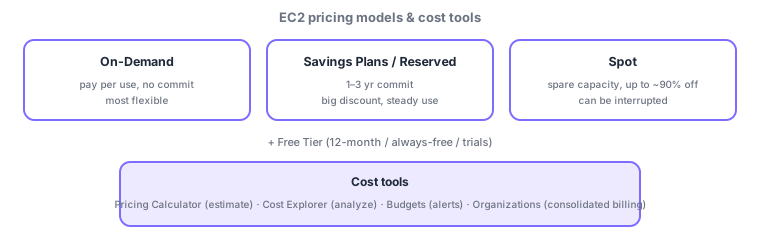
- On-Demand: pay per use, no long-term commitment—most flexible but priciest per unit.
- Savings Plans / Reserved Instances (RI): a big discount for a 1–3 year commitment—good for steady workloads.
- Spot Instances: use spare capacity at up to ~90% off (can be interrupted)—good for interruptible batch work.
- Free Tier: three forms—12-month free, always-free, and trials.
| Model | Discount/trait | Good for |
|---|---|---|
| On-Demand | No discount, most flexible | Short/variable/unpredictable |
| Savings Plans / RI | Big discount for 1–3 yr commit | Steady, predictable load |
| Spot | Up to ~90% off, interruptible | Interruptible batch/parallel |
6.1.2Cost-management tools
- Pricing Calculator: estimate cost before building. Cost Explorer: visualize/analyze actual spend (trends/breakdowns).
- AWS Budgets: budgets and alerts for overspend/usage. Cost allocation tags break down cost by team/project.
- AWS Organizations: group accounts for consolidated billing (volume discounts, central management) and SCPs for org-wide guardrails.
- AWS Billing Conductor: for internal cost showback/chargeback (supplementary).
Scenario: cost optimization. Cover the always-on production baseline with Savings Plans/RI, run heavy nightly batch on Spot cheaply, and use On-Demand for ad-hoc tests. Review monthly breakdowns in Cost Explorer, set ceiling alerts with Budgets, attribute by team with cost allocation tags, and bill org-wide via Organizations consolidated billing.
Watch the mix-ups: (1) Pricing Calculator (future = estimate) vs Cost Explorer (actual = analysis). (2) Budgets (budget/alerts) controls spend; Cost Explorer (analysis) visualizes it. (3) Spot = interruptible/cheap, SP·RI = discount for commitment, On-Demand = no discount/flexible. (4) Consolidated billing is Organizations.
Common points: choosing On-Demand / Savings Plans·RI / Spot, the Free Tier (three forms), Pricing Calculator (estimate) / Cost Explorer (actuals) / Budgets / cost allocation tags, and Organizations consolidated billing.
6.1.3Section summary
- Pricing: On-Demand / Savings Plans·RI (discount) / Spot (up to 90%, interruptible) + Free Tier (three forms)
- Tools: Pricing Calculator (estimate) / Cost Explorer (actuals) / Budgets / tags / Organizations (consolidated billing)
Sign in to track progress — Log in.
Quick check
(just a quick review)Q1. Which EC2 pricing model offers up to ~90% off in exchange for possible interruption?
Q2. Which AWS tool visualizes and analyzes your actual spend?
Q3. Which service groups multiple AWS accounts for consolidated billing, volume discounts, and central management?
Q4. Which AWS service sets a budget and alerts you when you are about to exceed it?
Q5. Which pricing model best lowers cost for a steady, always-on production workload?
Keep track of your progress
The full study guide is free to read. Sign up free to practice with the question bank, track what you have read, review your mistakes, and highlight passages.