

What's changed: Initial version
5.2Protecting infrastructure with ACLs
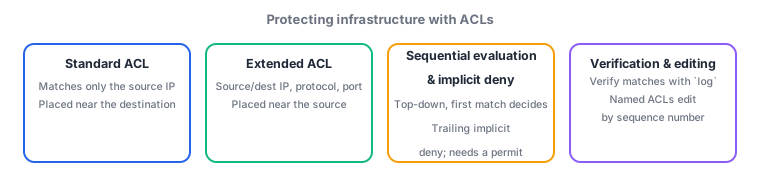
Covers the difference between a standard ACL (matching only the source IP) and an extended ACL (matching source/destination IP, protocol, and port), sequential evaluation (the first matching entry decides) with the trailing implicit deny, and the placement judgment of which interface and direction to apply it to. It also covers editing named ACLs by sequence number and verifying with log, so you can build a configuration that passes only the intended traffic.
An ACL is both a filter and a language for expressing match conditions: it is reused throughout ENCOR for QoS classification, selecting PBR traffic, selecting NAT traffic, restricting management access via access-class, and defining CoPP classes in the next section. That is exactly why you must internalize how it is evaluated—sequentially, decided by the first match, with an implicit deny at the end. What ENCOR asks is not the definition of standard versus extended but the diagnosis of "what breaks when this ACL is applied in this direction" and "why did intended traffic stop too."
5.2.1Standard and extended ACLs
- A standard ACL (numbers 1-99 and 1300-1999, or a named
ip access-list standard) matches only the source IP address. Because it cannot see destinations or ports, it cannot block access to just one server. Its coarse granularity means that applying it near the source takes down needed traffic as collateral, so it is traditionally placed closer to the destination. - An extended ACL (numbers 100-199 and 2000-2699, or
ip access-list extended) can match on protocol, source IP, destination IP, and source/destination ports. Since it expresses intent precisely—for examplepermit tcp 10.1.1.0 0.0.0.255 host 10.9.9.10 eq 443—the rule of thumb is to place it close to the source so unwanted traffic is dropped early, saving needless bandwidth. - Masks are written as wildcard masks (0 = must match, 1 = don't care), the inverse of a subnet mask;
10.1.1.0 0.0.0.255corresponds to a /24. A single host ishost 10.1.1.5and everything isany. Getting the inversion backwards matches a wider or narrower range than intended.
5.2.2Evaluation and editing
- An ACL is evaluated sequentially: entries are checked top-down, the first matching entry's permit/deny decides the outcome, and later entries are not evaluated. Therefore a broad entry placed above makes more specific entries below unreachable forever (for example, a leading
permit ip any anyrenders every subsequent deny meaningless). The ordering itself is the policy. - Every ACL ends with an implicit deny (deny any), so traffic matching no entry is discarded. An ACL with a single permit line therefore drops all other traffic. In operations, write an explicit
deny ip any any logat the end to make intent visible and use the hit counters inshow access-liststo detect unintended blocking. - A named ACL can be edited entry by entry using sequence numbers: under
ip access-list extended WEB-INyou can insert in the middle with15 permit tcp ...or remove one line withno 30. With numbered ACLs,no access-list 101deletes the entire ACL, which easily causes an outage where the applied interface references an ACL that is effectively nothing but the implicit deny.
5.2.3Judging placement and direction
- Apply with
ip access-group <name> in|outunderinterface, and determine direction from the router (that interface) perspective:inis traffic entering that interface andoutis traffic leaving it. Reversing the direction lets the traffic you meant to block pass while blocking what you meant to allow. - The principle is extended ACLs near the source, standard ACLs near the destination—but ENCOR asks less for the maxim than for whether you account for return traffic. Return packets of a TCP session have source and destination ports reversed, so an ACL that permits only one direction breaks the session when applied on the return path. Permit returns with the
establishedkeyword or with reflexive/zone-based stateful inspection. - Standard infrastructure protection includes source address validation at the boundary (dropping inbound packets that spoof your own addresses as the source),
no ip directed-broadcast, restricting the management plane withaccess-class, and protecting the control plane with CoPP (next section)—defending each plane separately. A data-plane ACL alone cannot protect the device's own CPU.
Most-tested: sequential evaluation decided by the first match, an implicit deny at the end, standard matches only the source IP while extended matches source/destination/protocol/port, and direction is in/out from the interface perspective. For "traffic stopped" questions, check four causes in order: entry ordering (a broad permit above), wrong direction, forgotten return traffic, and collateral damage from the implicit deny.
Suppose a branch router must "permit only HTTPS from branch LAN 10.20.0.0/16 to data-center web server 10.9.9.10 and drop the rest," and you write a single extended ACL line, permit tcp 10.20.0.0 0.0.255.255 host 10.9.9.10 eq 443, applying it out on the WAN interface. Immediately afterward the web works, but branch DNS resolution and NTP synchronization fail completely, and SSH from the operations host to the router is also cut. Concluding "the ACL is broken" misses the point: the problem is that it is doing exactly what you wrote. The first cause is the implicit deny—everything other than that one permit falls to the trailing deny any, so DNS (53), NTP (123), and other business traffic are dropped as collateral. The fix is to add the required services explicitly, such as permit udp 10.20.0.0 0.0.255.255 host 10.9.9.53 eq 53, and place deny ip any any log at the end so hit counts reveal omissions. Second, the lost SSH is a different plane's problem: an interface ACL that controls transit traffic is not the right tool for controlling traffic destined to the device itself (the management plane). Management access should be restricted with access-class under line vty; blocking the management path with an interface ACL was a side effect. Third, ordering and direction still deserve a check. The out direction means "leaving this interface, i.e., branch toward the data center," which matches the requirement, but the returning HTTPS responses travel the opposite way; if a similar ACL is applied in on the return path, the session fails unless returns are permitted with established or equivalent. This chain of judgment—estimate the blast radius of the implicit deny first, pick the right tool per plane (data, management, control), and reason about both directions rather than one—is the heart of ENCOR ACL questions.
| Aspect | Standard ACL | Extended ACL |
|---|---|---|
| Number ranges | 1-99, 1300-1999 | 100-199, 2000-2699 |
| Match criteria | Source IP only | Protocol, source/destination IP, ports |
| Recommended placement | Near the destination (avoid collateral drops) | Near the source (drop early) |
| Typical use | Simple source restriction, `access-class` | Per-service control; classification for QoS/PBR/CoPP |
| Shared pitfall | Unexpected blocking from the trailing implicit deny | A broad permit on top makes later entries unreachable |
Trap: "An ACL evaluates all entries and picks the best match" is wrong—the first matching entry decides and the rest are not evaluated (a different principle from routing's longest match). Also wrong: "writing one permit controls only that traffic and leaves the rest untouched"—the trailing implicit deny discards everything else. And "SSH to the device itself should be controlled with an interface ACL" is wrong; management access is properly restricted with access-class under line vty.
5.2.4Section summary
- A standard ACL matches only the source IP (place near the destination); an extended ACL matches protocol/source/destination/ports (place near the source to drop early). Masks are written as wildcards
- Evaluation is sequential and decided by the first match, with an implicit deny at the end. A broad permit on top makes later entries unreachable, and a single-permit ACL drops all other traffic
- Direction is
in/outfrom the interface perspective. Account for return traffic, and use the right tool per plane:access-classfor the management plane and CoPP for the control plane
Sign in to track progress — Log in.
Quick check
(just a quick review)Q1. A branch router has a single extended ACL line, `permit tcp 10.20.0.0 0.0.255.255 host 10.9.9.10 eq 443`, applied `out` on its WAN interface. Immediately afterward, branch DNS resolution and NTP synchronization fail. Which is the most likely cause?
Q2. An ACL should "deny Telnet (23) from 10.1.1.0/24 to server 10.9.9.10 and permit everything else," but Telnet still passes. The entries are, top to bottom, `permit ip any any` then `deny tcp 10.1.1.0 0.0.0.255 host 10.9.9.10 eq 23`. What is the correct remediation?
Q3. On a headquarters router, an extended ACL applied `in` on the inside interface permits only outbound HTTPS to any Internet server. Sessions initiate fine, but after applying a similar ACL `in` on the outside interface, responses to existing sessions stop arriving. What is the most appropriate remedy?
Keep track of your progress
The full study guide is free to read. Sign up free to practice with the question bank, track what you have read, review your mistakes, and highlight passages.