

What's changed: Initial version
5.1Device access control (lines, local authentication, AAA)
Covers applying local user authentication to line vty / line console and centralizing control with AAA (authentication, authorization, accounting). It frames the difference between TACACS+ (TCP 49, separates the AAA functions, encrypts the entire packet) and RADIUS (UDP 1812/1813, combines authentication and authorization, encrypts only the password) as design judgment: who may run which commands, and whether you get locked out when the server fails.
Securing a network device starts not with protecting the traffic that passes through it but with protecting access to the device itself. If everyone shares one privileged password and types the same enable, you cannot trace who did what, and you cannot revoke a departing employee's account. ENCOR tests this area as operational design: which authentication method you bind to each line (console/VTY), which AAA server you choose and how the device behaves when it fails, and where you draw the line on privilege levels and command authorization. The essence is not the username command but the judgment to foresee whether the very act of applying the configuration locks you out.
5.1.1Lines and local user authentication
- Management access is controlled per line:
line console 0for the physical connection,line vty 0 15for remote access, andline aux 0for the auxiliary port—each with its own authentication configuration. Configuringlogin localunderline vty 0 15authenticates against the local user database defined withusername ADMIN privilege 15 secret <pass>, using a username plus password. Plainlogin(withpassword) instead yields a shared password with no username, leaving no audit trail. - Store passwords with
secret(an irreversible hash) and avoidpassword(weak, reversible Type 7 obfuscation). Protect privileged EXEC withenable secret, and note thatservice password-encryptionis only Type 7 obfuscation and provides no real strength. On VTY lines, settransport input sshto forbid cleartext Telnet, and provisionip ssh version 2with an RSA key (crypto key generate rsa modulus 2048). - To restrict who can even reach the VTY lines, apply an ACL permitting only the management segment with
access-class <ACL> inunder the line (the key is that it goes under the line, not on an interface). Addexec-timeout 5 0to drop idle sessions andlogin block-foroptions to throttle brute-force attempts.
5.1.2The three AAA functions and how they are applied
- AAA consists of three independent functions. Authentication verifies "who you are" via username/password or certificates. Authorization decides "what you, once authenticated, are allowed to do" (EXEC shell privilege level, the set of executable commands). Accounting records "who did what and when," providing the trail for audit and incident investigation.
- On IOS you enable
aaa new-modeland define a method list such asaaa authentication login default group tacacs+ local. Methods are evaluated left to right, and the device falls through to the next method only when the previous one does not respond. If the server responds with a rejection, it does not fall back tolocal—that distinction determines behavior during failures. - Authorize the shell with
aaa authorization exec default group tacacs+ localand privileged commands withaaa authorization commands 15 default group tacacs+ local. Enabling authorization but forgetting the local fallback causes a partial lockout when the server is unreachable: authentication succeeds but no EXEC shell opens. The standard safeguard is a separate method list,aaa authentication login CONSOLE local, bound withlogin authentication CONSOLEunderline console 0.
5.1.3Choosing between TACACS+ and RADIUS
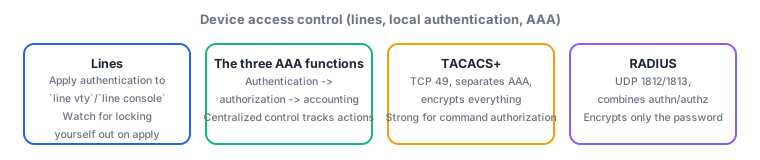
- TACACS+ uses TCP 49 and separates authentication, authorization, and accounting. Because it can query the server for authorization on a per-command basis, it suits fine-grained command authorization such as "this operator gets only
showcommands; that one may change configuration." It also encrypts the entire packet body, protecting usernames and executed commands from eavesdropping. It is Cisco-proprietary but is the de facto standard for device administration. - RADIUS uses UDP 1812 (authentication/authorization) and 1813 (accounting) and combines authentication and authorization into a single exchange. Only the password attribute is encrypted; the username and other attributes travel in cleartext. Being an IETF standard with rich extended attributes, it is widely used for 802.1X network access control of end users and devices (integrating with ISE, dynamically assigning VLANs or SGTs).
- The selection principle is to split by purpose: TACACS+ for device administration (who may run which commands) and RADIUS for network access control (which endpoint lands in which VLAN). The decision axes are whether per-command authorization is required and how much of the packet is encrypted—not blanket claims that "RADIUS is safer" or "TACACS+ is old."
Most-tested: TACACS+ = TCP 49, separated AAA, whole-packet encryption, suited to per-command authorization; RADIUS = UDP 1812/1813, combined authentication and authorization, password-only encryption, suited to 802.1X. Also nail three points: method lists are evaluated left to right and fall through only when a method does not respond (never on an explicit reject), login local uses the local database, and access-class is applied under the line.
Suppose you roll out centralized TACACS+ management on your core switches with aaa new-model, aaa authentication login default group tacacs+, aaa authorization exec default group tacacs+, and tacacs server ISE. SSH logins work fine right after the change, but during next-day maintenance a routing failure between the management segment and the server leaves you unable to log in to any switch, via SSH or console. Suspecting a changed password would be a misdiagnosis. The cause is simply that the method list has no local fallback: with group tacacs+ alone, an unresponsive server leaves no next method, so authentication fails—and because the default method list applies to every line that has no other list explicitly bound (including the console), your last resort was blocked at the same time. The correct design is doubly protective. First, always place local at the end, as in aaa authentication login default group tacacs+ local and aaa authorization exec default group tacacs+ local, and provision the matching local user (username ADMIN privilege 15 secret ...) on every device. Second, create a separate list, aaa authentication login CONSOLE local, and bind it under line console 0 with login authentication CONSOLE so that the console alone does not depend on the AAA server. Deciding to "avoid adding local because it weakens security" is wrong: the fallback is used only when the server does not respond (it is not taken when a reachable server returns a rejection), so it is not a hole that bypasses legitimate denials. Adding aaa accounting commands 15 default start-stop group tacacs+ also preserves a record of who ran which command during recovery. As for change procedure, the field rule is to create the local user and enable secret before enabling AAA, and to verify from a second session left open.
| Aspect | TACACS+ | RADIUS |
|---|---|---|
| Transport/port | TCP 49 | UDP 1812 (authn/authz), 1813 (accounting) |
| AAA separation | Authentication, authorization, accounting separated | Authentication and authorization combined in one exchange |
| Encryption scope | Entire packet body | Password attribute only |
| Per-command authorization | Strong (fine-grained via `commands 15`) | Weak (coarse, expressed via attributes) |
| Primary use | Administrative access to network devices | Network access control such as 802.1X |
Trap: "If the AAA server returns a reject, the method list falls back to local" is wrong—fallback happens only when the server does not respond; an explicit rejection from a reachable server does not move to the next method. Also wrong: "service password-encryption makes passwords safe"—Type 7 is easily reversible obfuscation, so use secret (a hash) when strength matters. And "RADIUS encrypts the whole packet" is wrong; whole-packet encryption is a TACACS+ characteristic.
5.1.4Section summary
- Bind authentication per line:
login localplustransport input sshunderline vty, restrict reachability withaccess-classunder the line, and store passwords withsecret(hashed) - AAA comprises authentication, authorization, and accounting. Method lists are evaluated left to right and fall through only on no response, so place
locallast and keep a separate console list to prevent lockout - TACACS+ = TCP 49, separated AAA, whole-packet encryption, suited to per-command authorization for device administration; RADIUS = UDP 1812/1813, combined authentication/authorization, password-only encryption, suited to 802.1X access control
Sign in to track progress — Log in.
Quick check
(just a quick review)Q1. A core switch was configured with only `aaa new-model` and `aaa authentication login default group tacacs+`. The next day a routing failure to the TACACS+ server made login impossible via both SSH and console. Which best describes the cause and the correct prevention?
Q2. You need to split the operations team into monitors who may run only `show` commands and engineers who may change configuration, authorizing and recording each executed command on the server. You also want executed command names hidden even if traffic is captured. Which protocol and rationale is most appropriate?
Q3. An audit finds that a device configured with `login local` on `line vty 0 15` plus `username OPER secret ...` accepts SSH from any internal host. You must permit SSH only from the management segment 10.10.10.0/24 and also block cleartext protocols. Which action is most appropriate?
Keep track of your progress
The full study guide is free to read. Sign up free to practice with the question bank, track what you have read, review your mistakes, and highlight passages.